

Updated on September 8, 2025
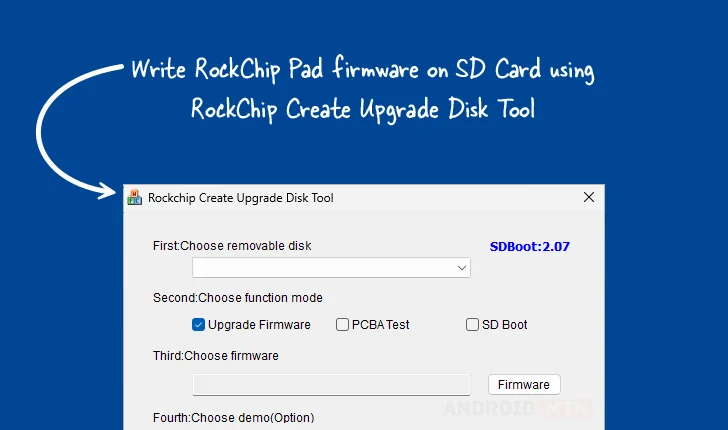
The Rockchip Create Upgrade Disk Tool, a specialized utility designed exclusively for the Windows operating system environment, serves as a cornerstone application for engineers, developers, and advanced users engaged in the provisioning and maintenance of Rockchip-based hardware platforms. This robust software facilitates the precise inscription of Rockchip boot firmware directly onto external storage media, specifically SD cards. Its core capability extends beyond simple flashing; it grants users granular control over the underlying storage architecture of these cards, enabling the meticulous creation and management of both physical and logical partitions. This level of control is crucial for deploying operating systems, customized bootloaders, and specialized testing environments onto Rockchip System-on-Chips (SoCs) found in a wide array of embedded systems, single-board computers, and Android devices.
The necessity for such a dedicated tool arises from the unique boot processes inherent to Rockchip architectures. Unlike standard PC systems, Rockchip devices often rely on initial boot instructions residing on removable media—such as an SD card or eMMC—to commence the boot sequence before transferring control to internal storage. The Create Upgrade Disk Tool acts as the necessary intermediary, ensuring that the boot firmware is written in the exact structure and format required by the Rockchip boot ROM to successfully initiate the system loading process. Without this specialized tool, the preparation of these bootable media often proves impossible or unreliable using general-purpose disk imaging utilities, which frequently lack the knowledge of Rockchip’s proprietary partition layouts or low-level writing requirements.
The utility’s significance in the development lifecycle cannot be overstated. For initial product prototyping, debugging complex boot failures, or implementing field recovery procedures, the ability to reliably write a known-good firmware image to an SD card is paramount. The tool’s architecture is optimized for interacting with the specific USB Mass Storage Class or proprietary interfaces that Rockchip devices expose during their bootloader or mask ROM modes, ensuring maximum compatibility across different generations of Rockchip chipsets.
Comprehensive Feature Set for Robust Firmware Management
The Rockchip Create Upgrade Disk Tool incorporates a multifaceted feature set, each component engineered to streamline and secure the process of preparing storage for Rockchip hardware. These functionalities address common pain points in embedded system development, ensuring that firmware deployment is both flexible and recoverable.
Precision Firmware Inscription
At its heart, the tool excels at direct firmware writing. This feature is dedicated to the secure transfer of Rockchip boot firmware images—often packaged as .img files—onto the designated SD card. Critically, the tool understands the nuances of various firmware formats utilized by Rockchip, including loader files, parameter files, and the core operating system images. By writing this firmware directly, it ensures the proper setup of the initial boot environment, including the configuration of necessary hardware initialization sequences embedded within the bootloader itself. This is essential for establishing the foundational communication layer between the SoC and the peripheral storage device, a prerequisite for any subsequent OS loading.
Advanced Partition Scheme Definition
One of the most powerful aspects of the Create Upgrade Disk Tool is its sophisticated partition management module. Users gain the capability to define the storage structure of the target SD card from the ground up. This involves managing both physical partitions, which map directly to the underlying storage blocks recognized by the hardware, and logical partitions, which allow for complex organization within the physical space, often adhering to established standards like MBR or GPT, depending on the target device requirements. This control is invaluable for segmenting the card—for instance, dedicating a small, protected partition for the bootloader, a larger partition for the root file system, and potentially an additional partition for user data or recovery images. Effective partition management maximizes storage utility and aids in system organization.
Multi-Mode Operational Flexibility
The tool transcends simple write operations by offering configuration settings for diverse operational modes relevant to the Rockchip ecosystem. These modes typically include:

- Firmware Upgrade Mode: The standard procedure for installing or updating the primary bootloader and system image.
- PCBA Testing Mode: Often used during the manufacturing or final assembly stages, this mode might involve writing diagnostic firmware or specific test binaries to validate the functionality of the Printed Circuit Board Assembly (PCBA) before final software loading.
- SD Boot Options: This allows developers to configure the card specifically to trigger the device’s boot ROM to prioritize booting from the SD card exclusively, bypassing attempts to boot from internal eMMC or NAND memory—a critical step for initial system bring-up or troubleshooting.
This multi-mode support ensures that the utility is adaptable across the entire hardware lifecycle, from early prototyping to mass production testing.
Granular, Selective Data Placement
Beyond bulk imaging, the tool facilitates highly specific data injection. The selective data writing feature empowers users to target exact sectors, blocks, or predefined partitions with specific files or image segments. This granular control is vital when only a small component of the boot sequence needs updating—such as flashing a revised parameter file or a specific kernel module—without necessitating a complete re-imaging of the entire storage medium. This precision saves considerable time during iterative development cycles where only minor modifications are being tested.
Real-Time Operational Visibility
To prevent user errors and provide confidence during lengthy writing processes, the utility incorporates robust Progress Monitoring. A clearly displayed, visual progress bar offers immediate, real-time feedback on the status of the ongoing operation, whether it is firmware flashing or partition table construction. This feedback loop is crucial for long-running processes, allowing users to gauge the remaining time and confirm that the tool is actively engaged and not stalled.
Integrated Demonstration and Validation Capabilities
Recognizing the importance of pre-deployment verification, the tool includes optional Demo Support. This feature can be leveraged to create standardized, verifiable disk images that can be quickly tested on reference hardware. By allowing users to simulate or verify the partition structure and boot sequence integrity in a controlled manner, it minimizes the risk associated with deploying untested images to critical hardware prototypes or production lines.
Essential Recovery and Rollback Mechanism
Perhaps one of the most reassuring features is the integrated Restore Capability. Embedded within complex flashing utilities, a recovery function is non-negotiable. This feature is designed to revert the SD card to a previously known, stable configuration or to execute a clean-up routine following a failed or interrupted flashing operation. This rollback mechanism safeguards the integrity of the storage medium, ensuring that a corrupted state does not render the SD card unusable for future attempts, thereby enhancing overall system reliability and developer productivity.
Accessing the RockChip Create Upgrade Disk Tool Versions
To support the diverse hardware requirements and legacy systems within the Rockchip ecosystem, the developers provide access to several key versions of the Create Upgrade Disk Tool. Users are advised to select the version that corresponds best with the specific Rockchip chipset or the firmware package they intend to deploy, as compatibility can sometimes vary between tool iterations. The utility is natively compiled for the Windows operating system, supporting both 32-bit and 64-bit architectures, ensuring broad accessibility across modern and slightly older development workstations.
The availability matrix below details the current primary versions accessible for download:
| Version | Download Link Designation |
|---|---|
| 1.4 | Link (Download Reference: rc4ud) |
| 1.53 | Link (Download Reference: rc5ud) |
| 1.7 | Link (Download Reference: rc6ud) |
The provision of multiple, distinct versions is a testament to the tool’s long-standing use within the embedded community. Version 1.4 might be essential for older RK29xx or RK30xx series chips, while Version 1.7 likely includes necessary updates for modern Rockchip platforms, such as those based on the RK35xx series, which feature more complex memory initialization routines and enhanced security features that require updated flashing protocols. Developers must confirm the required tool version against their target device’s documentation to ensure successful communication during the critical boot ROM flashing phase.
In conclusion, the Rockchip Create Upgrade Disk Tool stands as an indispensable utility for anyone working directly with Rockchip silicon. Its sophisticated capabilities—ranging from low-level firmware writing and precise partition management to comprehensive progress monitoring and recovery options—provide the robust control necessary to successfully develop, test, and deploy embedded systems powered by Rockchip technology in a professional and reliable manner.
