

The modern smartphone ecosystem exists in a delicate balance between user accessibility and stringent security protocols. For the community of Android enthusiasts and power users, the ability to modify system software is a hallmark of the platform’s versatility. However, this freedom comes with significant risks, most notably the dreaded "brick"—a state where a device becomes unresponsive due to corrupted firmware or system partitions. Traditionally, a locked bootloader serves as an impenetrable gatekeeper, preventing unauthorized software changes. Yet, when a device is rendered inoperable and the bootloader remains locked, a specialized pathway known as Emergency Download (EDL) Mode emerges as the ultimate recourse for recovery.
![How to Flash Files via EDL Tool [Supports Locked Bootloader]](https://droidwin.com/wp-content/uploads/2025/12/How-to-Flash-Files-via-EDL-Tool-Supports-Locked-Bootloader.webp)
In the landscape of device maintenance, particularly for brands within the Oplus umbrella such as OnePlus, the utility of the EDL Tool has transitioned from a niche developer utility to a critical survival kit for the average user. The primary challenge often faced by users involves the corruption of sensitive partitions, such as those housing the IMEI information or fingerprint sensor calibration data. A recent case study involving a OnePlus 11 user highlights the precarious nature of these modifications. After a standard firmware flash and the subsequent relocking of the bootloader, the user discovered that the device’s biometric authentication had failed entirely. This failure was traced back to a corrupted "persist" partition, a component vital for the hardware-software handshake required for fingerprint scanning.
The dilemma in such scenarios is twofold. First, the device is often in a state where it cannot boot into the Android OS, making standard software fixes impossible. Second, because the bootloader is locked, traditional flashing methods—which require an "unlocked" state to verify and write new data—are rejected by the system’s security architecture. This creates a logical paradox: the device needs new software to function, but it refuses to accept that software because its security gates are closed. This is where the EDL Tool demonstrates its unique value proposition. By interfacing directly with the Qualcomm chipset at a level lower than the bootloader, it bypasses the standard security checks, allowing for the restoration of critical partitions even on devices that appear to be permanently sealed.
![How to Flash Files via EDL Tool [Supports Locked Bootloader]](https://i.ytimg.com/vi/UQ4RuSj-ODU/hqdefault.jpg)
Understanding the mechanics of EDL Mode requires a look at the hardware level. Developed by Qualcomm, EDL is a low-level boot mode designed for factory programming and emergency recovery. When a device enters this state, it presents itself to a computer not as a mobile phone, but as a specific hardware interface (typically labeled as Qualcomm HS-USB QDLoader 9008). In this state, the device is essentially a blank slate waiting for instructions from a specialized tool. Unlike the MSM Download Tool, which has been a staple for OnePlus users for years, the Oplus EDL Tool offers a more granular level of control. While the MSM Tool often automates the process—sometimes including the relocking of the bootloader as a mandatory final step—the EDL Tool allows users to target specific partitions without necessarily wiping the entire device or resetting the bootloader state.
The restoration of the "persist" partition is a prime example of the tool’s necessity. This partition contains unique calibration data for the device’s sensors. If this data is lost or corrupted during a standard firmware update, the fingerprint sensor loses its "identity," rendering it useless even if the rest of the operating system is functioning perfectly. For the user who has had the foresight to create a backup of these partitions, the EDL Tool serves as the only bridge back to a functional device. Without it, the only alternative would often be a physical motherboard replacement at a certified service center, a costly and time-consuming endeavor.
![How to Flash Files via EDL Tool [Supports Locked Bootloader]](https://droidwin.com/wp-content/uploads/2025/12/partition-names.webp)
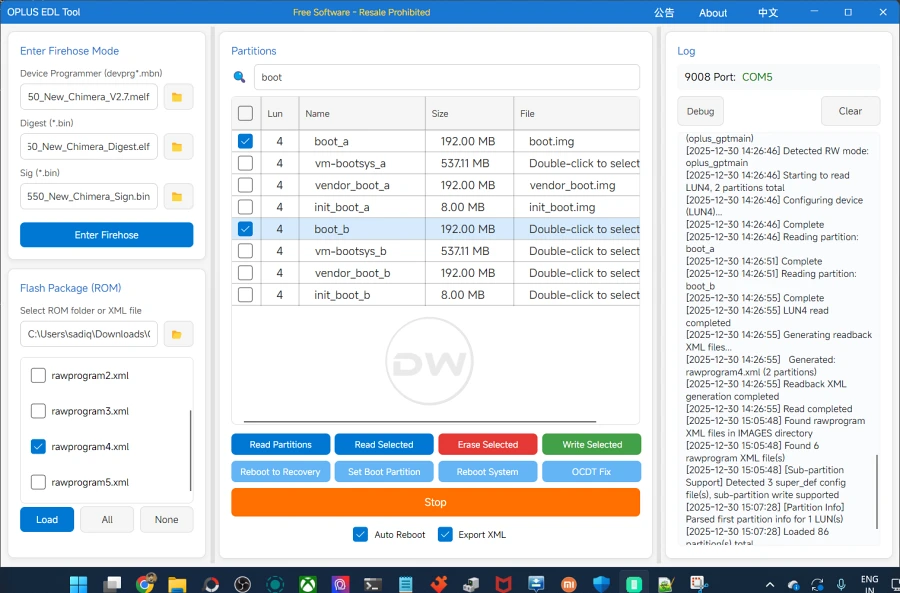
The procedural logic of utilizing the EDL Tool is both precise and unforgiving. It begins with the preparation of the workstation, ensuring that the correct Qualcomm drivers are installed to facilitate communication between the PC and the bricked handset. Once the device is successfully triggered into EDL Mode—often through a specific combination of physical button presses or via software commands if the device is partially responsive—the software interface takes over. The user must then navigate the complex internal structure of the device’s storage, identifying the specific image files that correspond to the corrupted partitions.
One of the most significant advantages of this method is its efficacy in "bricked" scenarios where the screen may not even turn on. Because the EDL interface is hardware-coded into the chipset, it remains accessible as long as the silicon itself is functional. This provides a level of insurance that software-based recovery modes, like Fastboot or Recovery Mode, simply cannot match. However, this power necessitates a high degree of caution. Flashing the wrong file to a critical partition can turn a recoverable software issue into a permanent hardware failure.
![How to Flash Files via EDL Tool [Supports Locked Bootloader]](https://droidwin.com/wp-content/uploads/2025/12/load-xml.webp)
The conversation surrounding the EDL Tool also touches upon the broader "Right to Repair" movement. As manufacturers tighten security to prevent malware and unauthorized access, they often inadvertently shut out the users’ ability to fix their own hardware. The availability of tools that can bypass a locked bootloader for the purpose of emergency restoration is a vital concession to the user base. It acknowledges that while security is paramount, the owner of the device should have a path toward recovery that does not involve discarding the hardware due to a software glitch.
Furthermore, the impact on data integrity is a major consideration for users. In many bricked scenarios, the primary goal is not just to make the phone work again, but to save the photos, documents, and messages trapped within the encrypted storage. The EDL Tool offers a glimmer of hope in this regard. If the user is only flashing system or sensor partitions—and avoids the "userdata" partition—there is a statistically significant chance that the personal data will remain untouched. This "surgical" approach to flashing is a stark contrast to factory-reset-heavy recovery methods, though experts consistently warn that no recovery process is entirely without risk to data.
![How to Flash Files via EDL Tool [Supports Locked Bootloader]](https://droidwin.com/wp-content/uploads/2025/12/select-partitions.webp)
In conclusion, the ability to flash files via the EDL Tool represents a critical evolution in mobile device maintenance. It serves as a master key for the most locked-down environments, providing a solution for corrupted sensors, broken IMEI registers, and systemic software failures that would otherwise render a device obsolete. As smartphones become more complex and their security measures more robust, the importance of low-level recovery tools will only grow. For the OnePlus 11 user and many others like him, these tools are not just about technical experimentation; they are about reclaiming a device from the brink of total failure, ensuring that a locked bootloader is not the end of the road, but merely a hurdle that can be cleared with the right technical knowledge and the appropriate digital instruments. The EDL Tool remains a testament to the resilience of the Android platform and the ingenuity of the community that supports it, proving that even in the most restricted environments, a path to restoration can always be found.
