

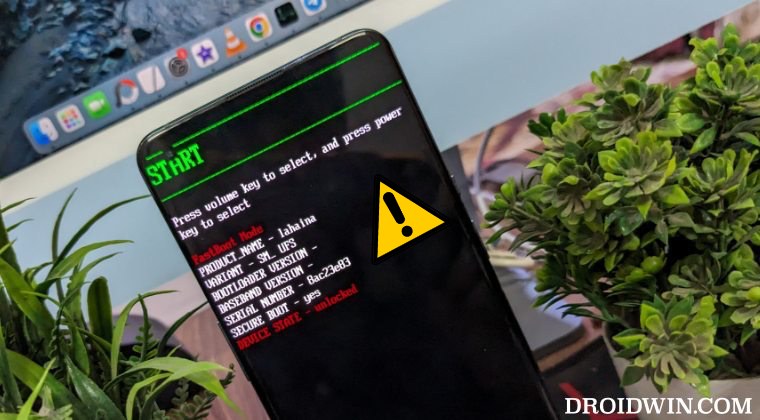
The OnePlus smartphone lineup has long been the preferred choice for Android enthusiasts, power users, and developers due to its historically permissive stance toward bootloader unlocking and third-party software modifications. However, the intersection of sophisticated hardware and complex software environments often leads to a common technical impasse: the device becoming perpetually stuck in Fastboot Mode. Often categorized as a "softbrick," this state signifies that while the device’s hardware remains functional and the bootloader is accessible, the primary operating system—OxygenOS—is unable to initialize. For the modern user, understanding the nuances of partition management, FastbootD interfaces, and Emergency Download (EDL) protocols is essential for restoring a device to its factory state.
The Fastboot loop is rarely a spontaneous event; it is typically the byproduct of an interrupted firmware update, a failed root attempt, or the installation of a custom recovery that is incompatible with the device’s specific partition scheme. When a OnePlus device enters this state, it essentially sits in a pre-boot environment, waiting for instructions from a connected computer via the Android Debug Bridge (ADB) and Fastboot interface. While intimidating, this state is fundamentally a safety mechanism, preventing the hardware from attempting to run corrupted code that could cause permanent damage.
To resolve these issues, technical experts categorize recovery methods into two primary tiers: the standard Fastboot ROM flash and the more invasive EDL recovery. Each method requires a specific set of tools and a precise understanding of the device’s current status.
The first line of defense involves the utilization of a Fastboot ROM. In the contemporary Android landscape, specifically since the introduction of Android 10 and the transition to dynamic partitions, the recovery process has become more layered. For a successful restoration via Fastboot, the device must be capable of entering FastbootD mode. Unlike the standard Fastboot mode, which interacts directly with the bootloader, FastbootD is a "userspace" implementation located within the recovery partition. This mode is critical because it allows the flashing of logical partitions—such as system, vendor, and product—which are often too large or complex for the base bootloader to handle directly.
Before initiating a flash, a user must verify the device’s connectivity. By utilizing the command "fastboot reboot fastboot," one can attempt to bridge the gap between the primary bootloader and the FastbootD environment. If the device successfully transitions to a screen displaying "FastbootD," the path to recovery is significantly clearer. In this environment, the user can deploy a variety of sophisticated tools designed to automate the flashing process. The Oxygen Updater application remains a cornerstone for obtaining the necessary firmware payloads, but the actual installation requires specialized utilities.
Tools such as "Fastboot Enhance" have emerged as indispensable assets for the OnePlus community. These utilities allow users to unpack the "payload.bin" files found in OnePlus firmware and flash individual images to their respective slots. For those seeking a more streamlined experience, the "Fastboot Firmware Flasher" is often recommended for its high success rate in restoring partition integrity. Furthermore, regional variations of OnePlus devices—ranging from the Chinese "ColorOS" variants to the Global and North American "OxygenOS" versions—require specific flasher ROMs. Utilizing tools like the SuperHybrid or Regional Flasher ensures that the modem and baseband settings remain compatible with the user’s local network infrastructure.
However, the transition from FastbootD back to the standard Bootloader is a critical step that many overlook. Once the logical partitions are staged, the device must often be returned to the primary Fastboot Mode using the "fastboot reboot bootloader" command to finalize the installation of the boot image and other critical low-level components. This dance between modes is the hallmark of modern Android maintenance, reflecting the increased security and complexity of the OS.

When the Fastboot interface fails or if the device is unable to reach the FastbootD menu, the situation escalates to what is colloquially known as a "hardbrick." In this state, the device may appear completely unresponsive, often showing nothing but a black screen, or it may be stuck in a boot loop that bypasses the Fastboot menu entirely. For OnePlus devices powered by Qualcomm Snapdragon chipsets, the Emergency Download (EDL) Mode provides a final, low-level backdoor for recovery.
EDL Mode operates at a level below the bootloader, interfacing directly with the primary bootloader (PBL) of the Qualcomm SoC. This mode is intended for factory-level diagnostics and flashing, making it an incredibly powerful tool for unbricking. Historically, OnePlus users relied on the "MSM Download Tool," a proprietary utility used by technicians at service centers. However, as OnePlus has integrated more deeply with Oppo’s corporate infrastructure (often referred to as the Oplus ecosystem), the availability of these tools has become restricted. Oppo has implemented stricter authentication requirements for its flashing software, effectively "patching" many of the free, public-facing versions of the MSM tool.
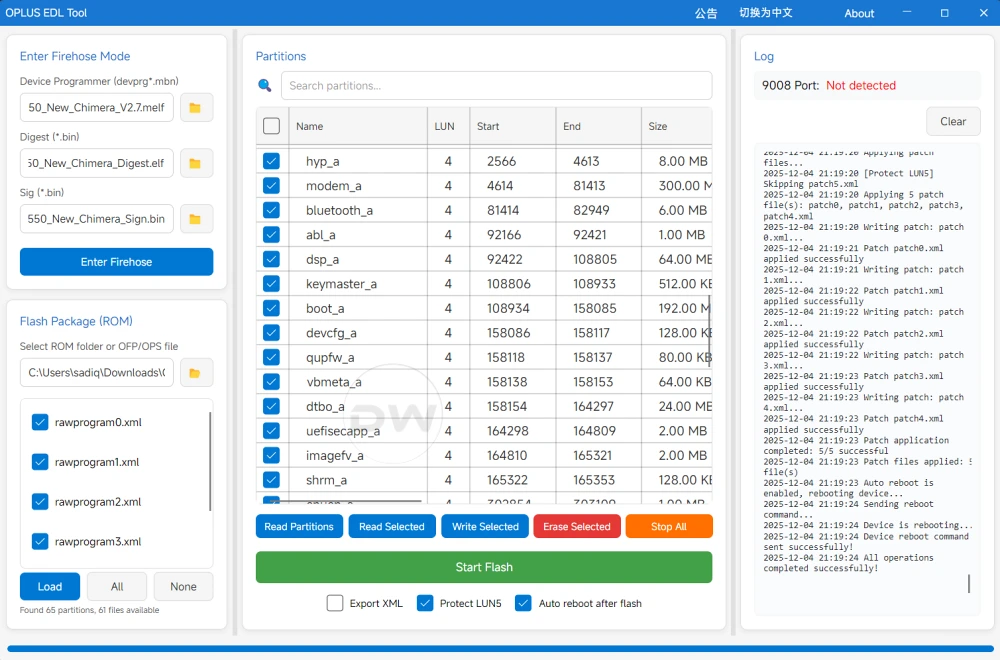
Despite these hurdles, the developer community continues to innovate. Currently, utilities such as the "OPLUS EDL Tool" and "DeepSmartTool" serve as the primary conduits for EDL-based recovery. These tools allow the user to bypass the standard boot sequence and force-flash the entire firmware stack. Entering EDL mode typically involves a specific hardware handshake—usually holding both volume buttons simultaneously while connecting the device to a PC. Once the computer recognizes the device as "Qualcomm HS-USB QDLoader 9008," the EDL tools can begin the process of repartitioning the storage and re-injecting a clean factory image.
The use of EDL methods is a double-edged sword. While it is the most effective way to "resurrect" a dead device, it is also a destructive process. It completely wipes the internal storage, including the user’s photos, messages, and application data. Furthermore, because these tools interact with the device at such a fundamental level, they carry a marginal risk of permanent hardware failure if the process is interrupted or if the wrong firmware version is applied. Nevertheless, for a device that is otherwise a "paperweight," the EDL method represents a vital lifeline.

Beyond the technical steps, the process of unbricking a OnePlus device serves as a stark reminder of the risks associated with modern smartphone customization. The "Red Cable Club" community often emphasizes the importance of data redundancy. Because both Fastboot ROM flashing and EDL recovery necessitate a complete data wipe, the importance of cloud backups and off-device storage cannot be overstated. In the world of Android modding, the question is rarely "if" a device will encounter a boot issue, but rather "when."
As OnePlus continues to evolve its software architecture, the methods for fixing these issues will likely become more standardized yet more locked down. The move toward a unified codebase with Oppo suggests that future recovery efforts will depend heavily on the availability of Oplus-specific authorized tools. For now, the combination of FastbootD flashing for softbricks and EDL tools for hardbricks remains the definitive roadmap for any user facing the dreaded Fastboot loop.
In conclusion, while being stuck in Fastboot Mode is a significant setback, it is a solvable problem for the informed OnePlus user. By systematically diagnosing whether the device can reach FastbootD and having the necessary Qualcomm drivers and Oplus-compatible tools ready, one can navigate the complexities of modern firmware restoration. This process not only restores functionality to the hardware but also deepens the user’s understanding of the intricate software layers that power today’s high-performance mobile devices. The resilience of the OnePlus ecosystem lies in this very ability to recover from the brink, provided the user is armed with the right technical knowledge and tools.
