

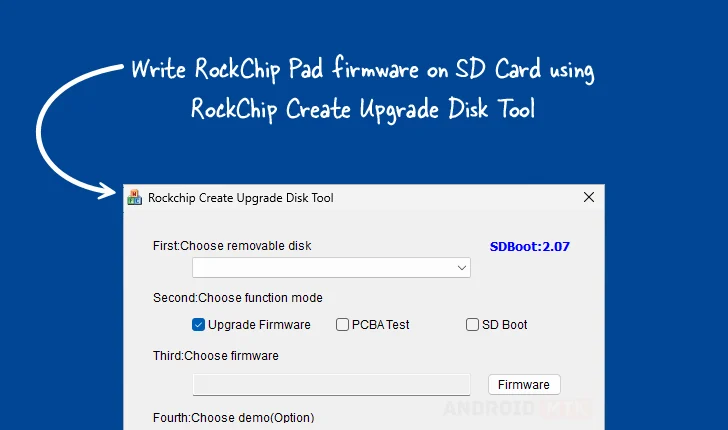
The Rockchip Create Upgrade Disk Tool, a specialized Windows application, stands as a cornerstone utility for developers, technicians, and advanced users engaged in the initialization and maintenance of Rockchip-based System-on-Chips (SoCs) and associated hardware platforms. Its primary function centers on the precise and reliable inscription of Rockchip boot firmware directly onto removable storage media, most commonly Secure Digital (SD) cards. This capability transcends simple file copying; it facilitates the complex process of establishing the initial boot environment necessary for any Rockchip-powered device, ranging from single-board computers (SBCs) and development kits to Android tablets and embedded systems, to successfully initialize. Crucially, the tool empowers users to manipulate the underlying structure of the target storage medium by enabling the creation and meticulous management of both physical and logical partitions. This fine-grained control allows for the strategic allocation of space, ensuring that critical bootloader components, operating system images, and user data are written to their designated sectors with absolute accuracy.
Deep Dive into the Functionality of the Rockchip Create Upgrade Disk Utility
The robust feature set embedded within the Rockchip Create Upgrade Disk Tool is engineered to address the diverse requirements encountered during the firmware flashing lifecycle for Rockchip hardware. Each capability serves a specific, vital role in ensuring device functionality, stability, and ease of deployment.
Precision Firmware Inscription
At the core of the utility is its specialized firmware writing capability. This is not a generalized disk imaging function; rather, it is optimized for the unique boot protocols employed by Rockchip silicon. The tool understands the necessary sector alignment and specific header requirements for Rockchip bootloaders, often referred to as the Loader or Maskrom mode initialization sequence. By supporting a variety of industry-standard image formats, the utility guarantees that the requisite boot sectors are correctly populated, thus enabling the device to transition successfully from a powered-off state into a recognizable flashing mode or directly into the target operating system environment upon subsequent power-up. For engineers dealing with new hardware bring-up or recovery scenarios where the primary storage is corrupted, this direct, low-level access to the boot chain via removable media is indispensable.
Advanced Partition Schema Management
A significant differentiator for this tool is its comprehensive partition management system. Users are granted the power to delineate storage space not just in a basic, single-partition format, but by defining intricate physical and logical subdivisions across the entire SD card volume. Physical partitions map directly to hardware boundaries, while logical partitions (often managed within an Extended Partition) allow for flexible subdivision of available space. This is paramount in scenarios requiring multi-boot capabilities, separating the kernel/boot partition from the system image partition, or dedicating secure, non-writable areas for critical device identifiers. Effective partition management ensures optimal utilization of the flash memory, prevents accidental overwriting of sensitive areas, and facilitates standardized deployment across fleets of identical hardware.
Versatile Operational Modes for Comprehensive Testing
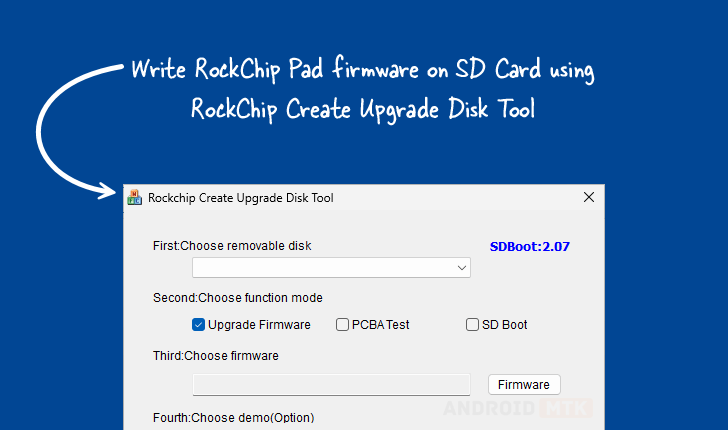
The utility exhibits remarkable adaptability through its support for multiple operational paradigms, reflecting the varied stages of hardware development and maintenance. Beyond standard firmware flashing aimed at end-user deployment, the tool supports specialized modes. The firmware upgrade mode is the standard pathway for refreshing the system software. However, the inclusion of PCBA testing mode suggests integration points for quality assurance workflows on the bare Printed Circuit Board Assembly (PCBA) level, possibly enabling low-level hardware validation tests before the final enclosure is assembled. Furthermore, the SD boot option provides a critical pathway for testing customized or early-stage operating systems directly from the removable media without permanently altering the device’s internal eMMC or NAND storage, accelerating the iterative development cycle.
Granular Control via Selective Data Writing
The capacity for selective data writing elevates the tool beyond a simple "flash-everything" utility. This feature allows a user to target specific data payloads or distinct image files to precisely defined sectors or pre-existing partitions on the SD card. For example, a developer might need to inject a specific configuration file, a custom kernel module, or a unique hardware calibration profile into a dedicated partition without disturbing the main operating system image already residing elsewhere on the card. This precision minimizes the risk of corruption during partial updates and allows for targeted debugging or configuration adjustments with surgical accuracy.

Transparent Operation Through Real-Time Monitoring
Recognizing that flashing operations can be lengthy and resource-intensive, the Rockchip Create Upgrade Disk Tool incorporates robust progress monitoring. A visible graphical feedback mechanism, typically a progress bar, furnishes the operator with real-time updates on the operation’s completion percentage, the current stage of the process (e.g., erasing, writing, verifying), and often, estimated time remaining. This visual assurance is crucial for maintaining operator confidence and preventing premature termination of a process that might otherwise appear unresponsive, thereby safeguarding the integrity of the storage medium and the firmware being written.
Integrated Validation and Demonstration Capabilities
The optional inclusion of demo support functionality is a pragmatic feature aimed at streamlining validation processes. In a controlled setting, this feature allows technicians to execute a pre-defined sequence of write and verification steps to confirm that the tool, the host machine, and the target SD card are interacting correctly before deploying potentially disruptive or time-consuming full system flashes. This capability is invaluable in manufacturing environments where rapid validation of the flashing setup itself is required before initiating mass production runs.
Essential Recovery and Rollback Mechanisms
Perhaps one of the most reassuring aspects of the utility is its integrated restore capability. In complex flashing scenarios, failures can occur due to power loss, software incompatibility, or hardware glitches. The restore function is designed to provide a safety net, allowing the user to revert the SD card to a known good state or attempt to repair a partially corrupted structure. This mechanism enhances data security and significantly reduces downtime associated with failed recovery attempts, ensuring that operators can safely troubleshoot and redeploy firmware updates without the fear of permanently bricking the source media.
Accessibility and Version Control
The utility is distributed exclusively for the Windows operating system, acknowledging the widespread use of Windows environments in technical and repair workflows. Recognizing that development environments vary, the tool is provided in versions compatible with both 32-bit and 64-bit architectures, ensuring broad usability across modern and legacy host PCs.
The availability of several distinct versions underscores the ongoing refinement of the tool in response to new Rockchip chipsets and evolving boot requirements. Developers are encouraged to utilize the latest available version for optimal compatibility and performance, although older versions are retained for legacy device support or specific compatibility needs identified in older development kits.
| Version | Download Link Summary |
|---|---|
| 1.4 | Legacy/Specific Compatibility Link |
| 1.53 | Intermediate Stability/Feature Set Link |
| 1.7 | Current/Recommended Release Link |
The maintenance of these download pathways ensures that users can select the precise iteration of the Create Upgrade Disk Tool that aligns with their specific hardware targets and system requirements, thereby maximizing the utility’s effectiveness in diverse Rockchip ecosystem deployments. The underlying architecture of the tool, built around direct communication protocols utilized by Rockchip devices in recovery modes, positions it as an essential piece of software infrastructure for anyone working intimately with the hardware layer of Rockchip-powered embedded systems.
