

The evolution of the Android operating system has reached a pivotal juncture where aesthetic customization is no longer a secondary feature but a core pillar of the user experience. Since the introduction of Google’s Material Design 3, often referred to as the "Expressive Design" language, the interface paradigm has shifted toward a more fluid, personalized, and color-coordinated environment. This design philosophy was intended to bridge the gap between functionality and art, permeating approximately 14 distinct system elements ranging from sliders and buttons to the foundational layout of the notification shade. However, despite these advancements, one of the most prominent features—Themed Icons—remains an unfinished symphony. Introduced during the Android 12 era and remarkably still carrying a "Beta" label as the industry looks toward Android 16, the themed icon initiative has struggled with inconsistent implementation across the broader app ecosystem.
The primary hurdle in achieving a perfectly harmonized home screen lies in the hands of third-party developers. For an icon to support the Material You dynamic theming engine, developers must provide a monochromatic vector asset that the system can then tint according to the user’s chosen wallpaper colors. While major tech giants and Google’s own suite of applications have largely adopted this standard, a significant portion of the Google Play Store remains non-compliant. This results in a jarring visual experience where sleek, minimalist themed icons sit adjacent to vibrant, legacy-style branding, breaking the immersive "Expressive Design" Google initially promised.
While the Android community has spent years waiting for a universal mandate from Google, various Original Equipment Manufacturers (OEMs) have stepped in to provide their own solutions. Samsung, a leader in the Android customization space, has been particularly proactive. Through its sophisticated One UI overlay, Samsung offers power users the tools to override developer neglect and force a unified look across all installed applications. However, unlike simpler implementations found in some "stock-plus" custom ROMs, Samsung’s method requires a more nuanced approach than merely toggling a single switch in the settings menu. Leveraging the power of the Good Lock suite, specifically the Theme Park module, users can finally achieve the aesthetic perfection they desire.
To begin the process of correcting non-themed icons on a Samsung Galaxy device, one must first ensure they have access to the Good Lock ecosystem. Available via the Galaxy Store, Good Lock acts as a gateway to advanced system modifications that go far beyond the standard "Settings" app. Within Good Lock, the "Theme Park" module is the essential tool for this task. Theme Park is designed to allow users to create bespoke themes, icon packs, and keyboard layouts from the ground up, providing a level of granular control that is virtually unmatched in the mobile industry.
The technical procedure for forcing icon uniformity starts by launching the Theme Park module and navigating to the "Icon" tab located at the bottom of the interface. Here, the user is prompted to "Create New." This initiates a blank canvas where the system analyzes the current wallpaper and suggests a variety of color palettes based on the Material You logic. Once a new icon set is initialized, the user will notice that while many icons automatically adopt the themed appearance, several outliers likely remain in their original, multi-colored state.
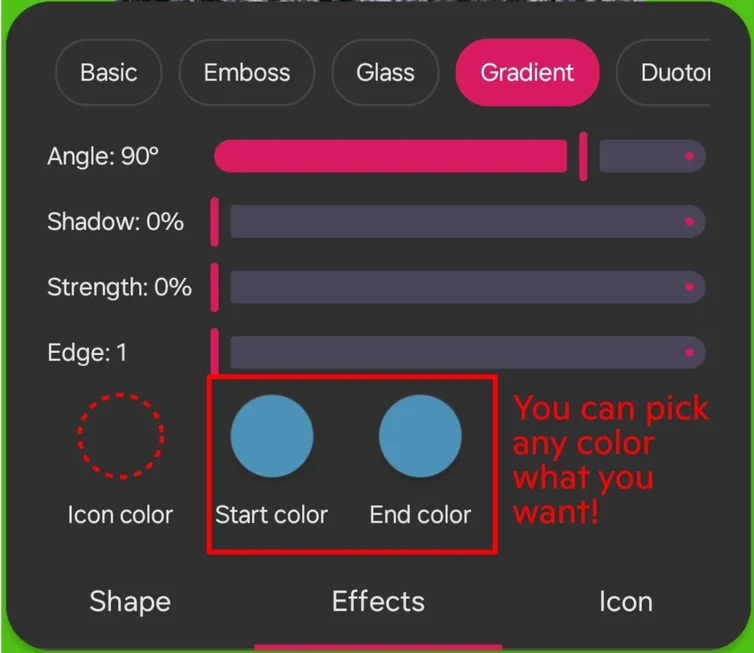
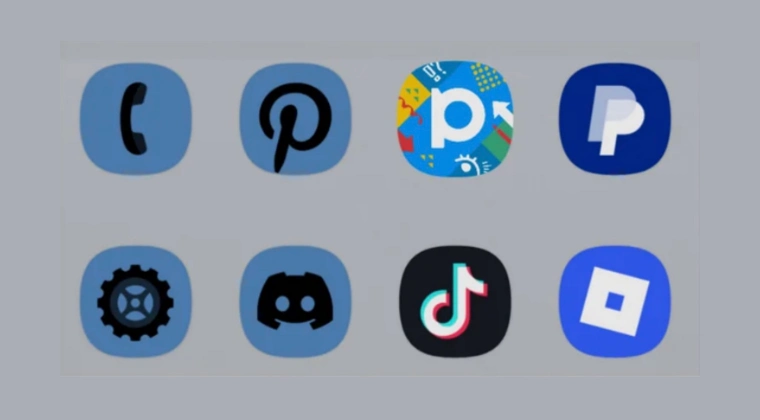
The "secret" to fixing these outliers lies within the "Icon Pack" sub-menu of the Theme Park creator. Upon selecting the icon pack option, the user is presented with a list of all installed applications. To force the themed effect on apps that do not natively support it, the user must look for the "Filter" or "Shape" options within the editor. By selecting a specific shape—such as a squircle or a circle—and applying a uniform color filter derived from the system’s primary palette, Theme Park can effectively "mask" the original icon. This process involves the software extracting the core silhouette of the non-compliant icon and applying a monochromatic tint to match the rest of the UI.
Furthermore, Samsung’s implementation allows for even deeper refinement. If a particular app icon looks distorted after the forced theming, Theme Park provides the ability to manually change individual icons. A user can tap on a specific app within the editor and choose a different icon from a downloaded third-party icon pack or even from their gallery. This hybrid approach—combining automated system-wide theming with the ability to manually override problematic apps—ensures that the final result is both consistent and visually pleasing.

Once the user is satisfied with the generated icon set, they must save the theme by giving it a unique name. After a brief installation process within the app, the new icon pack will appear in the "My Themes" section of Theme Park. Applying this theme replaces the stock icon behavior of One UI, effectively bypassing the limitations of the Android "Beta" implementation of themed icons. The result is a home screen where every single shortcut, from the most popular social media platforms to the most obscure utility apps, adheres to the chosen color scheme.
This level of customization is not merely about vanity; it speaks to a broader trend in user interface psychology. A cluttered and inconsistent home screen can lead to increased cognitive load, making it subtly more difficult for users to find the apps they need in a sea of competing colors and shapes. By utilizing Samsung’s tools to enforce a monochromatic or themed aesthetic, users can create a more serene and organized digital environment. This is the essence of what Material Design 3 sought to achieve: a UI that feels like an extension of the user’s personality rather than a chaotic collection of third-party branding.
It is worth noting that this solution, while robust, is a testament to the community’s ingenuity in the face of slow industry-wide adoption. The steps outlined in this guide were popularized in part by the dedicated Samsung community on platforms like Reddit, with users such as Kikato 280 being credited for refining the workflow that many now use to circumvent the "Beta" restrictions of Google’s icon engine. This grassroots innovation is what continues to drive the Android ecosystem forward, often forcing manufacturers to integrate these "hacks" into official software updates in the future.
As we move toward the release of Android 16, there is hope that Google will finally mandate monochromatic assets for all apps submitted to the Play Store, or perhaps introduce an AI-driven system that can automatically and accurately theme legacy icons without the need for manual intervention or third-party modules. Until that day arrives, Samsung Galaxy users remain in a privileged position. The combination of One UI’s flexibility and the powerful capabilities of the Good Lock suite provides a reliable bridge to the future of mobile design.

In conclusion, the journey toward a perfectly themed Android interface is currently a path of manual effort rather than automated perfection. While Google’s Material Design 3 has set the stage for a revolution in expressive UI, the "last mile" of icon consistency is still being paved. For those operating within the Samsung ecosystem, the tools for a flawless visual experience are already at their fingertips. By following the detailed steps within Theme Park, users can transcend the limitations of current app development and enjoy a home screen that is truly unified, professional, and aesthetically coherent. If any challenges arise during the setup process, the vibrant community of Galaxy enthusiasts remains a vital resource for troubleshooting and further optimization, ensuring that the promise of Material You is fulfilled on every device.
