

The landscape of Android customization has reached a significant milestone for owners of the OnePlus Ace 6, the high-performance handset known in international markets as the OnePlus 15R. In a move that signals the beginning of a vibrant third-party ecosystem, a functional build of OrangeFox Recovery has been officially released for the device. This development, spearheaded by recognized XDA Senior Member NullCode, serves as the essential gateway for enthusiasts looking to transcend the limitations of factory software. By providing a sophisticated environment to interact with the device’s internal partitions, this recovery environment transforms the OnePlus Ace 6 from a locked consumer product into a versatile platform for technical experimentation and optimization.
For the uninitiated, the arrival of a custom recovery is the most critical event in a smartphone’s lifecycle following its initial launch. While the stock recovery provided by OnePlus is designed for basic tasks—such as applying official Over-The-Air (OTA) updates or performing factory resets—it offers no pathway for deep system modifications. OrangeFox Recovery, built upon the foundation of the Team Win Recovery Project (TWRP), bridges this gap. It introduces a refined, Material Design-inspired user interface alongside a suite of advanced tools that allow for the flashing of custom ROMs, the installation of custom kernels, and the deployment of root solutions like Magisk. Beyond these common tasks, the recovery enables the creation of Nandroid backups, which are comprehensive, bit-for-bit snapshots of the entire operating system, allowing users to restore their devices to a perfect working state should a software modification go awry.
The OnePlus Ace 6 occupies a unique position in the market. As the Chinese counterpart to the OnePlus 15R, it boasts top-tier hardware that appeals to power users who demand high-speed processing and thermal efficiency. However, the software experience on the Chinese variant often differs from the global OxygenOS counterpart, frequently leading users to seek ways to "rebrand" or "debloat" their devices. The availability of OrangeFox Recovery is the catalyst for this process, providing the necessary infrastructure to swap regional firmware or move toward community-driven distributions such as LineageOS or Pixel Experience once they become available for this specific hardware configuration.

Technically, the implementation of OrangeFox on the OnePlus Ace 6 addresses several complexities inherent in modern Android architecture. Recent versions of Android utilize a dynamic partition system and an A/B seamless update structure. This means the device does not have a dedicated "recovery" partition in the traditional sense; instead, the recovery environment is integrated into the boot image or the vendor_boot partition. The work by NullCode ensures that the OrangeFox environment can navigate these logical partitions correctly, allowing users to mount the system, product, and vendor partitions for manual file manipulation or script execution.
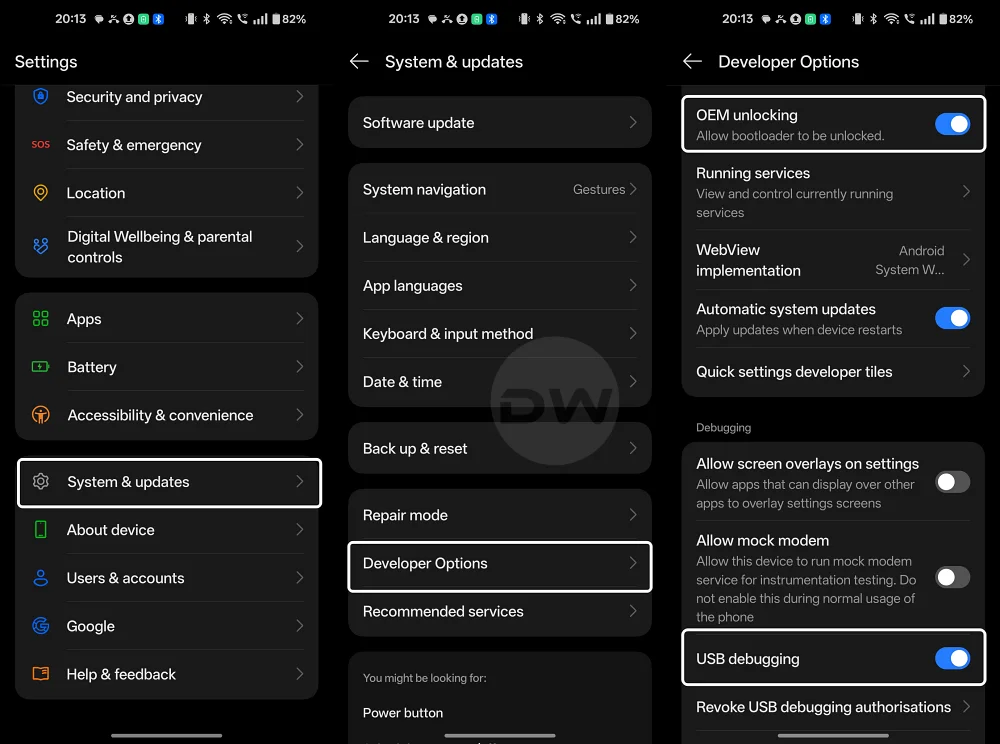
Before embarking on the installation of OrangeFox Recovery, users must satisfy several strict prerequisites to ensure the safety of their hardware. The most fundamental requirement is an unlocked bootloader. By default, OnePlus devices ship with a locked bootloader to maintain security and integrity; unlocking it is a mandatory step that will inevitably trigger a factory reset, wiping all internal storage. Furthermore, users must ensure their computer is equipped with the latest Android Debug Bridge (ADB) and Fastboot drivers. A stable USB connection and a battery charge of at least 60% are also recommended to prevent any power-related interruptions during the critical flashing phase.
The installation process for OrangeFox on the OnePlus Ace 6 follows a specific sequence designed to accommodate the device’s partition layout. Initially, the user must download the recovery image file provided by the developer. Once the device is connected to a computer and rebooted into Fastboot Mode—typically achieved by holding the Power and Volume Down buttons simultaneously—the user interacts with the device via a command-line interface. Because of the A/B partition scheme, the standard "flash" command is often replaced by a "boot" command for the initial run. This allows the user to temporarily boot into OrangeFox to verify its functionality before committing it to the device’s storage permanently.
Once the device has successfully booted into the OrangeFox interface, the user is greeted by a highly customizable environment. Unlike the austere text-based menus of yesteryear, OrangeFox provides a touch-optimized experience complete with a file manager, a terminal emulator, and even a built-in flashlight toggle. To make the recovery permanent, users typically utilize the "Install" menu within OrangeFox to flash the recovery zip file or use the "Flash Current OrangeFox" option found in the settings. This ensures that the custom recovery persists even after the device is rebooted into the main operating system.

One of the most praised features of OrangeFox is its integrated support for Decryption. Modern Android devices use file-based encryption (FBE) to protect user data. Without a recovery that can communicate with the device’s security hardware, the internal storage would appear as a jumbled mess of unreadable folders. The OrangeFox build for the OnePlus Ace 6 is designed to handle this decryption, prompting the user for their lock screen PIN or pattern upon entry, thereby granting full access to the internal storage for flashing files or managing backups.
The implications of having OrangeFox on the OnePlus Ace 6 extend to the realm of performance tuning. For gamers and power users, the ability to flash custom kernels is a significant draw. Custom kernels allow for fine-tuned control over the CPU and GPU frequencies, undervolting for better battery life, and the implementation of advanced wireguard VPN support or specialized file systems. With OrangeFox, these kernels can be swapped in seconds, allowing the user to find the perfect balance between raw power and longevity.
Furthermore, the recovery simplifies the process of achieving "Root" access. By flashing the Magisk ZIP file through OrangeFox, users gain administrative privileges over the Android OS. This enables the use of powerful modules that can change the system’s fonts, improve audio processing via Viper4Android, or bypass restrictive carrier limitations. For many OnePlus enthusiasts, the device is not truly theirs until they have achieved root access, and OrangeFox is the most reliable vehicle for that journey.
Despite the excitement surrounding this release, the developer and the community emphasize the importance of caution. Modifying system-level partitions carries inherent risks, including the potential for "bricking"—a state where the device becomes unresponsive. Users are strongly encouraged to utilize the Nandroid backup feature immediately after installing the recovery. By backing up the ‘Boot’, ‘Data’, and ‘System’ partitions, a user creates a safety net that can be deployed if a future modification causes a boot loop.

The release of OrangeFox Recovery for the OnePlus Ace 6 is a testament to the dedication of the independent developer community. While manufacturers continue to move toward more restrictive software environments, developers like NullCode provide the tools necessary for users to maintain agency over their hardware. As the OnePlus Ace 6 continues to age, it is this community support that will likely extend its lifespan, providing updates and features long after official manufacturer support has concluded.
For those ready to take the plunge, the recovery image is currently hosted on GitHub, maintaining a transparent and accessible repository for the latest builds. As the software matures, users can expect incremental updates that fix minor bugs or add compatibility for newer versions of Android. For now, the current build stands as a robust and essential tool for any OnePlus Ace 6 owner looking to explore the full potential of their smartphone. The transition from a standard user to a power user begins with a single flash, and for the Ace 6, that flash is OrangeFox.
