

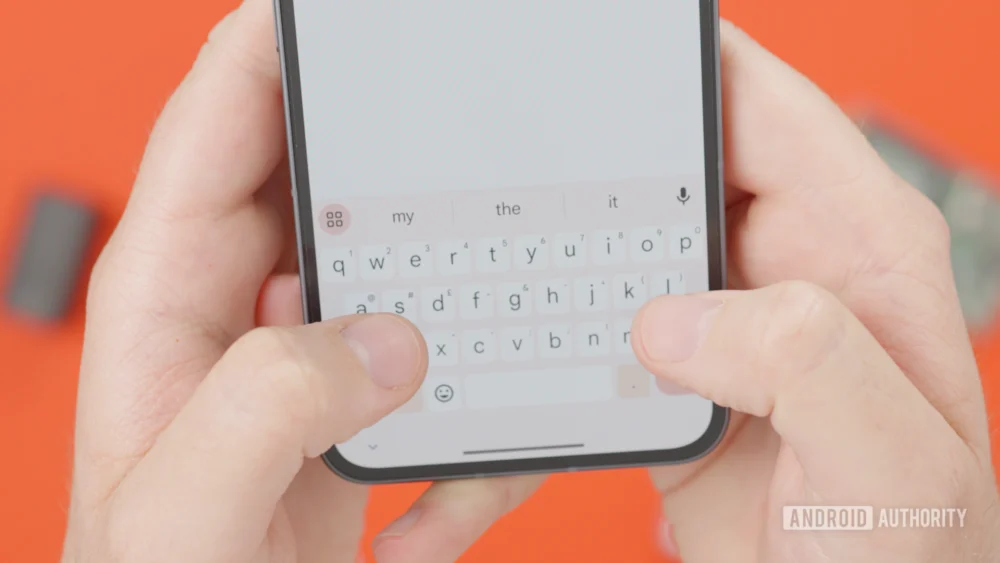
The evolution of the smartphone has seen devices grow from pocket-sized utilities into massive, high-resolution canvases capable of handling complex productivity tasks. However, as screen dimensions have expanded, the methods we use to interact with text have often struggled to keep pace. While typing speeds have increased thanks to predictive algorithms and gesture-based "glide" typing, the act of precise text manipulation—moving a cursor to fix a single character or navigating through a dense paragraph—remains one of the most persistent friction points in the mobile user experience. Google appears poised to address this long-standing hurdle with a significant overhaul of Gboard, its flagship keyboard application. Recent discoveries within the app’s code suggest that Google is developing a sophisticated "cursor mode" that effectively transforms the entire keyboard area into a high-precision virtual trackpad.
Gboard has long been the gold standard for Android input methods, prized for its deep integration with Google services and its robust set of customization options. For years, users have relied on a feature known as "glide cursor control." This utility allows a user to slide their finger across the spacebar to move the text insertion point left or right. While functional for minor corrections within a single line of text, the current implementation is fundamentally limited by its one-dimensional nature. To move the cursor to a different line or a distant paragraph, a user must either swipe repeatedly until the cursor wraps around the text block or abandon the keyboard entirely to tap the screen directly—a move that often results in "fat-finger" errors where the wrong word is selected.
The limitations of the current system are particularly glaring in the era of "phablets" and foldable devices. On a screen exceeding 6.7 inches, or on the expansive internal display of a device like the Pixel Fold, reaching for a specific line of text at the top of the interface requires a significant shift in grip, which can be both cumbersome and ergonomically taxing. The newly discovered feature, unearthed in an APK teardown of Gboard version 16.8.2.867538971-beta, aims to centralize control by keeping the user’s thumbs in the primary "typing zone" while granting them total command over the screen’s real estate.
According to technical analysis of the beta software, the proposed cursor mode is triggered by a long press on the spacebar, a gesture already familiar to many users. However, instead of merely sliding the cursor along a horizontal axis, the entire digital keyboard surface undergoes a functional transformation. The individual keys effectively disappear from the input logic, and the area becomes a blank, touch-sensitive pane. A virtual cursor then appears on the screen, which the user can manipulate in any direction—up, down, left, right, or diagonally. This 360-degree freedom of movement mirrors the experience of using a physical trackpad on a laptop, allowing for fluid navigation through large documents, emails, or code snippets without ever lifting a finger from the bottom third of the device.
One of the most striking aspects of this experimental feature is its lack of boundaries. Early testing of the beta code indicates that the software allows the virtual cursor to travel well beyond the physical confines of the Gboard interface. This suggests a level of system-level integration that could revolutionize how users interact with text-heavy applications. In its current form, mobile text editing often feels like a series of disjointed compromises; the new trackpad mode promises a more cohesive, desktop-like precision. By allowing the user to "scroll" and "point" with a high degree of granularity, Google is narrowing the productivity gap between mobile devices and traditional computers.
The timing of this development is no coincidence. Google has spent the last several years refining Android to better support large-screen formats, a push that began in earnest with Android 12L and has continued through subsequent iterations. As more users adopt foldables and tablets for work, the demand for sophisticated input tools has skyrocketed. A virtual trackpad is not just a convenience for the average texter; it is a vital tool for the "pro" user who needs to edit spreadsheets, draft long-form articles, or manage complex communication across multiple platforms. By turning the keyboard into a navigation hub, Google is leveraging the existing hardware of the smartphone—its high-polling-rate touch sensors and haptic engines—to provide a software-based solution to a hardware-scaling problem.
While the concept of a keyboard-turned-trackpad is not entirely new—Apple’s iOS has offered a similar functionality via a long press on the spacebar for several years—Google’s implementation appears to be aiming for a more robust and flexible experience. The "glide cursor control" currently found in Gboard has often been criticized for being too sensitive or too restrictive. The transition to a dedicated mode suggests that Google is focusing on intent; by clearly demarcating when the keyboard is a typing tool and when it is a navigation tool, the software can optimize touch sensitivity and acceleration for each specific task. This could reduce the accidental "ghost" inputs that sometimes plague gesture-based typing systems.
Despite the excitement surrounding this discovery, it is important to maintain a degree of cautious optimism. The feature was discovered through an APK teardown, a process that involves deconstructing the application’s package file to find hidden lines of code or assets that are not yet active in the public-facing version of the app. Developers often include these "works-in-progress" to test functionality in a controlled environment or to lay the groundwork for future updates. However, it is a common occurrence in the tech world for features to be tested and subsequently scrapped if they do not meet performance standards, if they conflict with other system behaviors, or if user testing reveals they are unintuitive.
Furthermore, the implementation of such a feature requires a delicate balance of haptic feedback and visual cues. To make a virtual trackpad feel "real," the device must provide tactile confirmation to the user that the mode has been activated. Android’s "Material You" design philosophy, which emphasizes fluid animations and responsive interfaces, will likely play a major role in how this feature is presented. If Google moves forward with a public release, users can expect to see refined transitions where the keyboard letters dim or blur as the trackpad becomes active, perhaps accompanied by a subtle vibration from the phone’s haptic motor.
The potential inclusion of this trackpad mode also raises interesting questions about the future of Gboard’s other gesture-based features. Gboard currently supports a wide array of shortcuts, such as swiping left from the delete key to erase entire words or using the "G" button to launch integrated searches. Integrating a multidirectional cursor mode will require careful UI mapping to ensure that these gestures do not overlap or confuse the user. It is possible that Google will offer this new cursor mode as an optional setting, allowing power users to toggle it on while keeping the traditional, simpler interface for those who prefer it.
In conclusion, the discovery of a virtual trackpad mode in the Gboard beta represents a significant step forward in the quest for the perfect mobile input method. It addresses a fundamental flaw in the way we interact with modern, large-screen smartphones and aligns with Google’s broader strategy of turning Android into a more capable productivity platform. By transforming a static grid of keys into a dynamic, multidirectional navigation tool, Google is proving that even the most basic elements of our digital lives—like the keyboard—still have room for profound innovation. Whether this feature makes it to the final version of Gboard remains to be seen, but its presence in the code is a clear signal that the future of mobile text editing is headed toward greater precision, better ergonomics, and a more seamless bridge between the smartphone and the PC.
