

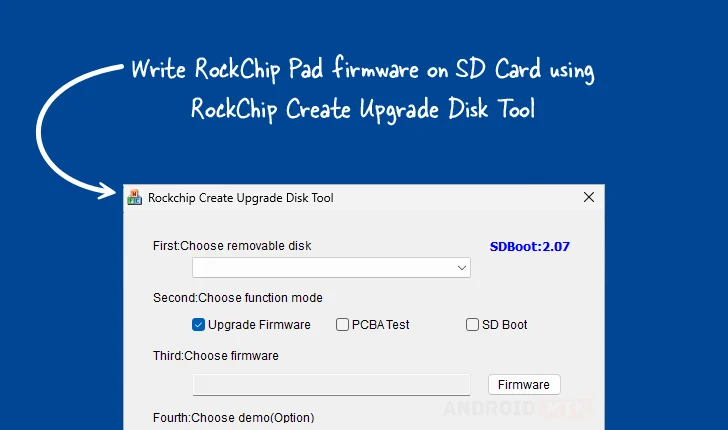
Updated on September 8, 2025, a specialized Windows application known as the Rockchip Create Upgrade Disk Tool serves as an indispensable resource for developers, technicians, and advanced users engaged with hardware powered by Rockchip System-on-Chips (SoCs). This robust utility is engineered specifically to facilitate the direct inscription of Rockchip boot firmware onto external storage media, predominantly Secure Digital (SD) cards. Its core functionality transcends simple data transfer, offering sophisticated control over the underlying storage structure, enabling users to meticulously define and manage both physical and logical partitions. This granular control is paramount for tasks ranging from initial device provisioning and operating system flashing to complex diagnostic testing and recovery procedures on a wide array of Rockchip-based embedded systems, single-board computers (SBCs), and Android devices.
The utility’s significance lies in its ability to bypass standard operating system interfaces for direct firmware manipulation. When a Rockchip device encounters issues—such as a corrupted bootloader, an incomplete operating system installation, or the need to test hardware compatibility before an official OS image is deployed—the ability to create a reliably bootable SD card becomes critical. The Create Upgrade Disk Tool provides the necessary low-level access to ensure the firmware is written correctly, establishing the foundational boot environment required for the device to initialize and subsequently load a full operating system or diagnostic routine.
Deep Dive into Core Functionalities
The feature set integrated within the Rockchip Create Upgrade Disk Tool is specifically tailored to address the multifaceted requirements of firmware deployment and system maintenance. Each module within the application plays a vital role in ensuring operational integrity and flexibility across diverse deployment scenarios.
Precision Firmware Inscription
The primary mechanism involves the direct writing of Rockchip boot firmware images. This is not merely copying a file; it involves sector-by-sector writing of the bootloader components—often including the initial program loader (IPL) and secondary program loader (SPL)—onto the designated sectors of the SD card. The tool inherently understands the specific addressing schemes and file formats proprietary to the Rockchip ecosystem. This capability is crucial for provisioning blank or factory-reset devices, ensuring that the necessary initial code is present to allow the device to recognize and load the remainder of the system software, whether it be a custom Android build, Linux distribution, or specialized firmware variant. Support extends across numerous firmware architectures common to Rockchip platforms, making it a versatile first-line tool.
Advanced Storage Structuring via Partition Management
A cornerstone of the utility’s power is its comprehensive partition management system. Users gain the ability to delineate storage space into distinct physical and logical sections on the target SD card. Physical partitioning establishes the fundamental boundaries recognized by the hardware, typically defining where the boot partition resides and where the main user data or system image will be placed. Logical partitioning, conversely, allows for further sub-division within an existing primary partition, offering advanced flexibility for complex multi-boot setups or segmented data storage (e.g., separating system read-only partitions from writable user data partitions). This level of structural control is essential for environments requiring strict separation of operational code from volatile data, or for developing multi-stage flashing processes where different images need to target specific logical volumes.
Versatility Through Multi-Mode Operation
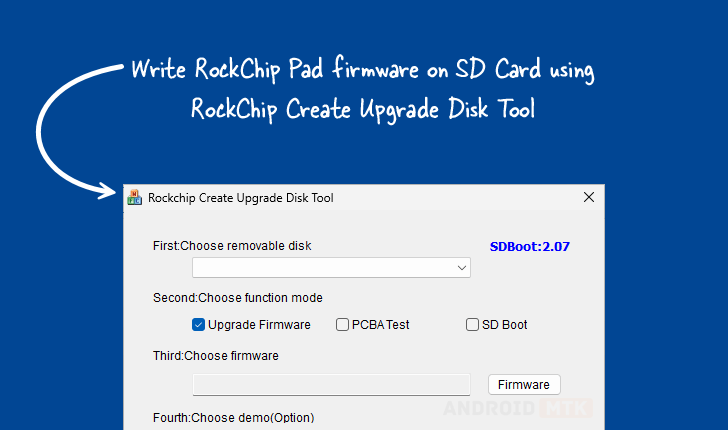
The tool transcends simple flashing by offering deployment options designed for different stages of the hardware lifecycle. The standard Firmware Upgrade Mode is utilized for routine system updates or initial device setup. Beyond this, the inclusion of PCBA Testing Mode signifies its utility in manufacturing and quality assurance workflows. PCBA (Printed Circuit Board Assembly) testing often requires writing minimal, specialized firmware or diagnostic routines directly to storage to verify hardware functionality—such as memory access, peripheral connectivity, and SoC stability—before the full operating system is installed. Furthermore, the SD Boot Option facilitates rapid prototyping and testing by ensuring the device is configured to immediately attempt booting from the freshly prepared SD card, bypassing internal eMMC or NAND storage altogether if necessary, which is invaluable during early development phases.

Granular Control with Selective Data Writing
Complementing the partition management feature is the capability for selective data inscription. Rather than overwriting an entire disk image, users can target specific sectors or predefined partitions to write specialized files—such as configuration files, specific drivers, or recovery scripts. This precision is vital when troubleshooting minor issues where the core firmware is intact but a specific component file has become corrupted. By targeting only the affected logical block, the risk associated with rewriting the entire system image is mitigated, significantly reducing downtime and the potential for introducing new errors.
Operational Transparency via Real-Time Monitoring
To maintain user confidence and provide necessary diagnostic feedback during lengthy operations, the tool incorporates robust progress monitoring. A visual indicator, typically a progress bar, furnishes real-time feedback on the operation’s completion percentage, remaining time estimation (where feasible), and status messages detailing the current step (e.g., "Writing Bootloader," "Creating Partition Table"). This transparency is critical when flashing large firmware files, as it prevents premature interruption due to perceived inactivity and allows technicians to accurately gauge the time required for batch operations.
Validation and Pre-Deployment Simulation with Demo Support
The inclusion of an optional Demo Support function serves a crucial role in environments prioritizing stability and adherence to protocols. This feature allows users to execute a simulated write or verification cycle without physically altering the target SD card or device state. It verifies that the chosen configuration parameters (partition layout, image selection, mode settings) are logically sound and compatible with the expected device parameters. This pre-verification step is a critical safeguard, particularly in production settings where incorrect settings could lead to mass device failure or costly rework.
Ensuring Resilience with Integrated Restore Capability
System failures are an inherent risk in embedded development. Recognizing this, the tool integrates a Restore Capability. This function is designed not just for flashing new images but also for reverting an SD card to a previously known good state or recovering from an operation that terminated unexpectedly (e.g., power loss during a write cycle). This mechanism often involves writing a standardized, minimal recovery image or restoring the partition table to a factory default configuration, providing a dependable safety net to bring a non-functional storage medium back to a state where further recovery attempts can be safely executed.
Accessing the Utility Versions
To cater to the evolving needs of the hardware ecosystem and different system architectures, multiple versions of the Rockchip Create Upgrade Disk Tool are maintained and made available. Users are advised to select the version that best aligns with their specific development environment and the firmware requirements of the target Rockchip SoC. Both 32-bit and 64-bit Windows operating systems are generally supported across the provided releases, although compatibility should always be cross-referenced with the specific tool version notes.
The following table delineates the currently accessible versions and corresponding download pathways, hosted on reliable third-party archives:
| Version | Download Link |
|---|---|
| 1.4 | Link |
| 1.53 | Link |
| 1.7 | Link |
These download links provide direct access to the executable files necessary to begin utilizing the tool’s advanced capabilities for firmware management and device recovery on Rockchip platforms. The continued availability of updated versions underscores the ongoing importance of these low-level utilities in maintaining the lifecycle and functionality of the vast installed base of Rockchip-powered hardware worldwide.
