

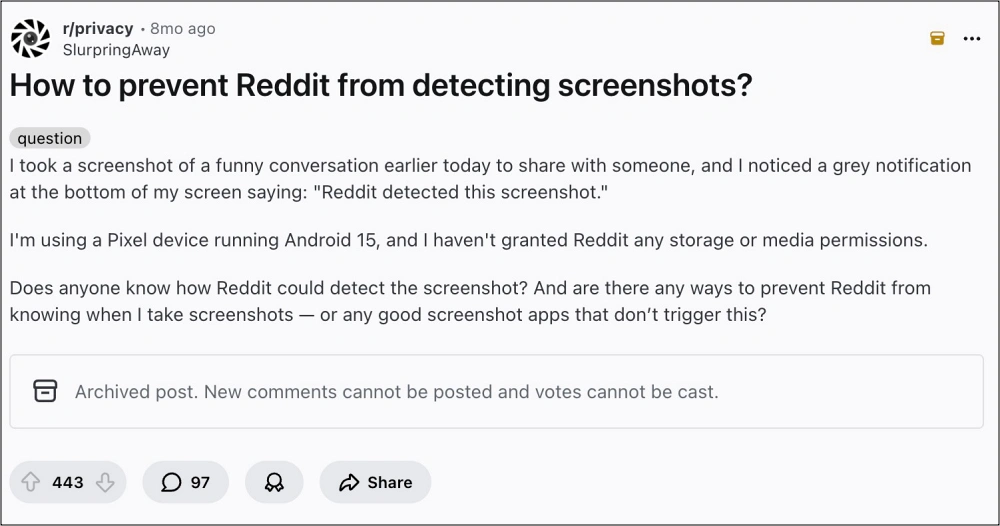
The landscape of mobile privacy and data security underwent a significant shift with the release of Android 14, as Google introduced a sophisticated new layer of transparency regarding how applications interact with user-initiated screen captures. Central to this evolution is the introduction of the android.permission.DETECT_SCREEN_CAPTURE API, a functional toolset designed to bridge the gap between total restriction and unregulated access. While previous versions of the Android operating system relied heavily on binary security measures, the latest iterations provide developers with a more nuanced way to monitor user behavior within their applications. This development has sparked a debate within the enthusiast community regarding the balance between developer control and user agency, leading to a surge in interest for methods to bypass these notification protocols.
To understand the current state of screenshot detection, one must first distinguish between the new API and the long-standing FLAG_SECURE mechanism. For years, Android developers have utilized the FLAG_SECURE window manager flag to protect sensitive information. When an app invokes this flag, the operating system treats the content as "secure," preventing screenshots from being taken at the system level. Users attempting to capture a screen under these conditions are typically met with a notification stating that the action is blocked by security policy, or they are left with a blank, black image. This remains the nuclear option for banking apps, streaming services like Netflix, and high-security enterprise tools.
In contrast, the android.permission.DETECT_SCREEN_CAPTURE API introduced in Android 14 does not prevent the capture itself. Instead, it creates a "handshake" between the operating system and the application. When a user executes a screenshot command—typically through a hardware button combination or a gesture—the system completes the capture but simultaneously triggers a callback to the active application. This allows the app to display a localized notification or log the event. The most common manifestation of this is a small toast message or pop-up within the app stating, "App detected this screenshot." This feature is intended to serve as a deterrent against the unauthorized sharing of private conversations or ephemeral content, similar to the functionality long seen in ephemeral messaging platforms like Snapchat.
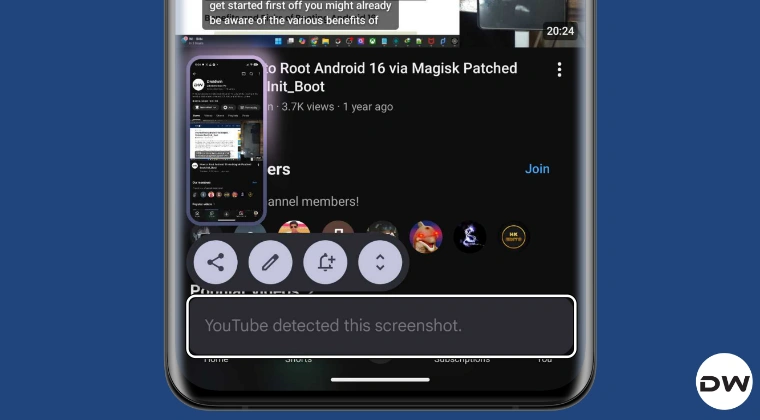
The implementation of this detection protocol has been noticeably inconsistent across the Android ecosystem, highlighting a fragmented rollout that depends heavily on both application updates and Original Equipment Manufacturer (OEM) integration. Currently, the detection prompt is most visible on Google’s own Pixel lineup and devices from Nothing Tech. Interestingly, even when apps like YouTube, Duolingo, and Reddit are updated to the latest versions across different devices, the detection behavior varies. Reports from the field indicate that while a Pixel running Android 14 or 15 will aggressively flag screenshots in these apps, other devices—such as those from Samsung or OnePlus—may not trigger the notification at all, even when running contemporary or even pre-release software versions. This suggests that some OEMs may not have fully enabled the underlying system hooks required for the API to report back to the application, or they have opted to prioritize a less intrusive user experience.
For many power users, the "App detected this screenshot" notification is viewed as an unnecessary intrusion. Whether for archival purposes, bug reporting, or personal record-keeping, the desire to capture one’s screen without alerting the application is a cornerstone of user autonomy. Fortunately, the open-nature of the Android platform allows for several workarounds, ranging from sophisticated "rootless" patches to deep system-level modifications.
For users who prefer not to compromise their device’s security model by unlocking the bootloader or gaining root access, the LSPatch method offers a viable path forward. LSPatch is a derivative of the LSPosed framework that functions by embedding the framework’s capabilities directly into a specific application’s APK file. This process, often referred to as "sandboxing" or "repackaging," allows a user to apply specific modules—such as those designed to nullify screenshot detection—to an individual app. By utilizing LSPatch, a user can take a standard APK, inject the necessary hooks to intercept the DETECT_SCREEN_CAPTURE API call, and reinstall the modified version of the app. Because the modification lives within the app itself rather than the system partition, it does not require root permissions, making it an ideal solution for those using devices with locked bootloaders or those who need to maintain Google’s Play Integrity standards for banking and work-profile apps.
However, for the enthusiast who demands a more permanent and system-wide solution, the root-based approach remains the gold standard. This method involves the use of Magisk or KernelSU to gain administrative access to the Android filesystem, followed by the installation of the LSPosed framework. Once the framework is active, users can deploy the "Disable FlagSecure" module. Despite its name, modern versions of this module have been updated to handle both the traditional FLAG_SECURE restrictions and the newer Android 14 detection API. By hooking into the system’s window manager and the core library responsible for reporting screen captures, the module effectively "blinds" the application. When a screenshot is taken, the module intercepts the signal that would normally be sent to the app, ensuring that the application remains unaware of the capture. This not only removes the annoying "detected" prompt but also restores the ability to take screenshots in apps that would otherwise block them entirely.
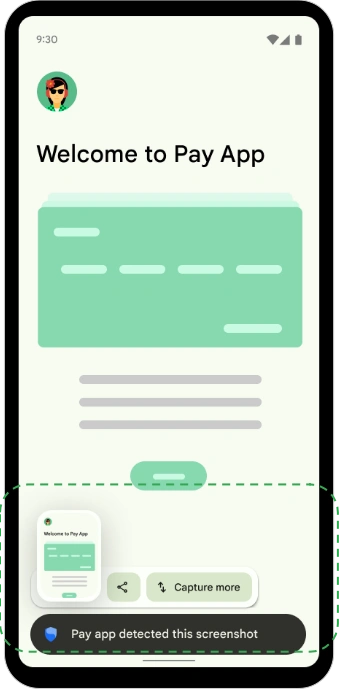
The technical logic behind these bypasses is centered on the concept of "method hooking." In the Android runtime (ART), every action—from displaying a button to detecting a screenshot—is governed by specific Java or Kotlin methods. Tools like LSPosed allow a module to "hook" into these methods, either replacing them entirely or altering their return values. In the case of screenshot detection, the module waits for the system to call the onScreenCapture() method. Instead of letting the app proceed with its notification logic, the hook simply returns a null value or terminates the process before the app can react. This level of control is what makes the Android modding community so resilient against new security features that users perceive as overreach.
While Google’s intent with the DETECT_SCREEN_CAPTURE API is rooted in enhancing privacy and giving developers more tools to protect content, the pushback from the community highlights a fundamental tension in modern computing. As mobile devices become more locked down in the name of security, the "cat-and-mouse" game between OS developers and modders intensifies. The current situation with Android 14 and 15 is merely the latest chapter in this ongoing saga.
It is also worth noting the ethical and legal considerations inherent in bypassing these protections. Many apps implement screenshot detection to protect intellectual property or to ensure the privacy of other users in a multi-user environment. Bypassing these features should be approached with an understanding of the app’s Terms of Service. However, from a purely technical standpoint, the ability to disable these notifications represents the ultimate expression of device ownership.
As Android continues to mature, we can expect Google to refine these APIs, perhaps making them mandatory for all OEMs to implement. This would eliminate the current inconsistencies seen between brands like Samsung and Google. Furthermore, as AI-driven screen analysis becomes more common, the very definition of a "screenshot" may change, potentially leading to even more advanced detection methods that look for "screen scraping" or hardware-level captures. For now, the combination of LSPatch for non-rooted users and LSPosed for rooted enthusiasts remains the most effective way to maintain a silent, undetected presence while navigating the increasingly monitored world of mobile applications. By understanding the underlying mechanics of the android.permission.DETECT_SCREEN_CAPTURE API, users can make informed decisions about their privacy and the level of control they wish to exert over their hardware.