

The global smartphone market has long been characterized by regional price disparities, and the OnePlus 15 is the latest flagship to highlight this economic divide. For many enthusiasts and budget-conscious tech adopters, the temptation to import a OnePlus 15 directly from China is nearly irresistible. By sourcing the hardware from its domestic market, buyers can often save hundreds of dollars compared to the official retail prices found in Europe, North America, or India. However, this financial windfall comes with a significant caveat: the software. While global units ship with the relatively clean OxygenOS, Chinese models are pre-loaded with ColorOS—a variant shared with Oppo that, while feature-rich, is often criticized by Western users for its aggressive bloatware, regional restrictions, and different aesthetic sensibilities.
To bridge this gap, a thriving secondary market has emerged. Third-party traders and savvy individual users often purchase these Chinese units, unlock their bootloaders, and flash the global OxygenOS firmware. Once the conversion is complete, the bootloader is frequently relocked to ensure the device passes Google’s stringent Play Integrity checks. This process creates what many consider the "perfect" device: high-end hardware at a Chinese price point, running the preferred global software with fully functional banking and payment applications. Yet, for power users, developers, and those who enjoy the freedom of root access, this "perfect" setup hides a technical dead end. Once a Chinese OnePlus 15 has been converted to OxygenOS and the bootloader has been relocked, the standard methods for regaining administrative control are effectively neutralized.
The root of this dilemma lies in the fundamental architectural differences between the regional firmware versions and the security protocols enforced by OnePlus and its parent company, Oppo. On a native ColorOS device, the path to an unlocked bootloader is clearly defined through an official "In-Depth Test" or "Deep Test" application. This utility acts as a gatekeeper, requiring users to apply for permission to unlock their hardware. Once approved, the device enters a state that allows the bootloader to be opened via standard fastboot commands. However, when OxygenOS is flashed onto this hardware, the digital handshake required for this process is broken. The OxygenOS environment does not natively support the Deep Test APK designed for Chinese hardware, and the standard fastboot unlock commands remain disabled because the device identifies as a regional mismatch.
For the average consumer who simply wants a functional phone with OxygenOS and working Google Pay, this limitation is invisible. But for the enthusiast who eventually decides they want to install a custom recovery, flash a custom ROM, or gain root access via Magisk or KernelSU, the realization that they are "locked out" of their own device can be frustrating. They find themselves in a digital purgatory: they have the global software, but the hardware’s regional identity prevents the software from granting the necessary permissions to unlock the bootloader again.
Fortunately, the mobile development community has identified a sophisticated workaround that bypasses the limitations of the fastboot interface entirely. The solution involves leveraging the Emergency Download (EDL) Mode, a low-level diagnostic state built into Qualcomm-based devices. Unlike Fastboot Mode, which is subject to the restrictions of the operating system’s current state and bootloader status, EDL Mode operates at a level near the hardware’s primary bootloader. It is designed as a "fail-safe" for unbricking devices when the standard software fails to boot. Because EDL Mode can communicate directly with the chipset, it allows for the complete overwriting of the device’s partitions, regardless of whether the bootloader is locked or what operating system is currently installed.
To reclaim the ability to unlock the bootloader on a converted OnePlus 15, the user must essentially perform a tactical retreat. The first step in this recovery operation is to use EDL Mode to flash the original Chinese ColorOS firmware back onto the device. This process effectively "re-sinicizes" the phone, returning it to its factory-out-of-the-box software state. While this might seem counterintuitive for someone who wants to use OxygenOS, it is a necessary prerequisite. Only within the native ColorOS environment can the Deep Test APK function correctly, as the app requires a specific set of regional server handshakes and system-level permissions that are only present in the Chinese firmware.
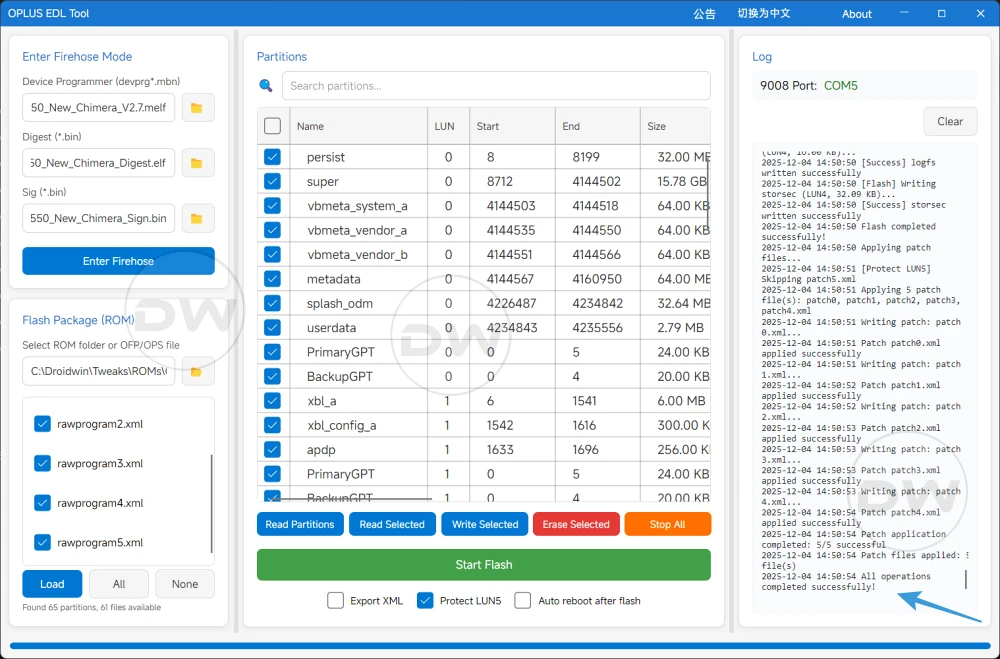
The technical execution of this process currently relies on specialized tools such as the OPLUS EDL Tool. This utility has become a cornerstone of the OnePlus and Oppo modding community, providing a graphical interface for flashing firmware via EDL Mode. Historically, such tools were restricted to authorized service centers and required expensive accounts or proprietary dongles. However, community-maintained versions of the OPLUS EDL Tool have democratized this access, allowing users to unbrick or revert their devices for free. It is worth noting, however, that this is a cat-and-mouse game. Manufacturers like Oppo frequently update their security protocols to patch these backdoors. As of the current release cycle for the OnePlus 15, these tools remain functional, but there is no guarantee that future security patches won’t close this loophole, making it significantly harder—or more expensive—to perform these conversions in the future.
Once the device has been successfully reverted to ColorOS via EDL Mode, the user must then navigate the official unlocking path once more. This involves installing the Deep Test APK, submitting a request for a bootloader unlock, and waiting for the mandatory review period, which can range from a few hours to several days depending on the current policy. After the request is approved, the device can be placed into Fastboot Mode, and the user can finally execute the command to unlock the bootloader. With the bootloader now open and the device back on its native firmware, the user is free to flash OxygenOS once again. Crucially, this time, the enthusiast should keep the bootloader unlocked if they intend to maintain administrative control.
The decision to keep a bootloader unlocked, however, introduces its own set of challenges, primarily concerning Google’s Play Integrity API. In the modern Android ecosystem, a device with an unlocked bootloader is often flagged as "untrusted." This leads to a cascade of software failures: banking apps may refuse to launch, Netflix may only play in low resolution, and Google Wallet will likely block contactless payments. For many, this is the reason they sought a "converted and locked" device in the first place.

However, the development community has been proactive in addressing these hurdles. Through various modules and tweaks, users with an unlocked bootloader can often "spoof" their device’s state to pass Play Integrity checks. This frequently involves the use of "keybox" files—digital certificates that allow a modified device to mimic a certified one. While these files are periodically revoked by Google in an ongoing game of security "whack-a-mole," new keys are regularly discovered and shared within enthusiast circles. For the dedicated user, the minor inconvenience of updating a keybox file every few months is a small price to pay for the total control afforded by an unlocked bootloader.
Ultimately, the situation with the OnePlus 15 serves as a cautionary tale for those looking to save money through international imports. While the hardware remains exceptional regardless of the region, the software barriers are becoming increasingly complex. Prospective buyers are urged to do their research before purchasing from international traders. If a buyer knows they will eventually want to root their device or experiment with custom software, they should explicitly seek out sellers who offer converted devices with an unlocked bootloader. Buying a device that has already been converted and relocked adds an extra, highly technical layer of labor to the user’s journey, requiring them to master EDL flashing just to reach the starting line of Android customization.
As OnePlus continues to integrate more deeply with the Oppo ecosystem, the distinctions between ColorOS and OxygenOS are likely to become even more blurred at a system level, while the security measures surrounding regional variants may tighten. For now, the EDL method remains a viable, albeit complex, escape hatch for those who find themselves trapped by a regional conversion. It is a testament to the ingenuity of the Android community that such paths exist, but it also underscores the reality that in the world of modern smartphones, true ownership of hardware often requires a deep dive into the most obscure corners of mobile engineering.