

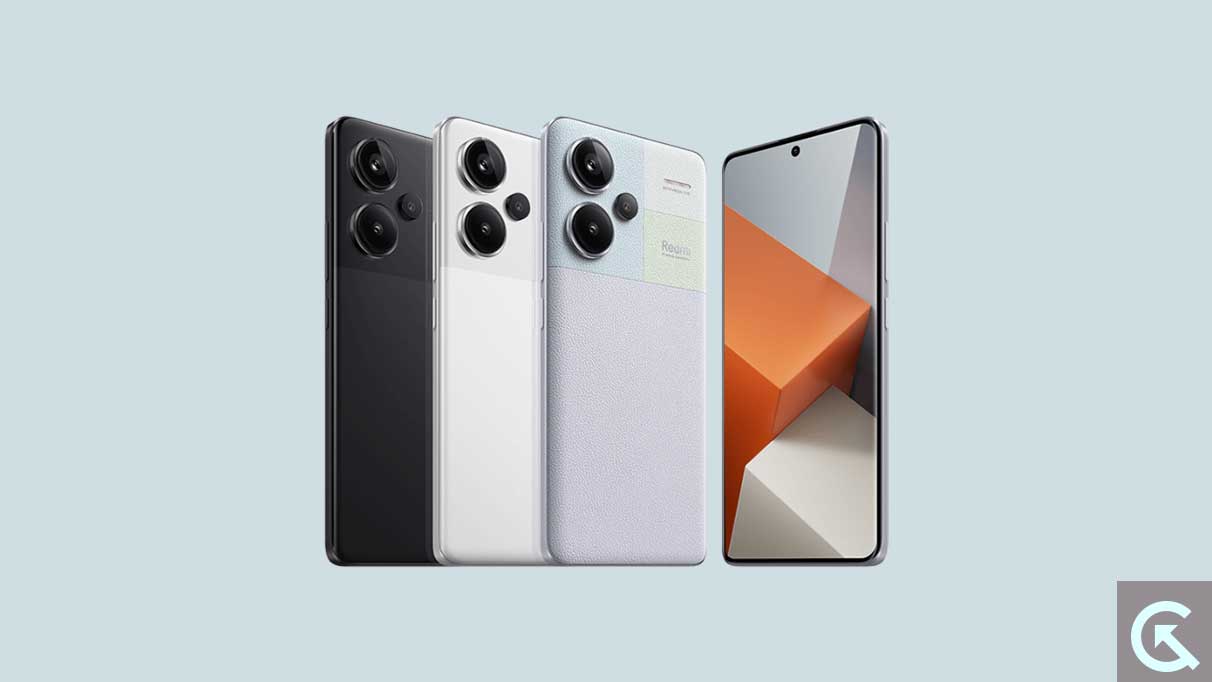
The lifecycle of a modern smartphone is often dictated not by its hardware capabilities, but by the longevity of its software support. While manufacturers have made strides in extending update windows, the enthusiast community frequently takes matters into its own hands to push boundaries even further. The Xiaomi Redmi Note 13 Pro Plus, a device lauded for its flagship-tier specifications at a competitive price point, has recently become the latest canvas for such innovation. Following Google’s recent release of Android 16 to the Pixel lineup, independent developers have successfully ported an unofficial Android Open Source Project (AOSP) build to this popular Xiaomi handset. This development offers users an early look at the future of mobile operating systems, bypassing the traditional wait times associated with official OEM rollouts.
The Redmi Note 13 Pro Plus remains a formidable piece of engineering in the mid-to-high-end segment. It features a stunning 6.67-inch 1.5K AMOLED display that achieves a balance between power efficiency and visual clarity. With a 120Hz refresh rate and a peak brightness that ensures legibility under direct sunlight, the hardware is more than capable of handling the sophisticated animations introduced in the latest Android iterations. Protected by Corning Gorilla Glass Victus, the device is built for durability, while the MediaTek Dimensity 7200 Ultra chipset provides the computational muscle required for heavy multitasking. Originally launched with MIUI 14 based on Android 13, the transition to a clean, AOSP-based Android 16 represents a significant shift in user experience, moving away from Xiaomi’s feature-heavy skin toward a more streamlined, "Google-centric" aesthetic.
![How to Install Android 16 on Xiaomi Redmi Note 13 Pro Plus [Download Link]](https://www.getdroidtips.com/wp-content/uploads/2023/09/Redmi-Note-13-Pro-Plus.jpg)
Android 16 brings with it a suite of enhancements categorized under the "Material 3 Expressive" design language. This is not a total departure from the Material You design introduced several years ago, but rather a sophisticated refinement. Material 3 Expressive focuses on the "feel" of the interface, introducing more organic animations that respond to touch with greater fluidity. Typography has been adjusted for better readability across various screen densities, and touch targets have been enlarged to accommodate more ergonomic navigation. For a device like the Redmi Note 13 Pro Plus, which boasts an expansive display, these UI refinements make the software feel deeply integrated with the hardware. Beyond the visual flair, Android 16 optimizes system-level resource management, potentially offering better battery longevity and sustained performance during gaming or high-resolution video playback.
For those looking to install this unofficial build, the process is a journey into the world of custom Android development. Unlike official over-the-air (OTA) updates, installing a custom ROM requires a fundamental understanding of the device’s bootloader and recovery systems. The first and most critical step is the unlocking of the bootloader. Xiaomi devices require the use of the proprietary Mi Unlock Tool, a process that often involves a waiting period mandated by the manufacturer. This security measure ensures that the user is the rightful owner of the device, but it also serves as the gateway to all third-party modifications. It is important to note that unlocking the bootloader triggers a complete factory reset, making a comprehensive data backup an absolute necessity.
Once the bootloader is unlocked, the installation of a custom recovery environment, such as TWRP (Team Win Recovery Project), is the next milestone. TWRP acts as a secondary operating system that allows users to modify the device’s internal partitions. Through this interface, users can "wipe" the existing MIUI partitions—specifically Data, Cache, and System—to create a clean slate for Android 16. This "clean flash" is vital; attempting to install a new version of Android over an old one without wiping can lead to "boot loops" or severe system instability due to conflicting configuration files.
![How to Install Android 16 on Xiaomi Redmi Note 13 Pro Plus [Download Link]](https://www.getdroidtips.com/wp-content/uploads/2023/09/Redmi-Note-13-Pro-Plus-300x169.jpg)
The Android 16 AOSP build itself is a lightweight package, but it typically arrives without Google’s proprietary applications due to licensing restrictions. To regain access to the Google Play Store, Gmail, and Maps, users must flash a separate package known as GApps (Google Apps). Developers recommend flashing the GApps package immediately after the ROM, before the first system boot, to ensure that Google Play Services are correctly integrated into the system framework.
From a technical performance standpoint, the Dimensity 7200 Ultra handles the AOSP environment with remarkable ease. Without the overhead of MIUI’s background services, the 12GB or 16GB of RAM available in the Pro Plus variants allows for near-instantaneous app switching. Early testers of this Android 16 port report that core functionalities—including Wi-Fi, Bluetooth, and cellular connectivity—are operational. However, as with any early-stage custom ROM, the "What Works" list is often balanced by "Known Issues." While the primary 200-megapixel camera sensor is functional, users might find that the specialized software processing found in Xiaomi’s native camera app is missing, necessitating the use of third-party alternatives like GCam ports to fully leverage the hardware’s potential.
The power delivery system of the Redmi Note 13 Pro Plus is another area where the software must be carefully tuned. The device supports 120W HyperCharge technology, which can fill the 5,000mAh battery in less than twenty minutes. In an AOSP environment, maintaining this level of charging speed requires specific kernel-level optimizations. Users should monitor device temperatures during the initial charging cycles on Android 16 to ensure that the fast-charging protocols are communicating correctly with the new software.
![How to Install Android 16 on Xiaomi Redmi Note 13 Pro Plus [Download Link]](https://www.getdroidtips.com/wp-content/uploads/2020/06/cmd-platform-tools.jpg)
One of the most compelling reasons to move to Android 16 via a custom ROM is the access to the latest privacy and security features. Android 16 introduces more granular control over app permissions, particularly regarding background location access and media library visibility. For users who are privacy-conscious, the ability to run a version of Android that is closer to the source code—and free from the telemetry often found in manufacturer skins—is a major draw. Furthermore, the AOSP experience provides a "blank canvas," allowing users to customize their devices with modules like Magisk for root access or various system-level themes that are not possible on stock firmware.
The installation of Android 16 on the Redmi Note 13 Pro Plus is more than just a software update; it is a statement of ownership. It demonstrates that the hardware, even a year or two into its lifecycle, can remain at the cutting edge of the mobile ecosystem through community-driven support. While the process involves risks—including the potential for "bricking" the device if instructions are not followed precisely—the reward is a device that feels brand new, running the latest innovations Google has to offer.
As the developer community continues to refine the Android 16 build for the Redmi Note 13 Pro Plus, users can expect more stability and the resolution of minor bugs. The journey from a factory-locked MIUI device to a customized Android 16 powerhouse is a rite of passage for many Android enthusiasts. It serves as a reminder that the "open" in Android Open Source Project remains a vital part of the mobile landscape, ensuring that high-quality hardware like the Note 13 Pro Plus can continue to thrive long after the manufacturer has moved its focus to the next generation of devices. For those ready to take the plunge, the future of Android is available today, provided they have the tools and the patience to unlock it.