

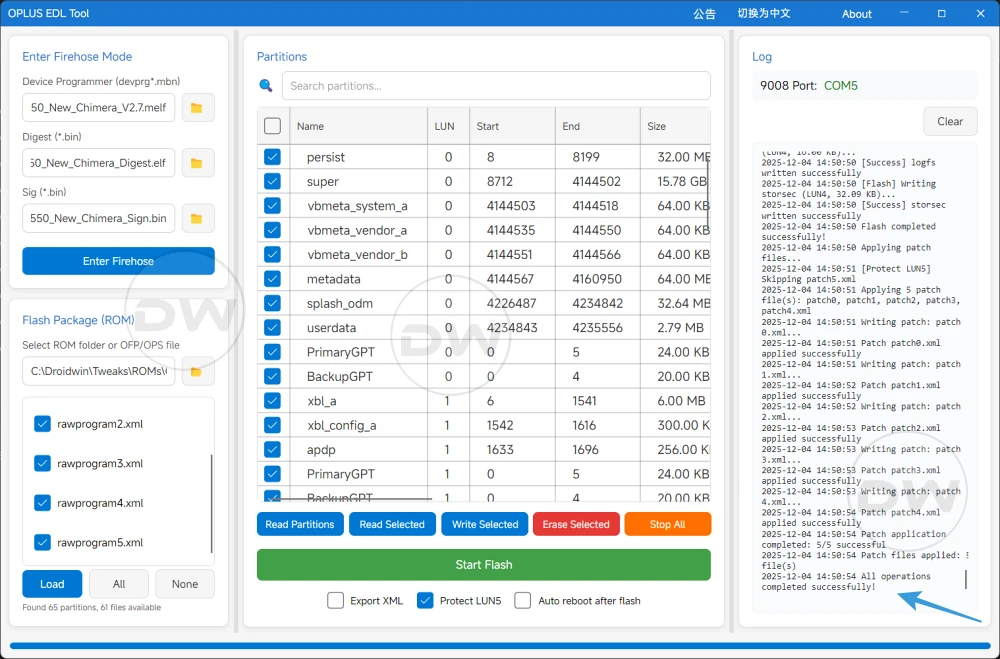
The landscape of Android smartphone recovery and modification has undergone a significant transformation with the emergence of the OPlus EDL Tool, a specialized utility designed to breathe life back into bricked OnePlus, Oppo, and Realme devices. For enthusiasts and technicians alike, the release of this tool—complete with the elusive device programmer, digest, and sign files—marked a milestone in independent device maintenance. However, as with any high-level technical interface interacting with low-level hardware protocols, the tool is not without its operational hurdles. The most prominent among these is the "Loader Send Failed" error, a frustrating roadblock that occurs during the critical transition into Firehose mode. Understanding the mechanics of this failure, the architecture of the Emergency Download (EDL) mode, and the precise steps required to restore communication is essential for anyone attempting to navigate the complexities of modern smartphone unbricking.
The OPlus EDL Tool represents a "holy grail" for the modding community, primarily because it provides a bridge to the Qualcomm Emergency Download mode, a secondary bootloader state that exists beneath the standard operating system and recovery partitions. Unlike Fastboot mode, which requires a functioning bootloader, EDL mode interacts directly with the chipset, allowing for the restoration of devices that have suffered catastrophic software failure, commonly referred to as a "hard brick." The tool’s feature set is comprehensive, offering users the ability to flash full firmware packages, read or write specific partitions, and execute the OCDT (OnePlus Custom Data Table) fix. This specific fix is particularly vital for resolving issues where a device becomes stuck in a Fastboot loop or displays incorrect hardware identification. Furthermore, the integration of a Cloud Loader feature—which automatically matches and downloads the appropriate loader for a specific chipset—has significantly lowered the barrier to entry for novice users.
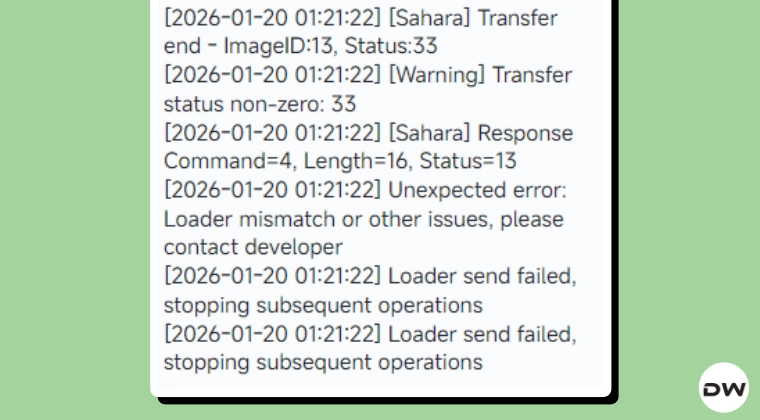
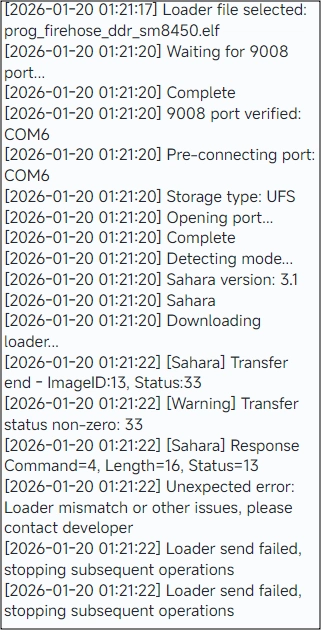
Despite these advanced capabilities, the "Loader Send Failed" error remains a persistent thorn in the side of the user experience. This error typically manifests at a specific juncture: the device is successfully connected in EDL mode, the necessary programmer files have been selected or automatically loaded, and the user initiates the "Enter Firehose" command. Instead of the tool establishing a handshake with the device’s internal storage, it terminates the process with a failure notification. For many, the immediate fear is that the device programmer files are corrupt or, more alarmingly, that manufacturers like OnePlus or Oppo have implemented a server-side patch to block unauthorized EDL access. However, technical analysis suggests that the issue is rarely a result of manufacturer intervention or file corruption. Instead, it is almost always a symptom of a desynchronized communication protocol between the host PC and the device’s Qualcomm Snapdragon chipset.
To understand why this failure occurs, one must look at the Firehose protocol itself. When a device enters EDL mode, it stays in a passive state, waiting for a "programmer" file to be uploaded into its volatile memory (RAM). This programmer acts as a temporary operating system that understands how to communicate with the NAND or UFS storage. The "Loader Send Failed" message indicates that the initial packet of data—the loader—was either rejected by the device or timed out during transmission. This is frequently caused by environmental factors such as unstable USB voltage, driver conflicts, or the device "timing out" of its initial EDL handshake window. Because EDL mode is designed for factory environments, it expects a clean, high-speed connection; any latency in the data stream can cause the device to reset the connection for security reasons.
Addressing the "Loader Send Failed" error requires a systematic approach to recalibrating the EDL connection. The primary objective is to force a complete reset of the USB handshake. The first step in this process involves a physical disconnection. Users should safely disconnect the device from the PC and terminate the OPlus EDL Tool process via the Task Manager to ensure no residual "zombie" processes are holding onto the COM port. Once the software environment is cleared, the device itself must be power-cycled. In a hard-brick state, this usually involves holding the Power and Volume buttons for a prolonged period—up to 20 seconds—to ensure the chipset has fully exited the previous failed EDL state.
The second phase of the solution focuses on the interface between the hardware and the software. One of the most common culprits for loader failures is the use of USB 3.0 or 3.1 ports. These high-speed ports often utilize controllers that are too aggressive for the legacy-style polling used by Qualcomm’s 9008 driver. Switching to a USB 2.0 port, or using a basic USB 2.0 hub, often provides the stable timing required for the Firehose protocol to initialize. Furthermore, the quality of the cable cannot be overstated; using the original proprietary "Warp" or "SuperVOOC" cable is recommended, as these are designed to handle the specific data and power requirements of OPlus devices.
Once the physical environment is optimized, the reconnection process must be executed with precision. The standard procedure for entering EDL mode involves holding both Volume Up and Volume Down buttons simultaneously while connecting the cable. Once the computer’s Device Manager recognizes the device as "Qualcomm HS-USB QDLoader 9008," the user should immediately return to the OPlus EDL Tool. It is often beneficial to pre-load the firmware or loader files into the tool before connecting the device. This minimizes the time between the device entering EDL mode and the tool sending the Firehose command, thereby reducing the window for a timeout to occur.
If the "Loader Send Failed" error persists after these steps, the focus should shift toward driver integrity. The Qualcomm 9008 driver is the bedrock of this entire operation. In many cases, Windows Update may have overwritten a stable, manually installed driver with a "generic" version that lacks the necessary permissions to execute raw data writes. Users should navigate to the Device Manager, uninstall the current driver, and perform a clean installation of the official Qualcomm driver package, ensuring that "Driver Signature Enforcement" is disabled on the Windows host if the driver is unsigned. This ensures that the OPlus EDL Tool has an unobstructed path to the device’s memory controller.
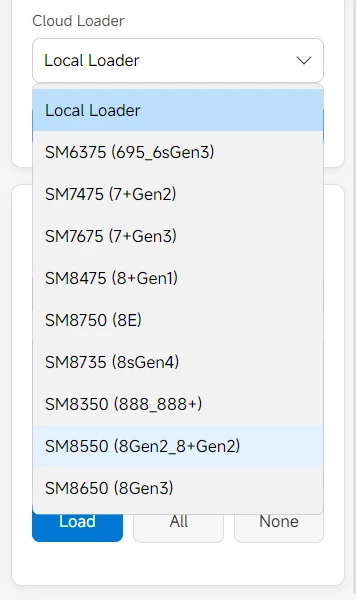
Another layer of complexity involves the "Digest" and "Sign" files. These are cryptographic components that verify the authenticity of the programmer to the device’s Secure Boot mechanism. While the OPlus EDL Tool handles much of this in the background, a mismatch in these files can trigger a send failure because the device’s internal fuse-blown security rejects the unauthorized loader. If the Cloud Loader feature fails to resolve this, users may need to manually source a specific "Unbrick Mini-Package" that corresponds exactly to their device’s regional variant and hardware revision. The modding community often provides these verified file sets, which include the specific programmer (.mbn or .elf), the digest, and the signature files required for a successful handshake.
In conclusion, while the "Loader Send Failed" error in the OPlus EDL Tool can be a daunting obstacle, it is rarely a terminal issue. It serves as a reminder of the delicate balance required when interfacing with high-security mobile hardware. By understanding that the error is rooted in communication timing and protocol synchronization rather than permanent manufacturer blocks, users can methodically troubleshoot the connection. Through the combination of proper driver management, physical port selection, and precise execution of the EDL entry sequence, the OPlus EDL Tool remains a potent and reliable instrument for device recovery. As mobile technology continues to evolve, the ability of the community to document and overcome these technical hitches ensures that the spirit of device ownership and repairability remains alive, even in the face of increasingly complex security architectures.