

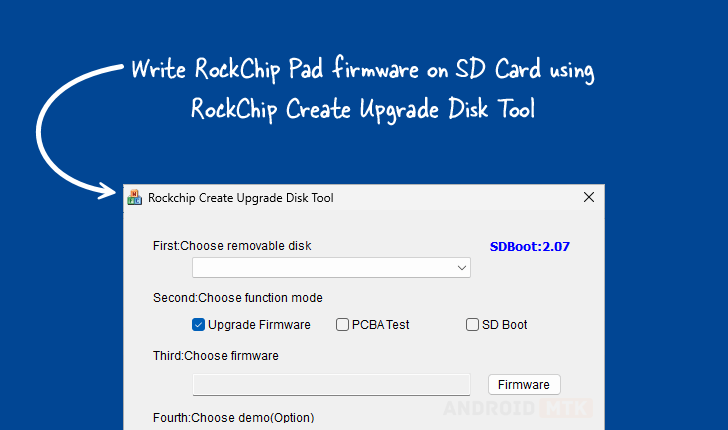
The Rockchip Create Upgrade Disk Tool, a specialized Windows-based utility, has emerged as an indispensable resource for developers, technicians, and advanced users engaged in the deployment and maintenance of Rockchip-powered hardware. This powerful application facilitates the precise writing of Rockchip boot firmware directly onto SD memory cards, establishing a critical bridge for system initialization and recovery. Its core functionality revolves around providing granular control over storage media, enabling users to meticulously construct and manage both physical and logical partitions. This capability is paramount for accurately writing proprietary data or complete image files to designated sectors of the storage device, ensuring system integrity and proper boot sequence execution on a wide array of Rockchip-based Single Board Computers (SBCs), tablets, and embedded systems.
The utility’s sophisticated design addresses the complex requirements of firmware management, moving beyond simple file copying to offer robust, sector-level control. The ability to manipulate partition schemes is particularly significant, as modern embedded operating systems often rely on specific, often hidden, partitions for bootloaders, kernel images, and root file systems. By offering direct partition management, the Create Upgrade Disk Tool bypasses the limitations of standard operating system formatting utilities, which often abstract away these critical low-level details.
In-Depth Examination of Core Features
The Rockchip Create Upgrade Disk Tool is engineered with a suite of features specifically tailored to streamline the process of loading or restoring firmware onto Rockchip platforms. Each component of the tool serves a distinct, crucial purpose in ensuring a successful and reliable device initialization or repair sequence.
Precision Firmware Writing Capabilities
At the heart of the utility lies its advanced firmware writing engine. This feature is designed to handle the intricacies of Rockchip bootloaders, which frequently utilize specialized file formats or require specific alignment for successful execution upon device power-on. The tool ensures that the boot firmware—the initial code executed by the processor—is written correctly to the storage medium, often to specific sectors designated as the primary boot area. This capability is essential for flashing initial operating systems onto new hardware or recovering devices that have experienced catastrophic boot sector corruption, effectively breathing new life into otherwise inert hardware. Support extends across various firmware packaging formats commonly employed within the Rockchip ecosystem, guaranteeing broad compatibility with diverse hardware revisions and software stacks.
Advanced Partition Structuring and Allocation
The utility’s partition management system represents a significant departure from conventional disk utilities. Users gain the autonomy to define both physical and logical partitioning structures on the target SD card. Physical partitions are straightforward divisions of the disk space, whereas logical partitions, often managed via extended partitions, allow for more flexible organization within limited primary partition slots. This granular control is invaluable for developers who need to replicate exact factory partition layouts, ensuring that the device’s firmware correctly identifies and mounts all necessary system components, such as boot partitions, recovery partitions, and user data areas. Efficient allocation of storage space according to specific project requirements becomes straightforward, optimizing the use of the removable media.
Versatile Multi-Mode Operational Framework
The tool’s flexibility is further underscored by its support for multiple operational modes, accommodating a spectrum of engineering and testing workflows. Beyond the primary function of firmware upgrade, which is aimed at general software deployment, the utility includes modes critical for hardware validation. The PCBA testing mode suggests integration capabilities for validating Printed Circuit Board Assemblies (PCBAs) during the manufacturing or quality assurance phases, likely involving pre-loading diagnostic firmware or running automated tests directly from the SD card. Furthermore, the SD boot option facilitates quick iterative testing cycles by allowing developers to rapidly load and boot different kernel or root file system configurations directly from the card without permanent flashing, significantly accelerating development timelines.

Targeted and Selective Data Implantation
A key differentiator for professional users is the selective data writing feature. This advanced function grants the ability to target specific partitions or even precise byte offsets within the SD card structure to implant data or image files. Instead of overwriting the entire storage medium with a monolithic image, an operator can inject a specific configuration file, a custom recovery script, or a modified kernel into its exact required location. This precision minimizes the risk of accidentally corrupting adjacent, functional partitions and drastically reduces the time required for small, targeted updates or fixes.
Real-Time Operational Visibility via Progress Monitoring
To maintain user confidence and prevent premature interruption of critical operations, the tool incorporates robust progress monitoring. A visual interface element, typically a progress bar, provides continuous, real-time feedback on the status of the ongoing operation—whether it involves flashing large firmware blocks or restructuring the partition table. This immediate visual confirmation reassures the user that the process is active and progressing towards completion, which is vital given that firmware writing operations can sometimes take considerable time depending on the size of the image and the speed of the SD card.
Integrated Demonstration and Verification Support
Recognizing the need for pre-deployment validation, the utility includes optional demo support. This feature is designed for rigorous testing scenarios, allowing technicians to verify that the newly written firmware and partition configuration behave as expected before deploying the SD card to a production unit or a sensitive testing environment. By simulating or enabling a demonstration mode via the prepared media, users can confirm boot sequence integrity, partition accessibility, and basic device functionality without committing to a final, potentially disruptive, system flash.
Robust Recovery and Rollback Mechanisms
Data integrity and system recoverability are paramount in firmware management. The restore capability integrated within the Create Upgrade Disk Tool addresses potential failures during the writing process or allows for easy reversion to a known good state. This functionality can involve restoring a backup of the original partition table or rewriting a known stable firmware version. For users encountering read/write errors or experiencing a device that fails to boot after an operation, the restore feature acts as a critical safety net, enhancing data security and ensuring operational continuity by facilitating recovery from problematic installations or partial writes.
Acquiring the Essential Deployment Utility
For those requiring this specialized tool for development, repair, or advanced customization of Rockchip hardware, the developers have made several versions of the Rockchip Create Upgrade Disk Tool available for the Windows operating system, supporting both 32-bit and 64-bit architectures. The availability of multiple versions (1.4, 1.53, and 1.7) suggests an evolution of the software, likely incorporating bug fixes, enhanced hardware support, and potentially expanded feature sets in later iterations. Users are generally advised to select the newest stable version available unless a specific legacy version is mandated by their hardware or existing firmware configuration.
| Version | Direct Download Link |
|---|---|
| 1.4 | [Link] |
| 1.53 | [Link] |
| 1.7 | [Link] |
The decision to distribute this utility via direct links reflects its status as a specialized, perhaps non-consumer-facing, tool often required by technicians rather than general end-users. The consistent updating of the tool, as evidenced by the version history, underscores the ongoing relevance of Rockchip platforms in the embedded systems market and the corresponding need for reliable, up-to-date low-level maintenance utilities. Successful deployment using this software hinges on meticulous adherence to documentation, especially concerning partition sizing and bootloader selection, ensuring that the powerful features of the Create Upgrade Disk Tool translate into reliable device operation.