

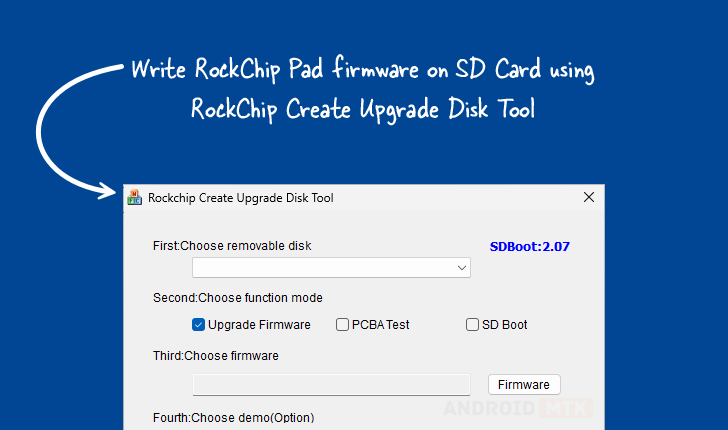
The Rockchip Create Upgrade Disk Tool, a specialized utility engineered exclusively for the Windows operating system, stands as an indispensable resource for developers, technicians, and advanced users engaged with Rockchip-powered hardware. Its primary function centers on the precise and reliable inscription of Rockchip boot firmware directly onto external storage media, most commonly SD cards. This capability transcends simple data transfer; it provides granular control over the initial boot environment, making it the cornerstone for device initialization, system recovery, and comprehensive testing protocols across a vast ecosystem of single-board computers (SBCs), Android TV boxes, and other embedded systems leveraging Rockchip chipsets. The tool’s architecture is meticulously designed to handle the complexities of creating and manipulating storage structures, enabling the establishment of both foundational physical partitions and more nuanced, software-defined logical partitions. This dual capability ensures that users can tailor the storage layout of the boot medium to accommodate specific firmware images, operational systems, or diagnostic data sets with exacting accuracy.
The official documentation, updated on September 8, 2025, underscores the utility’s maturity and ongoing relevance in the fast-evolving landscape of embedded systems development. The accompanying visual representation, showcasing the tool’s interface, highlights its professional deployment-ready aesthetic, suggesting a robust backend capable of handling high-stakes firmware operations without data corruption risks.
Deep Dive into the Multifaceted Capabilities of the Rockchip Create Upgrade Disk Tool
The utility’s strength lies in its comprehensive feature set, where each component is strategically implemented to streamline the often-challenging process of low-level hardware interfacing and firmware deployment. These features collectively transform a potentially error-prone manual procedure into a repeatable, auditable workflow essential for production environments.
Precision Firmware Inscription
The core functionality revolves around the direct writing of Rockchip boot firmware. Unlike standard file copying, this process involves flashing critical bootloader information—often including primary bootloaders (PBLs) and secondary program loaders (SPLs)—into the non-volatile memory sectors of the target SD card. The tool is engineered to interpret and correctly map various firmware image formats utilized by Rockchip’s diverse System-on-Chips (SoCs). This guarantees that the resulting bootable medium possesses the necessary integrity and structure to initialize the Rockchip processor correctly, initiating the boot sequence for the operating system or recovery environment stored subsequently on the card. This is vital for "bricked" devices where the internal storage is inaccessible or corrupt, making the external SD card the only viable pathway back to operational status.
Advanced Storage Structuring: Partition Management Superiority
A significant differentiator of this utility is its sophisticated partition management engine. Users gain the ability to define and control both the physical and logical organization of the SD card. Physical partitioning involves establishing the hard boundaries of storage areas recognized by the operating system kernel upon initial boot. Logical partitioning, conversely, allows for the creation of virtual subdivisions within existing physical spaces, often employed for separating data partitions from system partitions, or for staging different firmware builds. This granular control is essential for multi-boot setups or for adhering to vendor-specific partitioning schemes required by certain Rockchip platforms, ensuring that data integrity is maintained across disparate operational areas of the storage device.
Versatility Through Multi-Mode Operation
The Rockchip Create Upgrade Disk Tool is not confined to a single use case; it is intentionally versatile to support the entire development lifecycle. The tool offers distinct operational modes tailored for specific needs:
- Firmware Upgrade Mode: The standard mode for installing or updating the primary bootloader and system images onto the SD card, preparing it for device booting.
- PCBA Testing Mode: This specialized mode facilitates testing of the Printed Circuit Board Assembly (PCBA) itself. It often involves writing minimal diagnostic firmware or proprietary test routines directly to the card to verify hardware functionality (such as memory controllers, I/O interfaces, and peripherals) before the full operating system is loaded.
- SD Boot Mode: This setting prepares the card specifically for environments where the device is configured to boot exclusively from external SD media, bypassing internal eMMC or NAND storage checks, which is common during early prototyping phases.
This multi-modal approach reduces the need for separate, single-purpose utilities, centralizing control within one familiar interface.

Surgical Data Placement via Selective Writing
Beyond mass flashing entire images, the utility excels in selective data writing. This advanced feature empowers users to target precise sectors or predefined partitions on the SD card to write specific files. For instance, a developer might need to inject a custom configuration file into a small partition reserved for device settings without overwriting the entire operating system image. This precision is invaluable for iterative testing where only minor configuration adjustments are required, saving considerable time by avoiding full re-flashing cycles.
Real-Time Operational Transparency: Progress Monitoring
Recognizing that firmware operations can be time-consuming and resource-intensive, the tool incorporates robust visual progress monitoring. A dynamic progress bar provides immediate, graphical feedback on the operation’s advancement, including estimated time remaining and the current step being executed (e.g., sector verification, data transfer). This transparency mitigates user uncertainty, allowing technicians to accurately gauge the time commitment for each flashing session and immediately identify if an operation has stalled or failed prematurely.
Quality Assurance Integration: Optional Demo Support
The inclusion of optional demo functionality is a subtle but powerful addition aimed at quality assurance and deployment verification. This feature allows users to run a short, pre-configured sequence that tests the newly written firmware environment. It acts as a lightweight functional check—a "smoke test"—to confirm that the bootloader initialized correctly and that the basic partition structure is recognized before committing the SD card to a final deployment or integration test. This capability is crucial for large-scale manufacturing quality checks.
Disaster Recovery and Contingency Planning: Restore Capability
Perhaps the most reassuring feature for users dealing with sensitive data or mission-critical firmware is the integrated restore capability. This function serves as a safety net, allowing the user to revert the SD card to a previously saved, known-good state, or to recover gracefully from a failed flashing attempt that may have left the card in an inconsistent state. This safety mechanism ensures data survivability and significantly reduces the risk profile associated with high-stakes firmware manipulation.
Accessing and Deploying the RockChip Create Upgrade Disk Tool
The distribution of the utility is provided through dedicated download links, catering to the varying computational environments prevalent among developers today. Recognizing that older hardware or specific legacy builds may require 32-bit compatibility, while modern systems utilize 64-bit architectures, the availability of the tool is crucial for broad accessibility.
The provided archival record shows several version increments, indicating active maintenance and adaptation to newer Rockchip platforms and operating system updates:
| Version | Associated Release Focus/Significance | Direct Download Link |
|---|---|---|
| 1.4 | Early stable release, foundational feature set. | Link (e.g., https://androiddatahost.com/rc4ud) |
| 1.53 | Incremental update, likely addressing initial bug reports and minor feature enhancements. | Link (e.g., https://androiddatahost.com/rc5ud) |
| 1.7 | Latest known iteration, expected to include support for newer Rockchip SoC families and enhanced stability protocols. | Link (e.g., https://androiddatahost.com/rc6ud) |
The availability of multiple versions ensures that users encountering compatibility issues with the latest release on legacy hardware can easily roll back to a tested, stable predecessor, showcasing a commitment to long-term support for the user base. The tool’s deployment on Windows makes it instantly accessible to the majority of hardware development workstations globally, leveraging the ubiquity of the Microsoft ecosystem for standardized development workflows. The utility’s role remains central to maintaining the flexibility and longevity of devices powered by Rockchip technology, serving as the essential conduit between development software and physical hardware initialization.