

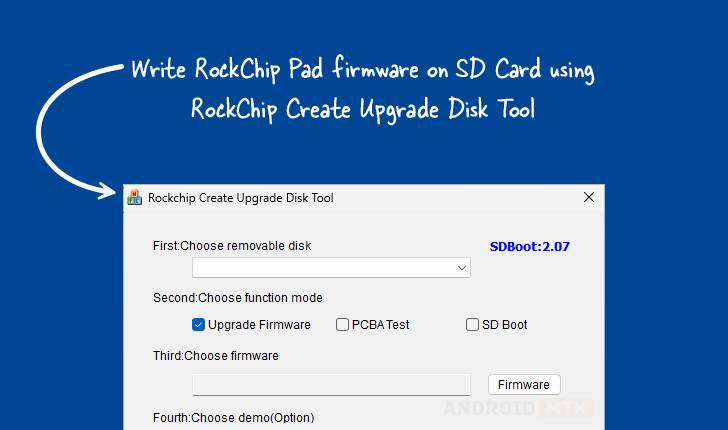
Updated on September 8, 2025, the Rockchip Create Upgrade Disk Tool stands as a cornerstone utility for developers, technicians, and advanced users working with Rockchip-based systems, including single-board computers (SBCs), Android TV boxes, and various embedded devices. This specialized Windows application is engineered specifically to facilitate the direct writing of Rockchip boot firmware onto external storage media, primarily SD cards, which is a crucial step in initial device setup, system recovery, and complex hardware testing. Its power lies not only in its ability to flash essential bootloaders but also in its granular control over the underlying storage architecture, enabling sophisticated management of both physical and logical partitions.
The fundamental purpose of this tool addresses a common challenge in the Rockchip ecosystem: ensuring that the initial boot environment—the firmware residing on the removable storage—is correctly configured to initiate the device’s operating system. Unlike standard file copying utilities, the Create Upgrade Disk Tool understands the specific partitioning schemes and low-level data structures required by Rockchip System-on-Chips (SoCs) to transition from hardware initialization to software execution. By acting as a dedicated flashing utility, it bypasses potential inconsistencies inherent in general-purpose disk imaging software, guaranteeing a reliable foundation for subsequent software operations.
The utility’s interface, optimized for the Windows operating environment, provides users with a centralized hub for these critical tasks. Its design prioritizes clarity while offering deep technical functionality, making it accessible to those performing simple firmware updates as well as engineers conducting rigorous hardware validation. The tool’s architecture is built around direct interaction with the storage controller, facilitating rapid and accurate data transfer necessary for large firmware images.
Comprehensive Feature Set for Robust System Management
The Rockchip Create Upgrade Disk Tool is defined by a suite of integrated features, each designed to streamline the often complex process of firmware deployment and storage preparation. These capabilities collectively transform a standard SD card into a precisely engineered boot medium or a segmented testing platform.
Precision Firmware Writing and Bootloader Integrity
The core function revolves around the secure and accurate inscription of Rockchip boot firmware. This process involves writing low-level bootloader code—often including the Initial Program Loader (IPL) and the Secondary Program Loader (SPL)—that the Rockchip SoC executes immediately upon power-on. The tool supports various firmware image formats commonly utilized within the Rockchip development sphere, ensuring broad compatibility across different chip revisions and product lines. Successful execution of this feature is paramount, as an improperly written bootloader can render a device completely inoperable, necessitating recovery procedures. The tool ensures that the boot image is written to the exact sector locations required by the hardware architecture, preventing boot failures due to misaligned data blocks.
Advanced Partition Management: Physical and Logical Control
A significant differentiator of this utility is its robust partition management system. Users are granted the capability to define and modify both physical and logical partitions on the target SD card. Physical partitioning involves defining the main structural boundaries of the storage space—the MBR or GPT layout. Logical partitioning, conversely, allows for the creation of partitions within existing primary partitions, often utilizing schemes like extended partitions or more modern volume management structures. This dual control is essential for complex deployments. For instance, an engineer might partition the card to reserve a specific physical block for the read-only boot partition, another for a read/write user data partition, and a third, logical partition, specifically for continuous logging during stress testing. This level of organization maximizes storage efficiency and isolates operational data.
Versatile Multi-Mode Operation for Diverse Scenarios
The tool is not limited to standard end-user firmware updates; it is equipped to handle diverse operational requirements through its multi-mode framework. Key modes include:

- Firmware Upgrade Mode: The standard procedure for installing or replacing the primary operating system boot image on the storage device.
- PCBA Testing Mode: This mode is specifically tailored for manufacturing and hardware validation. It often involves flashing diagnostic firmware or test suites directly onto the storage, allowing technicians to verify the functionality of the printed circuit board assembly (PCBA) without needing a fully functional host operating system.
- SD Boot Options: This mode provides configuration flexibility related to how the device attempts to boot from the SD card, potentially adjusting boot order parameters or enabling specific boot flags recognized by the Rockchip hardware initialization sequence.
This flexibility makes the Create Upgrade Disk Tool indispensable across the product lifecycle, from initial board bring-up to mass production quality assurance.
Granular Control through Selective Data Writing
Beyond full-disk flashing, the utility excels in selective data inscription. Users possess the fine-grained ability to target specific data payloads or image files to pre-defined partitions or even arbitrary sector ranges on the SD card. This precision is invaluable when debugging or updating modular components of a system. If only a specific kernel module or configuration file needs updating within a larger system image, the tool allows the user to inject that file directly into its correct location without needing to re-flash the entire operating system partition, saving considerable time during iterative development cycles.
Real-Time Operational Feedback via Progress Monitoring
To ensure transparency and aid in troubleshooting potential write errors, the tool incorporates a highly visible progress monitoring system. A dynamic progress bar visually represents the percentage completion of the ongoing operation—whether it is a full firmware write or a partition creation task. This real-time feedback is critical for long operations, allowing users to confirm that the process is actively running and not stalled, providing immediate assurance of successful data transfer kinetics.
Integrated Demo Functionality for Verification
Recognizing the potential pitfalls of deploying untested configurations, the utility includes optional demonstration support. This feature allows users to execute a pre-configured sequence of write and partitioning steps in a controlled, simulated, or limited-scope environment. This is primarily used to validate that the intended configuration will function as expected on the target hardware before committing resources to a full-scale production flash or deployment, serving as a crucial sanity check.
Essential Restore and Recovery Capabilities
A failsafe mechanism is built into the tool through its restore capability. This function is designed to revert the SD card to a previously known good state or to undo the effects of a failed or erroneous flashing operation. In scenarios where an update corrupts the boot sequence, the restore feature provides a pathway back to stability, significantly mitigating data loss risks and reducing device downtime associated with complex recovery procedures.
Accessing the RockChip Create Upgrade Disk Tool
The availability of this specialized utility is facilitated through direct download links for Windows users, catering to both 32-bit and 64-bit architectures, ensuring compatibility with the broadest range of development machines. Different versions of the tool are maintained to correspond with evolving Rockchip hardware requirements and firmware standards.
| Version | Download Link Identifier |
|---|---|
| 1.4 | https://androiddatahost.com/rc4ud |
| 1.53 | https://androiddatahost.com/rc5ud |
| 1.7 | https://androiddatahost.com/rc6ud |
The provision of multiple historical versions is a testament to the tool’s long-standing role in the Rockchip ecosystem, allowing users working with legacy hardware or specific older firmware branches to maintain operational continuity. Selecting the correct version is often contingent upon the specific Rockchip SoC model being targeted, as subtle differences in boot ROM or hardware initialization routines may necessitate version-specific flashing logic embedded within the Create Upgrade Disk Tool itself. Developers are generally advised to utilize the latest stable version unless compatibility issues with older hardware dictate the use of a specific predecessor. The tool remains a vital piece of software infrastructure, underpinning the development, testing, and maintenance of countless embedded systems powered by Rockchip processors.