

The landscape of Android customization has undergone a significant transformation in recent years, with many formerly prominent devices seeing a stagnation in third-party development. However, the Poco lineup continues to defy this trend, maintaining its status as a sanctuary for enthusiasts and developers alike. From the legendary Poco F1 to the recently released Poco F7, the series has consistently enjoyed a robust ecosystem of community-driven software. Despite the device being on the market for only a few months, the development community has already produced over fifteen distinct custom ROMs based on Android 16. This rapid adoption allows users to transition away from the increasingly heavy HyperOS environment toward a more streamlined, high-performance interface that prioritizes user control and aesthetic minimalism.
The appeal of the Poco F7 in the custom ROM scene stems from its impressive hardware-to-price ratio, making it a primary target for developers who wish to push the boundaries of the latest Android source code. By moving to an Android 16-based AOSP (Android Open Source Project) or a modified HyperOS 3 build, users can unlock features that are often restricted by regional software variants or manufacturer bloatware. Whether the goal is to achieve a "Pixel-perfect" experience or to maintain the Xiaomi feature set while stripping away telemetry and advertisements, the Poco F7’s current software library offers a solution for every type of power user.

A Diverse Catalog of Android 16 Options
The current repository of custom firmware for the Poco F7 is impressively varied, catering to different philosophies of mobile computing. For those seeking the purest Google experience, PixelOS and Project Infinity X provide a seamless transition to the aesthetic found on Google’s own flagship devices. These ROMs focus on the "Pixel Look and Feel," integrating exclusive features like Google Photos unlimited storage (via spoofing) and the latest Material You refinements. Conversely, LineageOS remains the gold standard for stability and longevity, offering a "no-frills" approach that focuses on privacy and performance without the overhead of Google services.
For users who crave deep customization, Evolution X and RisingOS Revived are the premier choices. These builds allow for granular control over every aspect of the UI, from status bar clock positions to advanced gesture controls and custom kernel tuning. Meanwhile, the HyperOS enthusiast community has not been left behind. Projects such as Xiaomi.eu, Pure CN Project, and ZKOS offer modified versions of the official Chinese firmware, localized for global audiences and optimized for better battery life and notification handling. These "Hybrid" ROMs are particularly useful for users who appreciate Xiaomi’s camera processing and system animations but want to avoid the bloatware typically associated with stock Global or Indian ROMs.
Other notable mentions include crDroid, known for its incredible speed and reliability; VoltageOS, which prioritizes under-the-hood optimizations; and specialized projects like EuclidOS and WitAqua. Each of these builds brings a unique flavor to the Poco F7, ensuring that the hardware is utilized to its maximum potential.

Essential Prerequisites and Preparatory Steps
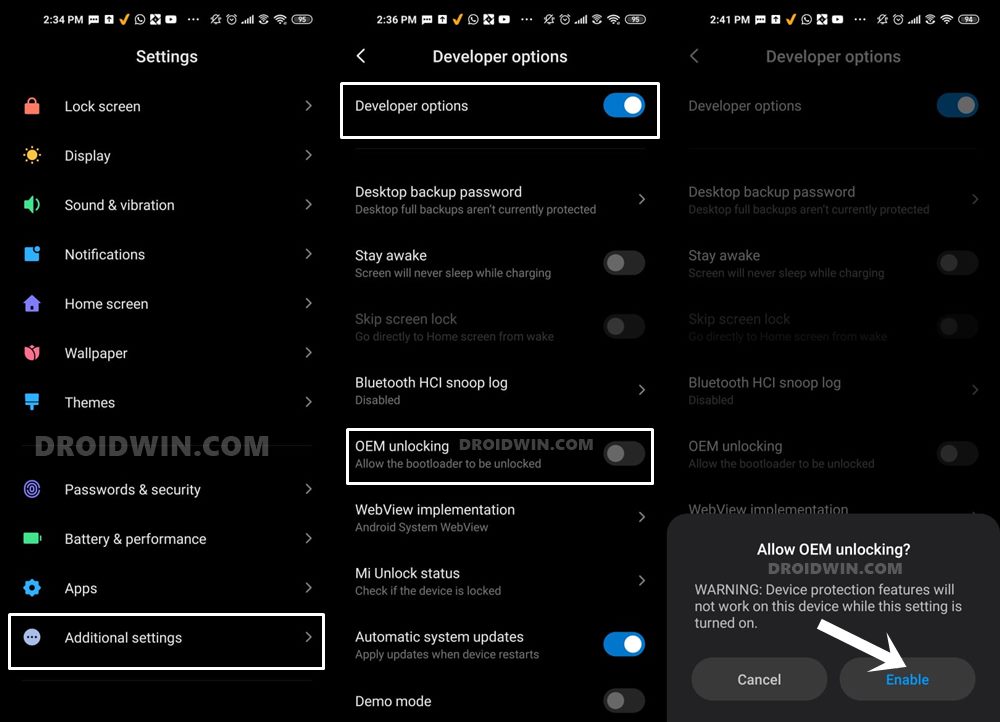
Before embarking on the journey of flashing custom firmware, several critical prerequisites must be met to ensure the safety of the device and the integrity of the data. First and foremost, the device’s Bootloader must be unlocked. This is a mandatory step for any system-level modification. It is important to note that unlocking the bootloader on Xiaomi devices often requires the use of the Mi Unlock Tool and may involve a waiting period imposed by the manufacturer. Furthermore, users should be aware that this process usually triggers a factory reset, wiping all internal storage.
A comprehensive backup of all personal data—including photos, contacts, and application data—is non-negotiable. While the flashing process is generally safe when followed correctly, the risk of data loss or a "boot loop" is always present in the world of custom development. Additionally, it is highly recommended to remove the Google Account and any Xiaomi Account from the device settings prior to flashing. This prevents the Factory Reset Protection (FRP) and Mi Cloud locks from triggering after the new OS is installed, which can otherwise lead to a tedious recovery process.
To facilitate the flashing process, a computer with properly configured ADB (Android Debug Bridge) and Fastboot drivers is required. Ensuring a stable connection between the PC and the Poco F7 is vital, as a disconnected cable during a critical partition flash can lead to a "bricked" state.

Establishing a Custom Recovery Environment
The installation of a custom recovery is the cornerstone of the ROM flashing process. For the Poco F7, OrangeFox Recovery has emerged as the preferred tool, especially for those dealing with HyperOS-based modifications. A custom recovery serves as an alternative bootable partition that allows users to perform advanced tasks such as Nandroid backups (full system images), partition formatting, and the installation of ZIP or IMG files.
The installation of OrangeFox involves booting the device into Fastboot mode and executing specific commands via the computer’s terminal. Once the recovery is flashed to the vendor_boot or recovery partition (depending on the specific build requirements), the user gains the ability to manipulate the system without needing a PC for every subsequent update. This environment is also where users will perform "Factory Resets" and "Format Data" operations, which are necessary to clear the encryption of the previous OS and allow the new Android 16 build to boot successfully.
Flashing Android 16 AOSP ROMs
For the majority of the ROMs available, such as AxionAOSP, Evolution X, and PixelOS, the installation follows a standardized AOSP flashing procedure. This typically involves using Fastboot to flash essential images like boot.img, dtbo.img, and vendor_boot.img before sideloading the actual ROM package.

A critical nuance exists for certain builds like PixelOS, which require the explicit flashing of the init_boot image alongside the standard partitions. This is due to the architectural changes in Android 16 that separate the generic boot ramdisk from the vendor-specific hardware initializers. Once these partitions are updated, the user enters the recovery environment, formats the data partition (to remove encryption), and utilizes the adb sideload command to transfer the ROM file. This method is preferred over on-device flashing as it ensures a cleaner installation and reduces the likelihood of file corruption.
Specialized Instructions for HyperOS 3 Based ROMs
The process for HyperOS-based ROMs, such as the Xiaomi.eu or Pure CN Project, can differ significantly. These are often distributed as "Hybrid" ROMs. This means they can be installed either through a custom recovery or directly via a Fastboot script on a PC. If using the Fastboot method, the user simply extracts the ROM archive on their computer and executes the provided .bat or .sh script while the phone is in Fastboot mode. These scripts are designed to automate the flashing of dozens of partitions, making it a more accessible option for those intimidated by manual command-line entries.
If choosing the recovery method for these ROMs, the steps mirror the AOSP process but often require a specific version of OrangeFox or TWRP that is compatible with Xiaomi’s proprietary dynamic partition mapping. It is essential to verify the specific requirements for each ROM, as some may require a "Firmware" flash (the low-level radio and bootloader code) prior to installing the main OS.

Advanced Customization and Rooting
Once the Android 16 ROM is successfully booted, many users choose to gain administrative privileges, commonly known as "rooting." For the Poco F7 running Android 16, Magisk remains a popular choice, though KernelSU and KernelSU Next are rapidly gaining ground due to their ability to operate within the kernel space, making them harder for security-sensitive apps to detect.
For those who need to pass SafetyNet or Play Integrity checks (required for banking apps and Google Pay), the integration of modules like SUSFS (System User Space File System) is becoming a standard practice. These tools allow the user to hide the modified nature of their system from the OS, ensuring that the device remains fully functional for daily financial transactions while still providing the freedom of a custom ROM.
Overcoming Common Obstacles: The FRP Lock
A common issue encountered by users after flashing a new ROM is the inability to bypass the initial setup wizard due to Factory Reset Protection (FRP). This is a security feature designed to prevent stolen phones from being reused, but it can accidentally lock out legitimate owners who forgot to sign out of their Google accounts before flashing.

If a user finds themselves stuck at this stage, the Poco F7 allows for a manual override through Fastboot. By executing a series of commands to erase the userdata, metadata, and frp partitions, the security flag is cleared, allowing for a fresh start. This emphasizes the importance of understanding Fastboot commands as a safety net for any enthusiast.
By following these procedures, Poco F7 owners can transform their device from a standard retail unit into a personalized powerhouse. The transition to Android 16 not only brings the latest features and security patches but also breathes new life into the hardware, proving once again why the Poco community remains the most vibrant sector of the Android aftermarket scene.