

The modern smartphone experience is often a balancing act between feature-rich functionality and peak hardware performance. For enthusiasts within the Samsung Galaxy ecosystem, this balance frequently tips toward aggressive optimization, leading many to engage in a process known as "debloating." By utilizing the Android Debug Bridge (ADB) or specialized third-party applications, users attempt to strip away the pre-installed software—often referred to as bloatware—that manufacturers include out of the box. However, as recent technical investigations reveal, the removal of seemingly redundant background services can have a cascading effect on core system features, most notably the "Hide Apps" functionality within Samsung’s One UI.
The drive to debloat is rooted in a desire for a leaner, faster, and more private user experience. Samsung’s One UI, while widely praised for its aesthetic and utility, is notorious for the sheer volume of background processes it maintains. It is not uncommon for a standard Galaxy flagship to run hundreds of individual packages simultaneously. For the power user, these represent a drain on battery life and a consumption of valuable RAM. In some instances, a single system service, such as the AI Live Wallpaper engine, can occupy upwards of 300MB of memory. When a user decides to disable over a hundred such packages in a single "debloating spree," the immediate results often appear positive: the device feels snappier, and free memory increases. Yet, the systemic interdependencies of Android-based operating systems mean that the removal of one "useless" service can inadvertently sever the lifelines of essential utilities.
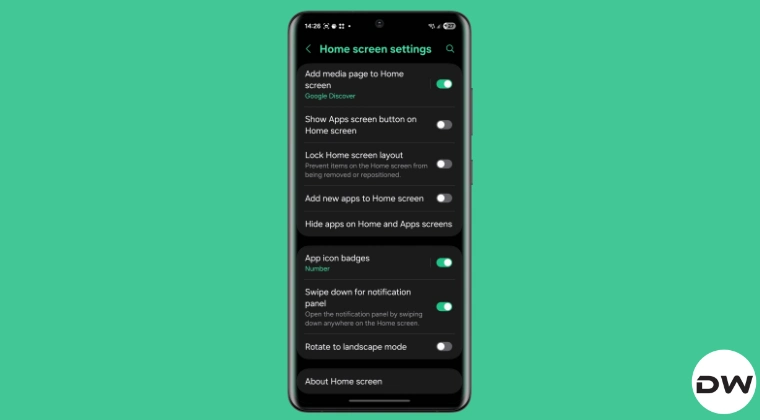
One of the most significant casualties of over-aggressive debloating is the "Hide Apps" feature. This utility is a cornerstone of privacy for many Samsung users, allowing them to remove sensitive applications from the home screen and app drawer without uninstalling them. The disappearance of this feature is rarely immediate or obvious. A user might notice that their custom wallpaper has reverted to the factory default—a side effect of disabling the aforementioned AI wallpaper services—but the loss of the app-hiding capability often goes unnoticed until the user attempts to manage their privacy settings a week or two later.
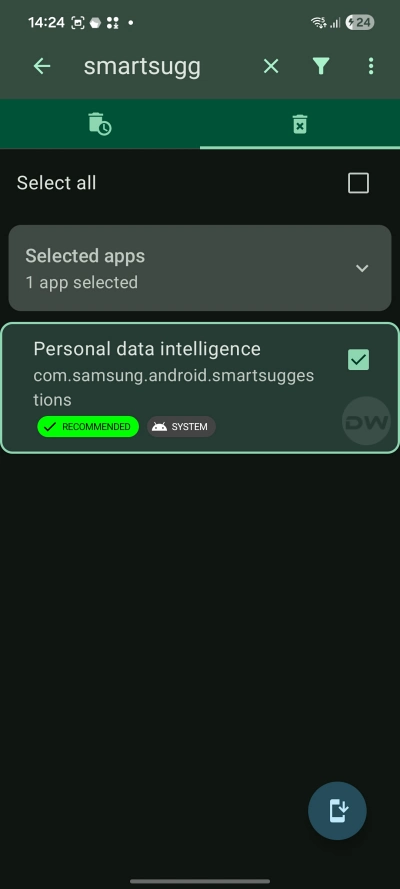
Technical analysis has identified the specific culprit behind this functional regression. The "Hide Apps" feature is not a standalone entity but is instead tethered to a suite of background services collectively responsible for system-level data organization and predictive user interface elements. These services are variously labeled across different Samsung software versions as "Personal Data Intelligence," the "Personal Data Engine," or "Samsung Smart Suggestions." While these names might suggest telemetry or non-essential data harvesting to the uninitiated, they are actually the foundational architecture upon which the One UI launcher builds its organizational features. When these packages are disabled, the launcher loses the ability to index hidden applications or even display the menu option to hide them.
Restoring this functionality requires a surgical approach to re-enabling the specific system packages that were previously decommissioned. There are two primary avenues for rectification: the command-line interface via ADB or the use of sophisticated third-party management tools like Canta. Each method caters to a different level of technical proficiency, but both aim to restore the equilibrium of the device’s software environment.
For those comfortable with a desktop interface, the Android Debug Bridge remains the gold standard for system modification. The process begins with the activation of Developer Options on the Galaxy device, followed by the enabling of USB Debugging. Once the device is connected to a computer with the appropriate drivers and ADB platform tools installed, the user must interface with the device’s package manager. The restoration command targets the specific package associated with Personal Data Intelligence. By executing a command to "enable" rather than "install," the user reactivates the dormant system code without needing to perform a full factory reset. This method is preferred by many because it provides a direct, transparent look at the system’s responses and ensures that no additional third-party software is introduced to the mobile environment.
Alternatively, the rise of "Shizuku-compatible" applications has democratized system-level modifications for users who prefer to work entirely on their handsets. Canta, a popular open-source uninstaller, leverages the Shizuku API to grant itself elevated permissions that would normally require root access. Within the Canta interface, users can navigate to the "Removed" or "Disabled" tab to locate the Personal Data Intelligence package. By simply toggling the service back to an active state, the internal logic of One UI is restored. Almost instantaneously, the "Hide Apps" option reappears within the Home Screen settings, and previously hidden applications return to their protected state.

The broader lesson for the Android community lies in the complexity of modern software architecture. The days of "standalone" apps are largely over; in a contemporary operating system like One UI, features are built as layers on top of shared services. The "Personal Data Intelligence" service is a prime example of this "middleware" layer. It does not just provide "smart suggestions" for the keyboard or the calendar; it acts as a central repository for how the user interacts with their app library. When a user hides an app, that preference is recorded and managed by this intelligence engine. If the engine is killed, the preference has nowhere to live, and the interface for managing it simply ceases to exist.
This incident also highlights the risks of using "automated" debloating scripts or pre-made lists found on community forums. While these lists are often compiled by experts, they are frequently tailored to specific versions of Android or specific regional variants of Samsung hardware. A service that is safe to disable on a Galaxy S21 running Android 12 might be critical for a Galaxy S24 running Android 14. Furthermore, the naming conventions used by Samsung can be misleading. A service that sounds like "bloatware"—such as "Smart Suggestions"—may actually be a dependency for a core privacy feature.
To avoid these pitfalls in the future, experts recommend an incremental approach to system optimization. Rather than disabling hundreds of packages in a single session, users should disable services in small batches and monitor the device for several days. This "soak testing" allows the user to identify exactly which action caused a specific feature to fail. Additionally, maintaining a meticulous log of every package modified ensures that if a feature like "Hide Apps" or "AI Live Wallpaper" disappears, the path to restoration is clear and documented.
Ultimately, the ability to customize and "clean" a device is one of the primary reasons users choose the Android platform. Samsung’s hardware is some of the most powerful on the market, and wanting to reclaim every megabyte of RAM is a logical pursuit for a power user. However, this power comes with the responsibility of understanding the underlying system dependencies. As this case demonstrates, the "Personal Data Intelligence" service is far more than just a suggestion engine; it is a vital component of the Galaxy user experience. By understanding the link between background services and foreground features, users can achieve a device that is not only fast and efficient but also fully functional and secure. The restoration of the "Hide Apps" feature is not just a fix for a bug; it is a masterclass in the intricate, interconnected world of modern mobile operating systems.