

Updated on September 8, 2025, the Rockchip Create Upgrade Disk Tool emerges as an indispensable Windows-based utility, specifically engineered to facilitate the precise writing of Rockchip boot firmware onto SD memory cards. This application transcends simple data transfer; it functions as a sophisticated platform for managing the foundational boot structures of Rockchip-powered hardware, ranging from consumer electronics to specialized development boards. Its core strength lies in the granular control it affords users over storage allocation, enabling the meticulous creation and administration of both physical and logical partitions on the target media. This capability is paramount for developers and technicians who require the ability to deploy operating systems, recovery images, or diagnostic software to exact locations on the storage medium.
The utility’s significance in the Rockchip ecosystem cannot be overstated. Rockchip System-on-Chips (SoCs) are ubiquitous in Android tablets, single-board computers (SBCs), digital signage players, and various embedded systems. When these devices encounter software corruption, require a clean system installation, or need preliminary testing before final assembly, direct firmware flashing via standard operating system tools is often insufficient or overly complex. The Create Upgrade Disk Tool bridges this gap by providing a dedicated, low-level interface for preparing bootable media, effectively serving as the initial handshake mechanism between the host PC and the Rockchip hardware during the recovery or provisioning process.
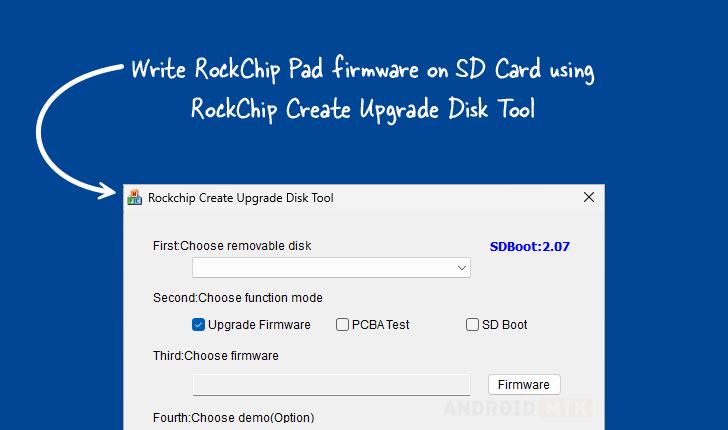
The accompanying visual representation, an image depicting the tool’s interface, reinforces its professional design, suggesting a focused application built for technical users rather than general consumers. The tool’s architecture is clearly optimized for interacting with the bootloader sequence inherent to Rockchip platforms, ensuring that the prepared SD card contains the necessary boot sectors and partitions recognized by the device’s initial boot ROM.
In-Depth Examination of Core Features
The Rockchip Create Upgrade Disk Tool is equipped with a suite of specialized functions, each meticulously designed to streamline the firmware management lifecycle for Rockchip implementations. These features collectively transform a standard SD card into a precisely configured deployment or recovery asset.
Advanced Firmware Writing Capabilities: At the heart of the utility is its robust firmware writing engine. This module is purpose-built to handle the complex binary structures that constitute Rockchip bootloaders and system images. It supports writing firmware in various accepted formats, ensuring compatibility across different Rockchip chipset revisions and product lines. The precision of this process is critical; an improperly written bootloader can render the target device completely inoperable (bricked). By managing the low-level writing operations, the tool guarantees the integrity and correct placement of the essential boot instructions, thereby facilitating the successful initiation of the device’s operating system or recovery environment.
Comprehensive Partition Management System: A standout feature is the tool’s capacity to manage both physical and logical partitions on the SD card. Physical partitioning defines the fundamental boundaries on the storage hardware. Logical partitioning, conversely, allows for the division of these physical spaces into manageable, accessible segments for specific functions. For instance, a technician might dedicate one logical partition for the bootloader, a second for the Android system image, and a third for persistent user data or diagnostics. This granular control is essential for multi-stage flashing procedures or when preparing cards for specialized testing where different data sets must reside in isolated storage areas. This organizational capability drastically improves efficiency during complex setup routines.
Versatile Multi-Mode Operation: The utility is not confined to a single task; it incorporates several operational modes tailored to different stages of the hardware lifecycle. These modes typically include:

- Firmware Upgrade Mode: The standard operation for deploying a new system image onto the device via the SD card.
- PCBA Testing Mode: This specialized mode is crucial during the manufacturing or repair phases. It allows engineers to flash diagnostic firmware directly onto the board assembly (PCBA) to test hardware components (like memory controllers, display interfaces, or connectivity modules) before the final enclosure is assembled, speeding up quality assurance.
- SD Boot Options: This configuration ensures the prepared card adheres strictly to the necessary parameters (like boot sequence and partition table structure) required for the Rockchip device to initiate booting directly from the SD card, bypassing internal eMMC or UFS storage if necessary—a common requirement for initial software loading or running temporary recovery environments.
Precise Selective Data Writing: Beyond full-image flashing, the tool offers the ability to target specific sectors or partitions for data injection. This selective writing capability grants unparalleled control. If only a configuration file, a kernel update, or a specific partition table needs modification, the user can target that exact location without overwriting the entire storage medium. This precision is invaluable for incremental updates or localized troubleshooting where preserving existing data on other partitions is crucial.
Real-Time Progress Monitoring: Recognizing that firmware flashing operations can be time-consuming, the utility incorporates a visual feedback mechanism. A dynamic progress bar offers real-time status updates on the operation’s advancement, including data transfer rates and estimated time remaining. This transparency alleviates user uncertainty, providing clear confirmation that the operation is proceeding correctly and preventing premature interruption, which could lead to data corruption.
Integrated Demo Support Functionality: For environments requiring rigorous verification or for training purposes, the inclusion of optional demo functionality is a significant advantage. This feature allows users to simulate or verify the intended configuration and successful firmware installation on the SD card without immediately deploying it to a production device. It serves as an essential checkpoint to validate partition layouts and initial boot status prior to committing the media to an expensive or time-sensitive hardware deployment cycle.
Robust Restore and Recovery Capability: A critical safeguard integrated into the tool is its restore functionality. In scenarios where a flashing attempt fails midway, leading to an unstable or corrupted state on the SD card, this feature provides a mechanism to revert the card to a known good state or to systematically attempt recovery procedures. This redundancy minimizes the risk associated with low-level storage manipulation, offering a safety net against operation failure and ensuring data integrity preservation where possible.
Accessibility and Version Control
The availability of the Rockchip Create Upgrade Disk Tool across standard Windows architectures (both 32-bit and 64-bit environments) ensures broad compatibility for technicians utilizing various host workstations. The provision of multiple downloadable versions—1.4, 1.53, and 1.7—indicates an active development cycle, where newer versions likely incorporate fixes, enhanced compatibility with the latest Rockchip SoCs, and refined user interfaces or underlying drivers.
| Version | Download Link | Key Context |
|---|---|---|
| 1.4 | [Link to v1.4] | Often an established baseline version, stable for older hardware. |
| 1.53 | [Link to v1.53] | Represents an intermediate refinement, potentially addressing early bugs or improving compatibility. |
| 1.7 | [Link to v1.7] | The latest iteration, expected to offer the broadest compatibility with contemporary Rockchip platforms and potentially optimized performance. |
Developers are strongly encouraged to utilize the most current version (1.7, as of this update) unless specific legacy hardware mandates the use of an older release. The progression between versions typically reflects an ongoing effort to harmonize the tool with evolving hardware specifications and new security protocols implemented in modern Rockchip chipsets.
In conclusion, the Rockchip Create Upgrade Disk Tool is far more than a simple flashing utility. It is a sophisticated, multi-faceted diagnostic and provisioning platform that grants deep, low-level access to the necessary steps for preparing bootable media for Rockchip devices. Its feature set—spanning advanced partitioning, multi-mode operation, and integrated safety checks—solidifies its position as an essential component in the workflow for hardware manufacturers, repair technicians, and embedded systems developers relying on Rockchip technology. The continued maintenance and release of updated versions underscore the enduring relevance of this utility in managing the complex boot processes of these widely utilized processors.