

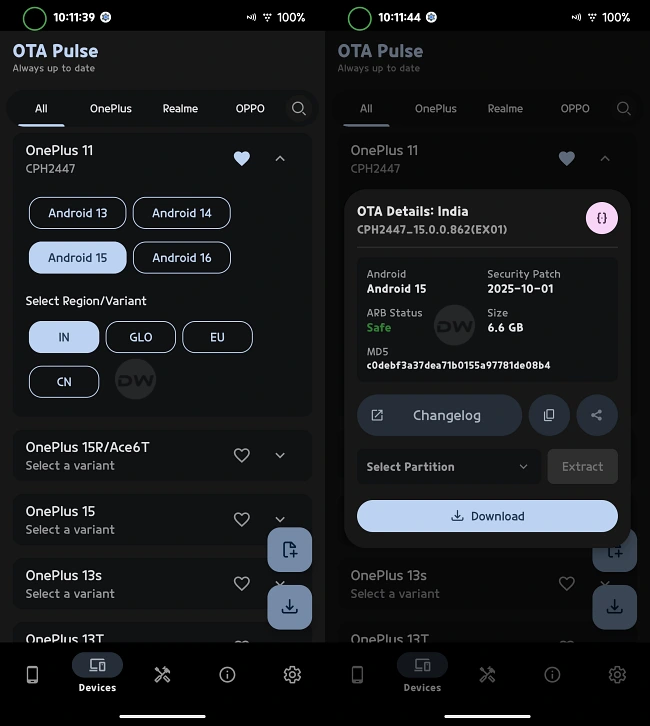
The ecosystem surrounding OnePlus devices has long been a sanctuary for Android enthusiasts, power users, and custom ROM developers. For years, the "Never Settle" mantra was synonymous with an open-door policy regarding bootloader unlocking and software experimentation. However, as the brand has evolved and integrated more deeply with the Oppo supply chain and software philosophy, the process of managing firmware has become increasingly complex. One of the most significant challenges facing the modern OnePlus user is the ability to revert to an older version of OxygenOS. Whether motivated by a desire to escape the bugs of a new update, the need to unbrick a device caught in a perpetual bootloop, or the requirement to return to a stable baseline after experimenting with custom firmware, the path to a successful downgrade is fraught with technical hurdles and potential risks.
The primary obstacle lies in the limitations of official tools. While OnePlus traditionally provides "rollback" or "downgrade" packages for major Android transitions, these utilities are designed with a very specific, narrow use case in mind. They are intended for functioning devices operating within a stock environment. These packages are typically deployed via the "Local Install" option within the system update menu—a luxury that is unavailable if a device is currently bricked, stuck on a boot animation, or running a third-party operating system like LineageOS or Pixel Experience. In these critical scenarios, the standard recovery methods fail because they require a functional Android user interface to initiate the process. For a device in a non-bootable state, the only salvation is often Fastboot Mode, yet official downgrade packages are rarely formatted for direct flashing via Fastboot commands.
Compounding this difficulty is the unreliable nature of the third-party firmware landscape. A cursory search for legacy OnePlus firmware often leads users into a minefield of predatory websites. Many of these repositories capitalize on the desperation of users with broken devices, either hiding the necessary files behind exorbitant paywalls or, worse, bundling the firmware with malicious scripts and adware. Even reputable community tools like Oxygen Updater, while invaluable for staying on the bleeding edge of software releases, are fundamentally designed to pull the latest available builds from the servers. They offer little assistance to the user who needs to travel back in time to a version of OxygenOS from six months or a year prior.
Fortunately, a specialized methodology exists to bridge this gap, though it requires a nuanced understanding of the current software landscape. The emergence of tools such as the OTAPulse repository has provided a lifeline for those seeking historical firmware builds. Unlike standard update checkers, these specialized utilities maintain a database of previous iterations, allowing users to bypass the "latest only" restriction imposed by official channels. However, utilizing these resources is not a simple "plug-and-play" affair; it demands a rigorous adherence to safety protocols and a deep dive into the technical specifications of the hardware in question.
Before attempting any firmware regression, one must confront the modern specter of mobile security: Anti-Rollback (ARB). Recently, OnePlus has implemented ARB mechanisms that fundamentally change the stakes of software modification. Anti-Rollback is a security feature designed to prevent an attacker from flashing an older, more vulnerable version of the operating system to bypass modern encryption or security patches. While its intentions are rooted in device protection, its implementation means that flashing a version of firmware with an ARB index lower than the one currently on the device can result in a "hard brick"—a state of hardware failure that is often irreversible without specialized factory tools.

Therefore, the first mandatory step for any user attempting to download and install older firmware is to verify the Anti-Rollback Index of both their current system and the target firmware. This is typically done through specific Fastboot commands that query the device’s internal security fuses. If the firmware you have downloaded carries an ARB index of zero, it is generally considered safe to flash, as it does not trigger the hardware-level block. If, however, there is a mismatch where the target firmware is "older" in the eyes of the ARB fuse, proceeding with the flash is a gamble that could end the life of the smartphone.
Once the safety checks are cleared and a full backup of all personal data is secured—as firmware flashing invariably wipes the internal storage—the process of acquiring the legacy software begins. By utilizing specialized downloader applications that interface with historical archives, users can select their specific OnePlus model and regional variant (such as Global, Indian, or European builds). The application then fetches the full OTA or fastboot-compatible package. Unlike the incremental updates that most users are accustomed to, these are massive files containing the entirety of the operating system’s partitions, from the boot image to the system and vendor blocks.
After the download is complete, the file is typically stored within a dedicated folder on the device’s internal storage, such as an "OTAPulseDownloader" directory. From here, the transition to a PC is necessary. Because the device is often being recovered from a state where the OS cannot boot, the actual installation is performed using a Fastboot Firmware Flasher or a similar script-based utility on a computer. This method bypasses the high-level Android environment entirely, communicating directly with the device’s bootloader to rewrite the partitions.
However, even this specialized method comes with a significant "catch" that users must acknowledge. The availability of these legacy builds is not infinite. While these tools provide a much broader selection than official channels, they are still limited to the specific builds that have been archived by the community and the tool developers. Users do not have the granular freedom to pick any specific monthly security patch from the last three years. Instead, they are usually offered one or two "milestone" builds for each major Android version (e.g., a stable build for Android 12, another for Android 13). While this limitation prevents a truly bespoke selection of software, it remains a vast improvement over the "latest or nothing" policy of the standard update engine. It provides a functional "reset point" that can bring a dead device back to life or return a customized device to a clean, manufacturer-sanctioned state.
The necessity of such community-driven workarounds highlights a growing tension in the smartphone industry. As manufacturers move toward more locked-down ecosystems in the name of security and parity, the "tinkerer" community is forced to develop increasingly sophisticated tools to maintain the level of control they once enjoyed. For the OnePlus owner, the ability to download and flash an older firmware version is more than just a technical convenience; it is an essential part of the device’s lifecycle management. It represents the difference between a discarded piece of electronic waste and a revived, functional tool.
In conclusion, while the golden age of effortless Android modding may be evolving into an era of high-stakes technical navigation, the ability to recover and downgrade OnePlus devices remains possible for those willing to do the research. By leveraging specialized repositories, respecting the lethal boundaries of Anti-Rollback indices, and utilizing low-level flashing tools, users can reclaim authority over their hardware. As software continues to grow in complexity, the value of these legacy archives and the knowledge of how to use them safely will only increase, ensuring that the spirit of user sovereignty remains alive, even as the official gates continue to close. What remains to be seen is how OnePlus will respond to these community efforts in the long term—whether they will further tighten the ARB constraints or recognize that a robust recovery path is a hallmark of a brand that truly respects its most loyal advocates.
