

The landscape of Android customization has long been defined by the struggle between user autonomy and system security. For years, power users relied on the Android Debug Bridge (ADB) or root access to bypass restrictive software environments. Shizuku emerged as a revolutionary middleware, allowing applications to access system-level APIs without requiring a full root procedure for every task. However, a new contender, Dhizuku, has entered the ecosystem, promising an even deeper level of integration by leveraging the "Device Owner" protocol. While Shizuku acts as a temporary bridge for shell commands, Dhizuku establishes itself as a permanent administrative authority, granting third-party applications permissions typically reserved for corporate enterprise management tools.

To understand Dhizuku, one must first understand the concept of a "Device Owner" (DO) in the Android operating system. Introduced by Google as part of the Android Enterprise framework, the Device Owner is a specialized type of device administrator that has the authority to control system-wide configurations, manage installed applications, and restrict specific hardware functions. Traditionally, this role is occupied by Mobile Device Management (MDM) software used by corporations to secure company-issued phones. Dhizuku hijacks this framework, positioning itself as the primary Device Owner. Once Dhizuku is granted this status, it acts as a proxy, sharing its high-level privileges with other user-installed applications via a dedicated API. This allows apps to perform actions like silent installations, app freezing, and advanced system modifications that would otherwise require root access or frequent ADB tethering.
The distinction between Shizuku and Dhizuku is fundamental to how they interact with the Android kernel and user space. Shizuku operates by running a process under the shell user identity. While powerful, this process is volatile; it generally terminates upon a system reboot, requiring the user to re-enable "Wireless Debugging" or reconnect to a computer to restart the Shizuku service. In contrast, Dhizuku utilizes the Device Policy Manager (DPM). Because the Device Owner status is a persistent system state, Dhizuku remains active across reboots without any manual intervention. Furthermore, because it operates within the DPM framework, Dhizuku can access specific "Device Owner-only" APIs that are inaccessible even to the shell user that Shizuku employs. However, this power comes with a significant trade-off in terms of setup complexity and initial device preparation.

The benefits of migrating to a Dhizuku-based workflow are primarily centered on persistence and permission depth. Users who find the constant re-activation of Shizuku cumbersome will find Dhizuku’s "set it and forget it" nature highly appealing. For developers, Dhizuku offers a more streamlined way to implement features like "Hail" (an app-freezing utility) or "Amarok" (a privacy-focused file hider). These applications can utilize Dhizuku to disable system packages instantly, a feat that usually requires complex ADB commands. By centralizing the Device Owner permission, Dhizuku prevents the need for multiple apps to compete for administrative control, which is a technical impossibility under Android’s "single owner" rule.
Despite these advantages, the drawbacks of Dhizuku are non-trivial. The primary hurdle is the installation process, which requires the removal of all user accounts—including Google accounts—from the device. This is a security measure built into Android to prevent malicious actors from seizing control of a device that is already in use. Additionally, the ecosystem for Dhizuku is currently smaller than that of Shizuku. While many apps are beginning to support both, some legacy customization tools remain strictly tied to Shizuku’s shell-based architecture. There is also a heightened security risk; granting an application Device Owner status is effectively handing over the keys to the digital kingdom. If the Dhizuku app or an app it authorizes were to be compromised, the potential for system-wide data breaches or device bricking is significantly higher than with standard user-level apps.

For users prepared to navigate these complexities, the installation of Dhizuku can be achieved through two primary vectors: the non-root method using ADB and the direct root method. Regardless of the chosen path, a comprehensive data backup is mandatory. The process of stripping accounts can occasionally trigger factory reset protections or lead to synchronization issues if not handled with precision.
The non-root installation is the most common path for enthusiasts. It begins with the activation of Developer Options on the Android device, typically achieved by tapping the "Build Number" seven times in the system settings. Once "USB Debugging" is enabled, the user must download the Dhizuku APK from a trusted source, such as the official GitHub repository. The most critical and disruptive step follows: the user must navigate to the device’s "Accounts" settings and remove every single account. This includes Google, Samsung, Xiaomi, or any other third-party accounts, as well as any secondary users or guest profiles. Android will refuse to assign a Device Owner if even one account remains active.

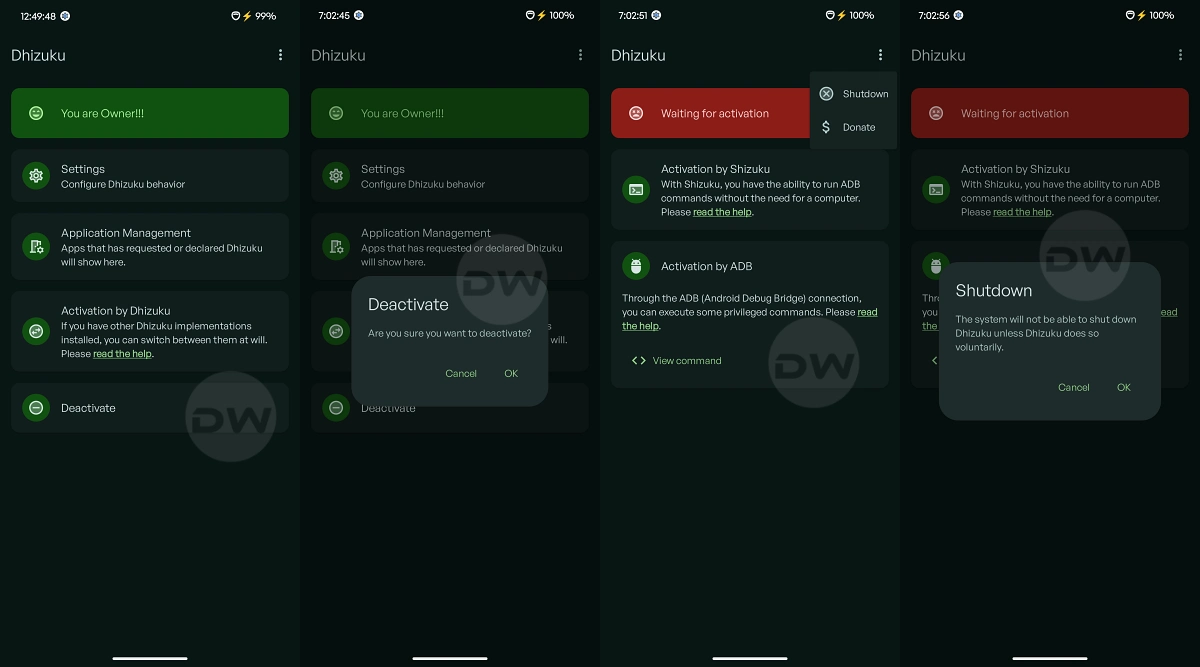
Once the device is "clean," it must be connected to a computer with ADB binaries installed. The user then executes a specific terminal command: adb shell dpm set-device-owner com.rosan.dhizuku/.DhizukuDeviceAdmin. If successful, the terminal will return a message indicating that the device owner has been set. At this point, the user can open the Dhizuku app to verify its status. If the dashboard indicates that Dhizuku is active, the user may then safely re-add their Google accounts and restore their personal data. The application will now function as a persistent administrative bridge.
For users who already possess root access via Magisk or KernelSU, the process is considerably less invasive. Rooted users do not need to remove their accounts. Instead, they can use a terminal emulator on the device or an ADB shell to grant the same permissions. Some iterations of Dhizuku also support a direct "Root Start" option within the app interface, which uses the su binary to bypass the manual DPM assignment. This method is preferred for those who want the persistence of Dhizuku without the logistical nightmare of account management, though it does require the device to have an unlocked bootloader and a modified boot image.

Utilizing Dhizuku involves a shift in how users interact with their apps. When an app like Hail or IceBox is opened, the user will be prompted to select a "working mode." Instead of selecting "Shizuku" or "Root," the user selects "Dhizuku." This triggers a request to the Dhizuku manager, where the user must manually authorize the application. This granular control ensures that only trusted apps can leverage the Device Owner APIs. Once authorized, these apps can perform heavy-duty system tasks with near-instantaneous execution speeds.
Maintenance of a Dhizuku-enabled device requires an understanding of how to de-escalate these permissions if necessary. To stop Dhizuku, one cannot simply uninstall the app. Because it is registered as a Device Owner, the Android system protects it from deletion to prevent theft-recovery bypasses. To uninstall Dhizuku, the user must first enter the app’s settings and locate the "Uninstall" or "Remove Device Owner" option. This action will strip the administrative rights, allowing the app to be deleted like any other software. In extreme cases where the app becomes unresponsive, a full factory reset via recovery mode is the only way to remove the Device Owner status.

As the Android Open Source Project (AOSP) continues to evolve, tools like Dhizuku represent the community’s commitment to maintaining user sovereignty. While Google continues to tighten the "sandboxing" of applications for security reasons, the discovery and utilization of the Device Policy Manager for personal customization marks a sophisticated turning point. Dhizuku is not merely a Shizuku alternative; it is a specialized tool for users who demand permanent, enterprise-level authority over their hardware. While the setup remains a barrier to entry for the average user, the resulting stability and power offer a compelling argument for the future of advanced Android management. Whether this niche ecosystem grows to rival Shizuku depends largely on developer adoption and the continued accessibility of the Device Owner protocol in future Android releases.
