

The early adopter community within the Android ecosystem is currently navigating a period of significant turbulence as a critical software bug has rendered numerous essential applications unusable on Pixel devices. Reports originating from a wide array of social media platforms and developer forums, most notably Reddit’s Android Beta community, indicate that users enrolled in the Android 16 preview cycle are experiencing systemic application crashes. This instability appears to be localized primarily to devices running the Android 16 QPR3 Beta 2 build, creating a challenging environment for those who rely on these handsets for daily productivity and secure communications. The scope of the disruption is broad, affecting a diverse portfolio of software ranging from e-commerce platforms and smart home controllers to high-security banking applications and essential workspace tools.
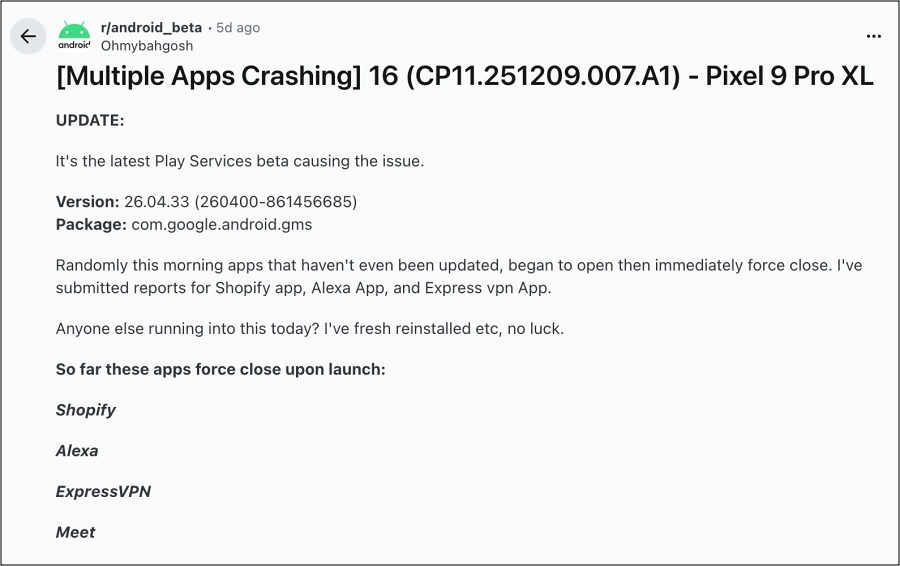
Among the specific applications identified by the community as being prone to immediate failure are Shopify, Amazon Alexa, ExpressVPN, and Google Meet. Furthermore, the disruption has extended into the financial sector, with multiple banking applications failing to initialize, alongside core productivity software such as Google Messages and Google Sheets. The nature of these crashes is typically abrupt; users report that upon attempting to launch the affected software, the application either fails to open entirely or terminates within seconds, often returning the user to the home screen without a standard error dialogue. This has caused considerable friction for professionals who utilize Shopify for business management or Google Sheets for data analysis, highlighting the inherent risks associated with operating pre-release operating system software on primary hardware.
![Apps Crashing on Pixel Android 16 [Fixed]](https://droidwin.com/wp-content/uploads/2026/02/Apps-Crashing-on-Pixel-Android-16.jpg)
A deep technical analysis of the system logs provided by affected developers and power users has pinpointed the root cause of this instability. The culprit is not the Android 16 operating system code itself in isolation, but rather a specific iteration of Google Play Services. Specifically, version 26.04.33 (identified by the build string 260400-861456685) appears to contain a corrupted network stack. Play Services serves as the foundational layer for almost all modern Android functionality, acting as the intermediary between third-party applications and the core OS. When this layer malfunctions, the ripple effects are felt across the entire software library.
Forensic debugging of the crash logs revealed a recurring fatal error: "java.lang.RuntimeException: Unable to retrieve the NetworkSecurityPolicy associated with the TrustManager." This specific exception suggests a breakdown in how the device handles encrypted communications and security certificates. The TrustManager is a critical component of the Android security architecture responsible for deciding whether to trust the credentials presented by a remote server. When an application attempts to establish a secure connection—which is a requirement for banking apps, VPNs, and cloud-syncing tools like Google Sheets—it queries the NetworkSecurityPolicy. Because the latest Play Services beta is unable to retrieve this policy, the system triggers a runtime exception to prevent a potential security breach, resulting in an immediate application crash.
Interestingly, the manifestation of this bug is not universal across the entire Pixel lineup. Some users, including internal testers running the exact same version of Google Play Services on Android 16 hardware, have reported no discernible issues. This discrepancy suggests that the bug may be triggered by specific hardware configurations, regional settings, or perhaps a fragmented server-side rollout of certain Play Services components. It is also possible that a cached set of security policies on some devices allows them to bypass the initial check that is failing for others. Regardless of its inconsistent nature, the severity of the bug for those affected has prompted an urgent search for viable workarounds while the official development teams at Google work toward a permanent patch.
![Apps Crashing on Pixel Android 16 [Fixed]](https://droidwin.com/wp-content/uploads/2026/02/bug-Apps-Crashing-on-Pixel-Android-16.webp)
For users currently ensnared in this cycle of application failures, there are several strategic interventions available to restore functionality. The most effective long-term solution involves exiting the Google Play Services Beta program. While the beta program allows enthusiasts to test cutting-edge features before the general public, it also exposes them to unrefined code that has not undergone rigorous stability testing. To revert to a stable environment, users are advised to navigate to the official Google Play Services testing page on the web. By selecting the "Leave the Program" option, the user signals the Play Store to replace the experimental build with the latest stable version. It is important to note that after leaving the program, it may take several hours for the system to recognize the change and prompt a download of the stable version. In many instances, the device will handle this transition automatically in the background, though a manual check for updates in the Play Store can sometimes expedite the process.
A second, more immediate method of mitigation involves the manual uninstallation of updates for Google Play Services. This effectively rolls the service back to the "factory version" that was originally packaged with the system image. There are two primary avenues for executing this rollback. The first is through the system settings menu, though this can sometimes be restricted by device administrator permissions if the user has active "Find My Device" or work profile settings enabled. The second, and often more reliable method, is through the Google Play Store interface. By searching for "Google Play Services" within the store, users may find an option to "Uninstall" or "Remove Updates." Confirming this action will strip away the buggy 26.04.33 version. Following this rollback, the device will likely attempt to update itself again; users should remain vigilant to ensure the store does not immediately re-install the problematic beta build.
The broader implications of this incident underscore the delicate balance of the Android ecosystem. Google Play Services is often referred to as the "silent OS" because it updates independently of the main Android version, allowing Google to push new features and security patches to older phones. However, this independence also means that a single flawed update can bypass the standard OS-level safeguards. In the context of Android 16, which is still in its developmental infancy, such conflicts are expected, yet they serve as a stark reminder of why beta testing is generally discouraged for users who do not have a secondary "stable" device available.
![Apps Crashing on Pixel Android 16 [Fixed]](https://droidwin.com/wp-content/uploads/2026/02/play-service-beta-to-stable.webp)
The specific failure of the NetworkSecurityPolicy is particularly telling of the modern mobile landscape’s reliance on "Always-On" connectivity. Because almost every modern app requires a secure handshake with a server to function—whether to verify a subscription, sync a document, or authenticate a biometric login—a failure in the network stack is essentially a total system failure. The apps that are crashing are not doing so because of internal logic errors, but because the floor has been pulled out from under them by the very system designed to keep their connections safe.
As of the latest dispatches from Google’s developer relations, there is an official acknowledgment that the issue is being investigated. The engineering teams are reportedly analyzing the specific conditions that lead to the TrustManager failure, but they have stopped short of providing a definitive "Estimated Time of Arrival" (ETA) for a corrective update. Given the severity of the issue—particularly its impact on banking and financial accessibility—it is highly probable that a "hotfix" will be deployed via the Play Store’s silent update mechanism in the coming days.
Until an official fix is distributed globally, Pixel users on the Android 16 QPR3 Beta 2 path are strongly encouraged to utilize the aforementioned workarounds. Maintaining a functional device is paramount, and the minor inconvenience of losing early access to beta features in Play Services is a small price to pay for the restoration of essential services like Google Meet and banking accessibility. This situation remains fluid, and as Google releases further technical documentation or a formal patch, the recommended course of action may shift. For now, the transition back to the stable branch remains the most robust defense against the current wave of software instability.
