

The landscape of the mobile industry underwent a seismic shift with the introduction of the triple-folding form factor. While history notes that the Huawei Mate XT Ultimate Design pioneered this specific hardware category in late 2024, it was the subsequent release from Samsung—the Galaxy Z TriFold—that truly catalyzed global consumer interest. Samsung’s entry into the tri-fold market succeeded where others encountered friction, primarily due to the South Korean giant’s established global distribution infrastructure and, perhaps more importantly, its continued utilization of the Android-based One UI ecosystem. In a post-GMS era where Huawei’s hardware remains tethered to HarmonyOS, the Samsung Galaxy Z TriFold emerged as the definitive choice for power users seeking a tablet-sized experience that fits within a pocket while maintaining full compatibility with the Google suite of applications.
Despite its global release, a significant segment of the enthusiast community opted to procure the Galaxy Z TriFold through Chinese secondary markets and import channels. The motivation for this is primarily economic; regional pricing strategies often result in the Chinese SKU being available at a substantially lower price point than its European or North American counterparts. However, this financial saving comes with a distinct set of technical compromises. The Chinese firmware, tailored for a market where Google services are restricted, lacks the fundamental frameworks required for essential features like Android Auto, the Google Play Store, and seamless Google Assistant integration. Furthermore, the system is often burdened with regional bloatware and aggressive background process management that can interfere with international notification standards.
To rectify these software discrepancies, users are increasingly turning to firmware flashing—a process that replaces the regional Chinese software with a "Global" variant, typically the Singapore (XSP) version. This procedure effectively transforms the device’s software identity, enabling the full suite of Google Mobile Services (GMS) and restoring critical functionality such as Android Auto. For those who have imported the Galaxy Z TriFold and find themselves hindered by the limitations of the domestic Chinese ROM, the following comprehensive analysis and guide outline the transition to a global software environment.
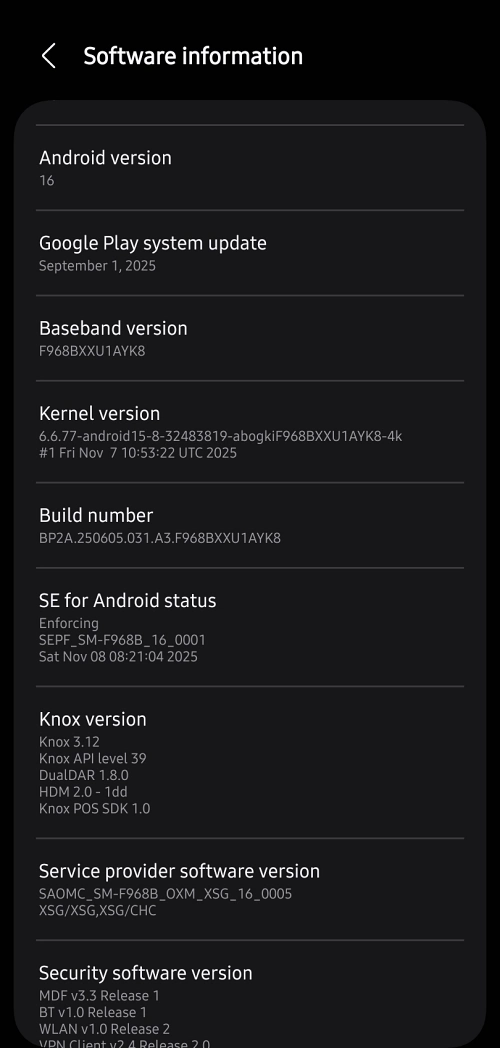
Understanding the technical prerequisites is the first and most vital step in this migration. The most critical factor in a successful firmware flash on a Samsung device is the "BIT" version, also known as the binary security level. Samsung employs an anti-rollback mechanism that prevents users from installing firmware with a lower binary version than what is currently installed on the device. Therefore, it is imperative to identify the current software version of the Chinese Galaxy Z TriFold before proceeding. If a device is running on its original, out-of-the-box software without having received any over-the-air (OTA) updates, it likely occupies the BIT 1 category. Conversely, if the device has been updated since its release, it has likely moved to BIT 2. Matching the binary version of the Singapore (XSP) firmware to the current Chinese binary version is non-negotiable; failure to do so will result in a "Binary Check Fail" error within the flashing tool, rendering the process unsuccessful.

The firmware identified for this transition is the SM-F968B variant. Specifically, for devices on the initial binary level, the SM-F968B/XSP/F968BXXU1AYK8 build is utilized. For devices that have undergone subsequent security and stability updates, the BIT 2 firmware—build SM-F968B/XSP/F968BXXS2AZA1—is required. These builds are sourced from the Singapore region because the XSP code is renowned for its stability, lack of carrier branding, and immediate access to the latest Android features and security patches.
Before initiating the flashing sequence, a rigorous data preservation strategy must be implemented. Flashing a different regional firmware requires a "Clean Install," which necessitates a factory reset. This process will irreversibly erase all local data, including photos, documents, and application settings. Utilizing Samsung Smart Switch for a full desktop backup or leveraging cloud-based solutions is highly recommended. Furthermore, ensuring the device has at least 70% battery life and using a high-quality, original USB-C data cable is essential to prevent power-related failures during the critical write phase of the procedure.
The technical execution involves the use of Odin3, Samsung’s proprietary internal flashing utility. The process begins by downloading the appropriate firmware package and extracting the compressed files. A standard Samsung firmware package consists of five distinct files, labeled BL (Bootloader), AP (System Partition), CP (Modem/Radio), CSC (Consumer Software Customization), and HOME_CSC. For a regional migration—changing from Chinese firmware to Global firmware—the "CSC" file must be used rather than "HOME_CSC." While "HOME_CSC" attempts to preserve user data, it frequently leads to partition conflicts and system instability when switching between different regional software bases. Using the "CSC" file ensures that the device re-partitions itself correctly to accommodate the new global software structure.
Once the files are prepared, the Galaxy Z TriFold must be placed into "Download Mode." This is achieved by powering down the device completely and then holding the volume up and volume down buttons simultaneously while connecting the device to a computer. Once the teal warning screen appears, a single press of the volume up button confirms the entry into Download Mode. In the Odin interface on the PC, the user must map each extracted file to its corresponding slot: the BL file to the BL slot, the AP file to the AP slot, the CP file to the CP slot, and the CSC file to the CSC slot. The USERDATA slot remains empty.
With the files loaded and the device recognized by the software—indicated by a highlighted "ID:COM" port in Odin—the flashing process can begin. This stage involves the software rewriting the device’s read-only memory (ROM). It is a delicate phase where the device must not be disturbed or disconnected. The progress bar will track the movement of system images, including the heavy AP file which contains the core One UI operating system. Upon completion, Odin will display a green "PASS!" message, and the Galaxy Z TriFold will automatically reboot.

The initial boot following a firmware change is notoriously lengthy, as the system must rebuild its cache and initialize the new global framework. Once the setup screen appears, users will immediately notice the difference: the option to sign in with a Google Account is present from the outset. Upon completing the setup, the device will function as a native global unit. Android Auto, which previously failed to initialize on the Chinese software, will now be fully operational, allowing for seamless integration with vehicle infotainment systems. Furthermore, the device will now be eligible for OTA updates directly from the Singapore servers, ensuring that the software remains current without the need for manual flashing in the future.
It is worth noting the implications for Samsung Knox and warranty status. Flashing official, signed Samsung firmware via Odin typically does not trip the Knox security fuse, meaning that features like Samsung Pay (in supported regions) and Secure Folder should remain functional. However, because the device was originally intended for the Chinese market, certain regional features like Samsung Wallet may still default to their original configuration depending on the hardware-level CSC hardcoding. Nevertheless, the primary goal of achieving a stable, Google-integrated environment is successfully met through this process.
In conclusion, the Samsung Galaxy Z TriFold represents a pinnacle of mobile engineering, yet its hardware potential can be artificially throttled by regional software limitations. For the global user, the transition from Chinese firmware to the Singapore Global ROM is more than just a technical preference; it is a necessity for modern connectivity. By meticulously matching binary versions and utilizing professional flashing tools, owners can unlock the true global capabilities of their triple-folding hardware, merging the economic benefits of importation with the uncompromising functionality of the global Android ecosystem. This migration marks the final step in truly "owning" the device, ensuring that the revolutionary tri-fold experience is supported by software that is as expansive as the screen itself.
