

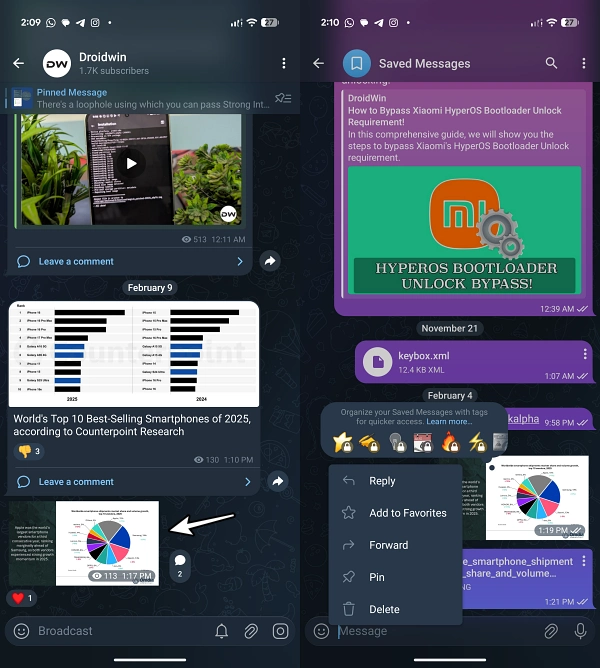
In the contemporary landscape of digital communication, Telegram has emerged as a powerhouse for high-fidelity media sharing and community management. Renowned for its generous file size limits and cloud-based storage, the platform is often the preferred choice for photographers, web developers, and digital marketers who require a seamless transition of visual assets across devices. However, a persistent technical nuance has recently surfaced, causing significant frustration among power users: the spontaneous and unwanted conversion of high-resolution images into static stickers. This phenomenon, which effectively cripples the utility of shared media by enforcing extreme compression and removing the ability to enlarge or zoom, is not a random glitch but rather a byproduct of how modern web standards collide with the internal logic of messaging applications.
The crux of the issue lies in the rapid adoption of the WEBP image format. Originally developed by Google as a successor to legacy formats like JPEG and PNG, WEBP was designed to provide superior lossy and lossless compression for images on the web. By utilizing advanced predictive coding, WEBP allows webmasters to maintain visual quality while drastically reducing file sizes—often by 30% or more compared to traditional formats. While this is a boon for website loading speeds and SEO performance, it creates a unique architectural conflict within the Telegram ecosystem. Telegram’s internal engine has historically utilized the WEBP extension as the primary container for its sticker sets. Consequently, when a user attempts to upload a standard image that carries a .webp extension, the application’s automated processing system frequently misidentifies the file as a sticker rather than a photograph.
The user experience resulting from this misidentification is universally poor. When an image is "stickered," Telegram treats it as a UI element rather than a media file. This triggers a specific set of protocols: the image is stripped of its original resolution, compressed to fit a predetermined bounding box (usually 512×512 pixels), and rendered without the standard "click-to-expand" functionality. For a content creator who has meticulously optimized a high-definition infographic or a professional photograph, this conversion is catastrophic. The resulting "sticker" becomes a blurry, unreadable thumbnail that serves no practical purpose in a professional or educational context. This issue is particularly prevalent among web developers who download assets directly from their optimized websites—where WEBP is now the industry standard—and attempt to share them with colleagues or subscribers via Telegram channels.

To understand why this happens, one must look at the evolution of messaging metadata. Most modern applications use MIME (Multipurpose Internet Mail Extensions) types to determine how a file should be displayed. However, Telegram’s legacy support for its proprietary sticker format appears to take precedence over standard MIME sniffing when it encounters a WEBP file. Because the sticker format and the web-optimized image format share the same file extension, the software defaults to the more restrictive "sticker" category to ensure that custom sticker packs function correctly. This prioritization reflects a design choice where the platform’s social features—stickers being a cornerstone of Telegram’s identity—occasionally override its utility as a file-sharing tool.
Fortunately, for users plagued by this automated conversion, several workarounds exist, ranging from quick file-system edits to more robust technical conversions. The most immediate and accessible solution involves a manual intervention in the file’s metadata by renaming the extension. In many instances, simply changing the suffix from .webp to .png or .jpg is sufficient to "trick" the Telegram upload parser into treating the file as a standard image. When a user renames a file on a desktop environment or through a mobile file manager, the operating system typically issues a warning that changing the extension may make the file unusable. For the purposes of bypassing Telegram’s sticker logic, this risk is usually negligible. Once the extension is changed to .png, Telegram no longer triggers the sticker processing algorithm, allowing the image to be sent in its full resolution with the ability for recipients to enlarge and download it.
However, the renaming method is not a universal panacea. Because the underlying data structure of a WEBP file is fundamentally different from a true PNG or JPEG, some image viewers or older versions of Telegram may fail to render the renamed file correctly. In these cases, the file header—the piece of code that tells software how to read the image—remains in the WEBP format despite the PNG label. This can lead to "file corrupted" errors or broken previews. For users who require a more stable solution, a formal image conversion is necessary. This involves using an image editing suite, such as Adobe Photoshop or GIMP, or even a basic built-in tool like Microsoft Paint or macOS Preview. By opening the WEBP file and selecting "Export As" or "Save As" to a native JPEG or PNG format, the software rewrites the file’s actual data structure. This ensures that the image is not only recognized as a non-sticker by Telegram but is also compatible with every other application and device.
Beyond manual conversion, there is a third, often overlooked method within the Telegram interface itself: the "Send as File" or "Send without Compression" feature. When a user selects a photo through the standard gallery picker, Telegram’s AI-driven compression and categorization tools are activated. By choosing to send the image as a "File" (represented by the paperclip icon followed by the "File" selection), the user bypasses the media-specific processing entirely. This treats the image as a raw data packet, similar to a .zip or .pdf file. While this prevents the image from appearing as an inline preview in the chat—requiring the recipient to download it to view it—it guarantees that the original resolution and the WEBP extension remain intact without the risk of being converted into a sticker.

The persistence of this issue highlights a broader challenge in the tech industry: the lag between the adoption of new web standards and the update of application logic. As WEBP becomes the dominant format for the internet, messaging platforms must refine their heuristic analysis to distinguish between a 20KB emoji and a 2MB high-resolution professional graphic, even if they share the same extension. Until such a time as Telegram implements a more sophisticated detection system—perhaps one that checks the dimensions and metadata of a WEBP file before defaulting to sticker mode—the responsibility falls on the user to manage their file types.
The implications of this technical quirk extend into the realm of digital archiving and community management. For those managing large Telegram channels, the "sticker bug" can lead to a perceived lack of professionalism or a breakdown in communication, especially when sharing time-sensitive information like stock charts, technical diagrams, or promotional flyers. Understanding the relationship between file extensions and platform-specific behavior is no longer just a concern for IT professionals; it is a necessary skill for the average digital citizen.
In conclusion, while the conversion of WEBP images into Telegram stickers is an undeniable nuisance, it is a problem with a clear technical origin and several viable solutions. By acknowledging the dominance of the WEBP format and the specific way Telegram’s architecture interprets it, users can take proactive steps to ensure their media is delivered as intended. Whether through the quick fix of renaming an extension, the thoroughness of a formal file conversion, or the strategic use of the "Send as File" feature, the power to maintain visual fidelity remains in the hands of the sender. As digital communication continues to evolve, the friction between optimized web formats and interactive social features will likely persist, requiring a constant cycle of adaptation and technical troubleshooting from users and developers alike. For now, a simple change in naming convention or a brief trip to an image converter remains the most effective bridge between a compressed web asset and a clear, high-resolution Telegram message.
