

The global smartphone market has long been characterized by regional variations, but few ecosystems are as complex as that of OnePlus. For enthusiasts and power users, the allure of purchasing Chinese-market hardware—often boasting earlier release dates and more aggressive pricing—is frequently tempered by the technical hurdles of regional software conversion. At the heart of this friction lies the transition between ColorOS, the primary operating system for OnePlus devices in China, and OxygenOS, the global variant preferred by international users. While the hardware remains largely identical, the security protocols governing the bootloader and system integrity have become increasingly stringent, leading to a precarious situation for those who seek to bridge the gap between these two software worlds.
The central conflict arises when a user successfully converts a Chinese OnePlus unit to OxygenOS and proceeds to lock the bootloader. In the realm of Android customization, locking the bootloader is typically seen as a final step to ensure device security and restore features like biometric authentication for banking apps. However, for a converted OnePlus device, this action can trigger a technical "dead end." Once the bootloader is locked on a non-native firmware region, the standard Fastboot Mode—the primary gateway for system modifications and recovery—often becomes inaccessible. Without access to Fastboot, the traditional "fastboot flashing unlock" command is rendered useless, effectively trapping the device in its current state.
This lockout creates a significant barrier for users who wish to return to ColorOS or those who need to troubleshoot system failures. When Fastboot is disabled, the only remaining avenue for system restoration is the Emergency Download Mode, commonly known as EDL flashing. EDL is a low-level diagnostic state inherent to Qualcomm chipsets, allowing for a total wipe and reinstallation of the factory firmware. However, unlike Fastboot, which is user-accessible, OnePlus and its parent company, Oppo, have restricted EDL tools to authorized service centers. For the average consumer, this necessitates either a physical trip to a repair facility or the use of third-party remote flashing services, which often require a financial investment and a leap of faith regarding digital security.
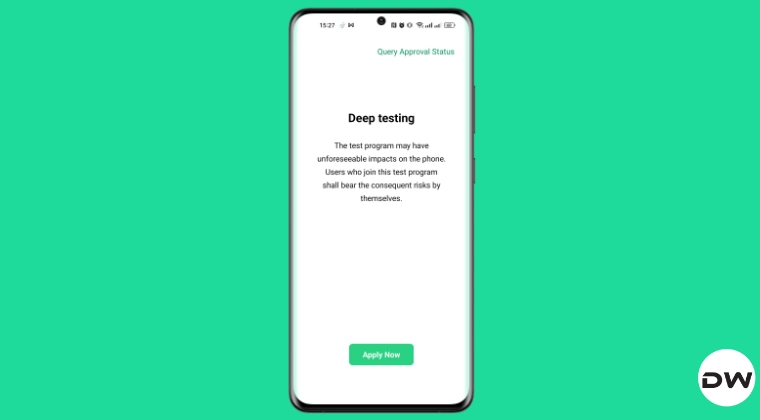
Even if a user manages to navigate the complexities of EDL flashing and successfully restores ColorOS to their device, a secondary and perhaps more frustrating obstacle awaits: the DeepTest application. In the Chinese software ecosystem, unlocking the bootloader is not a simple toggle in the developer settings. Instead, it requires an official "Deep Testing" or "In-Depth Test" app provided by the manufacturer. This application serves as a gatekeeper, requiring a formal request to be sent to OnePlus servers for approval before the bootloader can be modified.
The critical flaw in this system for second-hand buyers or those who purchased through international resellers is the account-binding requirement. The DeepTest application links the bootloader unlock permission to the specific HeyTap or Oppo account that initiated the first request. In most cases involving imported devices, this account belongs to the original vendor or a bulk reseller in China who performed the initial conversion to OxygenOS. For the end-user, obtaining the credentials for this original account is virtually impossible, leaving them unable to re-unlock their bootloader even after returning to the original Chinese firmware.
However, a technical window of opportunity has been identified for users who find themselves in the early stages of this transition. For those currently operating a OnePlus device on ColorOS with an unlocked bootloader—specifically those who have not yet initiated the conversion to OxygenOS—there exists a method to utilize the "Request to Exit Deeptest" feature. This function is essentially a digital "reset" for the device’s status on the manufacturer’s servers. By successfully exiting the DeepTest program, the device’s bootloader status is reconciled with the official server records, potentially allowing a new user to register the device under their own account and maintain control over the unlocking process in the future.
This process has gained particular relevance with the release of the OnePlus 15 in the Chinese market. As the latest flagship, the OnePlus 15 features the most advanced iteration of ColorOS, which includes updated security patches that make traditional workarounds more difficult. Reports from the developer community suggest that the "Exit Deeptest" method remains functional on the latest CN builds of the OnePlus 15, providing a crucial safety net for those looking to experiment with global firmware.
To execute this maneuver, a user must navigate to the DeepTest application while still on a stable ColorOS environment. The interface typically provides a status update on the current "testing" phase of the device. By selecting the option to request an exit from the program, the user initiates a handshake with the OnePlus verification servers. If the request is granted, the device effectively "un-registers" its current unlock token. It is a vital preemptive step; once the device is wiped or the software region is changed, the ability to communicate with these specific server-side protocols is often lost.
The implications of failing to perform this step are profound. A device that has been converted to OxygenOS and then locked becomes a "black box." It cannot be updated via traditional local update methods if the version increments do not align, and it cannot be reverted to its original state without external intervention. This has led to a burgeoning secondary market for "unbricking" services, where specialized technicians use leaked factory accounts to bypass the EDL restrictions. For the enthusiast community, this represents a significant shift away from the open, user-friendly "Never Settle" philosophy that originally defined the OnePlus brand.
Furthermore, the technical risks involved in these maneuvers cannot be overstated. Modifying system-level partitions and interacting with low-level boot protocols carries the inherent danger of "hard-bricking" the hardware—a state where the device becomes completely unresponsive and incapable of even entering EDL mode. Such failures are often catastrophic, resulting in the permanent loss of data and the potential for hardware damage. As such, the community consensus emphasizes the absolute necessity of comprehensive data backups before attempting any interaction with the DeepTest app or bootloader settings.
The broader context of this situation reflects a tightening of the Android ecosystem in China. As manufacturers face increasing pressure to secure user data and prevent the unauthorized distribution of software, the "golden age" of easy bootloader unlocking appears to be waning. OnePlus, by integrating more closely with Oppo’s software infrastructure, has adopted a more corporate approach to system security. While this benefits the average user by providing a more stable and secure environment, it creates a labyrinth of red tape for the "modding" community that helped build the brand’s initial reputation.
For owners of the OnePlus 15 and other recent models, the "Request to Exit Deeptest" feature is more than just a menu option; it is a critical tool for maintaining the long-term flexibility of their hardware. By understanding the relationship between the HeyTap account, the DeepTest server, and the physical state of the bootloader, users can avoid the expensive and frustrating "EDL trap."
In conclusion, while the allure of the latest OnePlus hardware from the Chinese market remains strong, it comes with a prerequisite for technical literacy. The transition between ColorOS and OxygenOS is no longer a simple matter of flashing a new ROM. It is a high-stakes negotiation with regional security protocols. The "Request to Exit Deeptest" method offers a rare point of leverage for the user, ensuring that they—and not a distant reseller—remain the masters of their own device. As OnePlus continues to evolve, the ability to navigate these hidden menus and server-side requirements will remain the defining skill for any user looking to enjoy the best of both software worlds. For now, the path is clear: verify your account, back up your data, and ensure your DeepTest status is cleared before making the leap to global firmware.
