

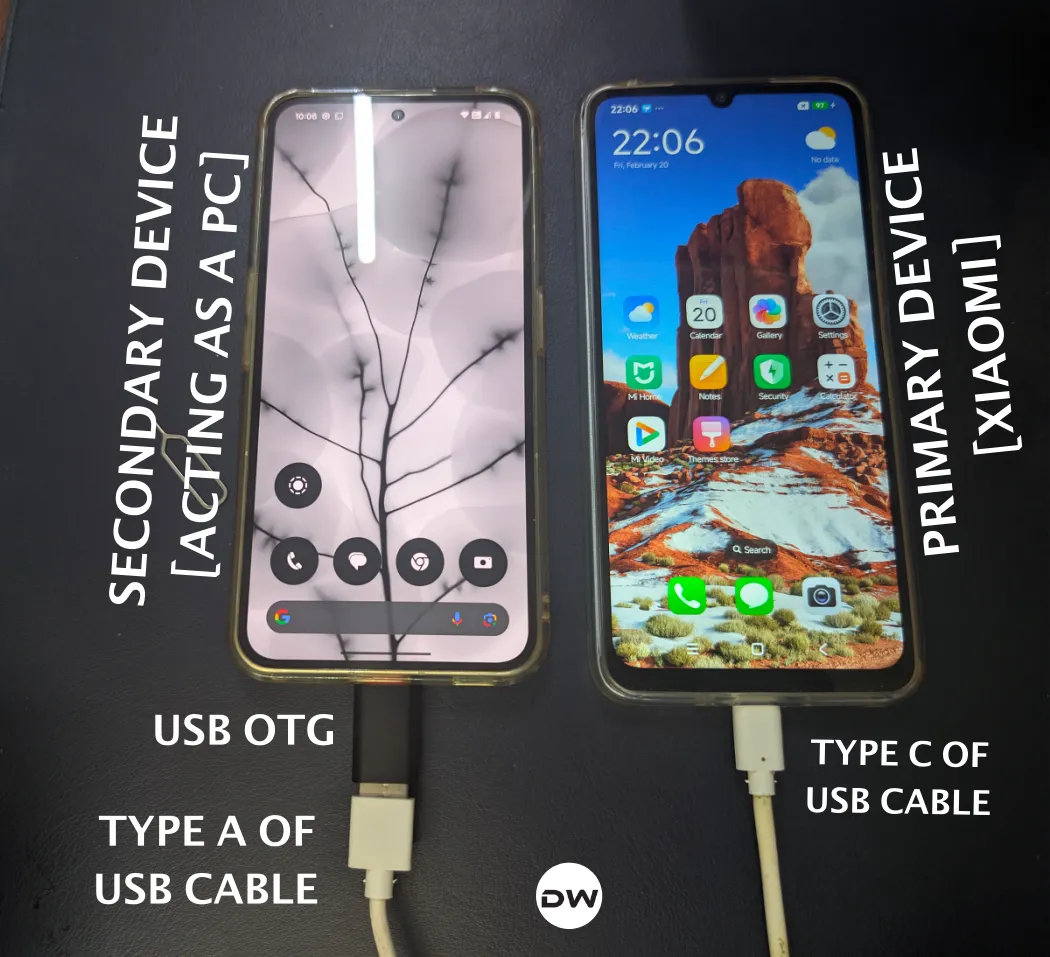
The landscape of Android customization has undergone significant shifts over the past decade, and Xiaomi has consistently remained at the epicenter of this evolution. Traditionally, the process of restoring a Xiaomi, Redmi, or Poco device to its factory state or upgrading its firmware required a tethered connection to a Windows-based PC. This reliance on the Mi Flash Tool and the Fastboot interface has been a staple for power users and technicians alike. However, a growing demand for portability and the increasing capabilities of modern mobile hardware have led to the emergence of a sophisticated "PC-less" methodology. By leveraging the power of USB On-The-Go (OTG) technology and mobile terminal emulation, users can now perform complex Fastboot ROM installations using only a secondary Android device.

This paradigm shift is not merely a matter of convenience; it is a vital recovery path for users who may find themselves with a soft-bricked device while away from a traditional computing environment. While the process is technically demanding, it mirrors the logic of desktop flashing, substituting the PC’s processing power and USB ports with a "host" smartphone. Understanding the nuances of this procedure requires a deep dive into the intersection of Android’s security architecture and the hardware protocols that govern device communication.
Before embarking on this technical journey, one must acknowledge the critical divergence between Xiaomi’s legacy MIUI and the newer HyperOS. The transition to HyperOS brought with it a more stringent set of security protocols regarding bootloader unlocking. For users still operating on MIUI, the ecosystem remains relatively open, allowing for bootloader unlocking and firmware manipulation without the mandatory intervention of a desktop computer. Conversely, HyperOS users face a more rigid wall; currently, the official bootloader unlocking process for HyperOS necessitates a PC to run the Xiaomi Unlock Tool and verify account permissions against the company’s servers. Consequently, while the actual flashing of a Fastboot ROM can be performed mobile-to-mobile on any Xiaomi device, the prerequisite of an unlocked bootloader remains a significant gatekeeper for those on the HyperOS platform.

The core of this PC-free method lies in the establishment of a host-client relationship between two mobile devices. The "host" device acts as the commander, sending raw image files and partition instructions to the "client" device—the Xiaomi phone being flashed. This is made possible through the use of a USB OTG adapter and a terminal emulator, such as Termux, which provides a Linux-like environment on Android. Within this environment, users can install the Android Platform Tools (ADB and Fastboot), effectively turning their smartphone into a portable flashing station.
Preparation is the most critical phase of the operation. Because flashing a Fastboot ROM involves a complete rewrite of the device’s partitions, it results in a total loss of user data. This is an irreversible process that formats the internal storage, meaning that comprehensive backups to cloud services or external media are non-negotiable. Furthermore, the hardware bridge must be robust. A high-quality OTG adapter or a direct USB-C to USB-C data cable is required. Users must also ensure that both devices have a battery charge of at least 60% to prevent a power failure during the sensitive writing process, which could lead to a permanent "hard brick" state where the device becomes unresponsive even to hardware-level recovery tools.

The software environment on the host device must be meticulously configured. This involves installing the Termux application along with the Termux:API extension. These tools allow the host device to interact with the USB hardware at a low level. A common hurdle in modern Android versions (Android 13 and above) is the "Restricted Settings" security feature. This safety mechanism prevents third-party applications from accessing sensitive permissions, such as "Display over other apps," which are often required for terminal emulators to function correctly during hardware interactions. If a user finds that they cannot enable these permissions, they must navigate to the application info page and manually bypass the restriction via the overflow menu—a process that requires a specific sequence of interactions with the system UI to "unlock" the toggle switches.
Once the environment is set, the actual flashing procedure begins with the acquisition of the correct Fastboot ROM. It is imperative to download the specific ROM for the device’s region (Global, India, China, or Europe) and ensure it is the "Fastboot" version, typically ending in a .tgz extension, rather than the "Recovery" version which ends in .zip. After extracting these files on the host device, the user must navigate the terminal to the directory containing the flashing scripts. The connection is then initiated by booting the target Xiaomi device into Fastboot Mode—usually achieved by holding the Power and Volume Down buttons simultaneously—and connecting it to the host via the OTG bridge.

Verification of the connection is a step where many users encounter difficulties. To ensure the host device "sees" the target device, a simple power-draw test is often the most reliable indicator. If the target Xiaomi device begins to charge when connected to the host, the physical 5V rail is active, and data communication is likely possible. Within the terminal, executing the "fastboot devices" command should return a unique serial number. If this number appears, the bridge is stable, and the flashing script can be executed. This script automates the process of sending individual partition images—such as the system, vendor, boot, and userdata partitions—to the target device.
Troubleshooting is an inevitable part of mobile-to-mobile flashing. One of the most frequent issues involves the "Missing Overflow Icon" when trying to allow restricted settings for Termux. This occurs when the Android system does not automatically recognize the user’s intent to grant elevated permissions. The solution involves a clever workaround: navigating to the "Display over other apps" menu, attempting to toggle the switch, receiving the "Restricted Setting" error, and then returning to the app info page. This sequence often triggers the system to reveal the hidden "Allow restricted settings" option in the top-right corner of the screen.

Furthermore, OTG stability can be finicky. Not all USB-C cables are created equal; some are designed only for charging and lack the necessary data lines for high-speed firmware transfer. If the "fastboot devices" command returns an empty result despite the device charging, the user should swap cables or check for lint in the USB ports, which can interfere with the data pins. Additionally, ensuring that the host device has "USB Debugging" and "OTG Storage" toggled on in its own developer options can sometimes resolve handshake issues between the two Linux kernels.
The implications of this method extend beyond mere convenience. It represents a democratization of device maintenance. In regions where access to personal computers is limited but smartphones are ubiquitous, the ability to repair software issues or update firmware via a friend’s phone is a game-changer. It shifts the power from a centralized desktop model to a decentralized, mobile-first ecosystem. However, with this power comes a heightened responsibility. The lack of a GUI (Graphical User Interface) means there is no "undo" button once the flashing script begins. Each command must be precise, and the integrity of the ROM file must be verified via MD5 or SHA checksums to ensure no corruption occurred during the mobile download.

In conclusion, while Xiaomi continues to refine its software experience with HyperOS and MIUI, the community-driven methods for device management continue to evolve in parallel. Flashing a Fastboot ROM without a PC is a testament to the flexibility of the Android platform and the ingenuity of its user base. By understanding the interplay between OTG protocols, terminal emulation, and Android’s evolving security layers, users can maintain their devices with an unprecedented level of independence. Whether recovering from a system failure or simply seeking the latest software iteration, the mobile-to-mobile flashing technique stands as a robust, albeit technical, bridge to device sovereignty. As we move further into the era of HyperOS, staying informed about these methods—and their limitations regarding bootloader security—will be essential for any Xiaomi enthusiast looking to navigate the future of mobile technology.
