

Updated on April 15, 2026
In the complex ecosystem of modern mobile maintenance, the ability to recover bricked devices and manage low-level firmware partitions is an essential skill for technicians and power users. The OPlus EDL Tool emerges as a sophisticated, cross-platform graphical user interface (GUI) designed specifically to streamline Emergency Download (EDL) operations for the OPLUS group, which encompasses OnePlus, OPPO, and Realme handsets. By abstracting the intricacies of the Qualcomm Firehose protocol into a user-friendly environment, this utility eliminates the need for cumbersome command-line operations, offering a streamlined pathway for flashing ROMs, performing partition-level data manipulation, and decrypting proprietary firmware containers.
The Evolution of EDL Flashing
Emergency Download mode, commonly referred to as EDL mode (or Qualcomm 9008 mode), is the final safety net for Android devices. It is a low-level interface that allows communication with the device’s bootloader before the primary operating system or recovery partition is loaded. Traditionally, accessing this mode required expert-level knowledge of the Qualcomm Sahara and Firehose protocols, often involving manual execution of scripts that could easily lead to data corruption if mishandled.
The OPlus EDL Tool modernizes this process by providing an intuitive dashboard. It bridges the gap between raw hardware protocols and user-friendly software management, ensuring that both legacy devices and the latest flagships—equipped with high-end chipsets like the Snapdragon 8 Gen 4 (SM8750) or the SM8650—can be serviced with high precision.
Core Functionality and Technical Prowess
The utility functions as a comprehensive bridge between the PC and the mobile device’s eMMC or UFS storage. Its architecture is built to handle the most common pain points associated with Qualcomm device repair:
Streamlined Firehose Integration
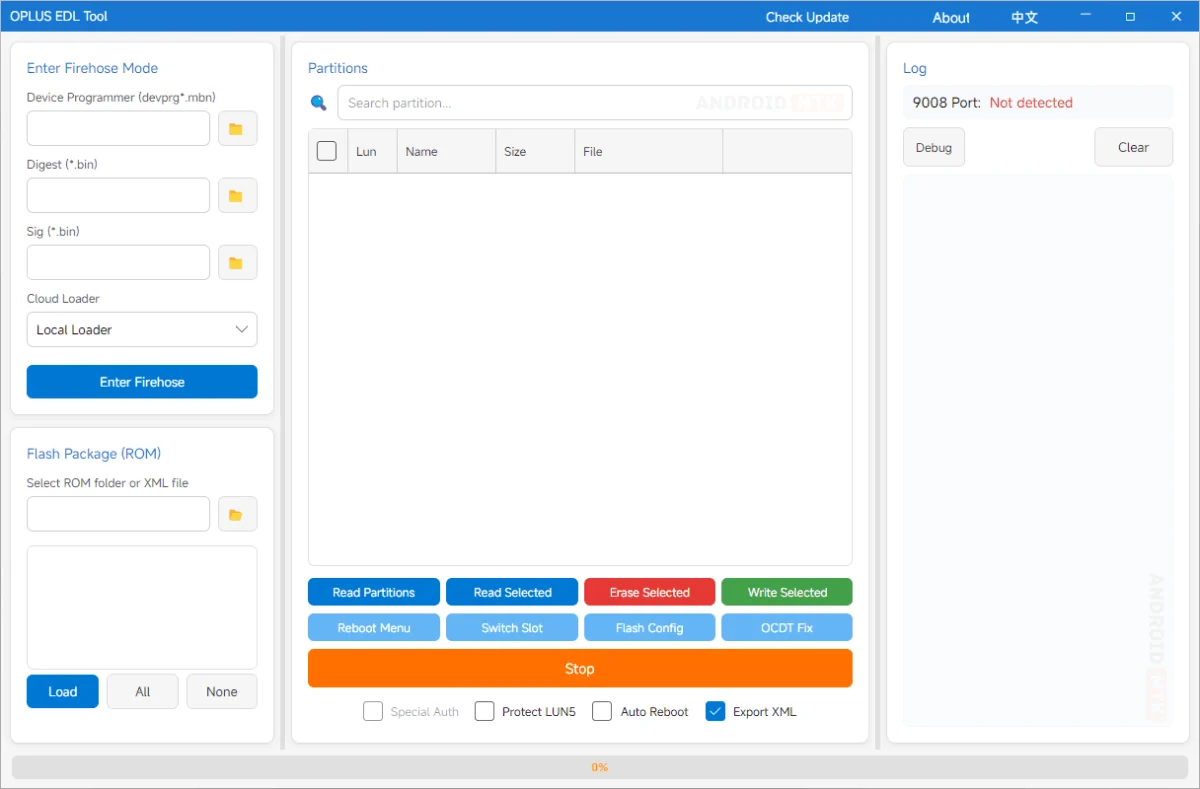
The heart of the OPlus EDL Tool lies in its robust Firehose mode management. By automating the loading of essential device programmers (the devprg*.mbn files), alongside the corresponding digital signature and digest files, the tool ensures that the handshake between the PC and the phone is secure and authenticated. This is critical for modern, security-conscious OPLUS devices that strictly verify firmware signatures before allowing any write operations.
Advanced ROM and Partition Handling
One of the most significant advantages of this software is its ability to process raw ROM packages. Whether a user is dealing with extracted folders or complex, encrypted OFP and OPS firmware files, the tool handles the heavy lifting. It enables users to parse through rawprogram XML files, which act as a blueprint for the device’s partitions. Through the GUI, users can select specific partitions to flash, perform batch operations, or utilize the tool’s intelligence to handle "super partition" merging. This is particularly vital for Android 10+ devices, where the system, vendor, and product partitions are unified into a single logical "super" image.

OFP and OPS Decryption
The OPLUS ecosystem frequently utilizes proprietary OFP and OPS formats to package their software updates. These containers are encrypted to prevent unauthorized modification. The OPlus EDL Tool integrates a native decryption engine, removing the necessity for external, often unreliable, third-party decryption scripts. By processing these files internally, the tool ensures that the integrity of the binary data is maintained, facilitating a smooth transition from an encrypted package to a flashed, bootable system.
Intelligent Partition Management and Safety
Beyond flashing, the tool serves as a diagnostic suite. It can query the device to generate a complete map of the partition table. This allows users to read, back up, or wipe individual partitions—a feature that is indispensable for repairing specific issues such as a corrupted EFS (Encrypted File System) partition, which stores vital radio calibration data and IMEI information. The ability to perform selective backups of persist, modem, and OCDT partitions ensures that users can mitigate risks before attempting major repairs.
Enhancing Workflow with Modern Features
The OPlus EDL Tool is not merely a static flashing utility; it is designed with a workflow-first mentality.
- Automatic Port Detection: A common hurdle in hardware repair is the inconsistent behavior of COM ports. The OPlus EDL Tool eliminates this by continuously polling for the Qualcomm HS-USB QDLoader 9008 interface. Once the device is detected, the software immediately prepares the interface, saving the user the trouble of manually mapping ports in the Windows Device Manager.
- Cloud Loader Integration: Perhaps the most innovative feature in recent iterations is the chipset-based cloud loading system. By identifying the device’s chipset, the tool can query a remote repository to fetch the exact Firehose programmer, digest, and signature files required. This minimizes the risk of using mismatched or incompatible programmers, which is a leading cause of permanent hardware damage (hard-bricking).
- Bilingual Accessibility: Recognizing the global reach of the OPLUS brand, the interface supports both English and Chinese. This seamless language switching ensures that technical documentation and error messages are clear to a diverse international community of developers and repair technicians.
Practical Applications in Device Maintenance
The primary utility of the OPlus EDL Tool manifests in three core scenarios:
- Unbricking: When a device fails to boot into the OS or Recovery mode due to a corrupted bootloader or interrupted OTA update, the tool acts as the primary recovery mechanism. It re-flashes the essential boot partitions to restore basic functionality.
- Firmware Restoration/Downgrading: Users can use the tool to flash official stock ROMs, effectively resetting the device to its factory state or reverting to a previous software version to resolve bugs introduced in newer updates.
- Advanced Data Repair: For technicians performing board-level repairs, the ability to read and write individual partitions allows for the reconstruction of critical system areas, enabling the recovery of devices that have suffered from storage-level corruption.
Download and Compatibility
The OPlus EDL Tool is designed for Windows environments, maintaining compatibility with both 32-bit and 64-bit architectures. To ensure the highest level of success, it is recommended to use a high-quality data cable and ensure that the appropriate Qualcomm USB drivers are installed on the host machine.
| Version | Download Link |
|---|---|
| 2.0.0 | Download OPlus EDL Tool v2.0.0 |
| 3.2026.025 | Download OPlus EDL Tool v3.2026.025 |
Final Considerations
While the OPlus EDL Tool is a powerful ally, it is intended for users with a foundational understanding of mobile firmware architecture. Incorrectly flashing partition data or clearing critical security partitions (like the primary bootloader) can lead to irreversible hardware failure. Always verify the compatibility of the ROM package with your specific model variant before initiating any write operations. By leveraging the automated, safety-conscious features of the OPlus EDL Tool, users can navigate the complexities of Qualcomm-based device maintenance with confidence, ensuring their devices remain functional and up-to-date.
