

The arrival of the first beta iteration for a new Android operating system version is traditionally met with a mixture of fervor and trepidation within the global technology community. With the recent deployment of the Android 17 Beta 1, the cycle of excitement followed by immediate frustration has once again surfaced across major digital discourse platforms. As early adopters rush to experience the latest features promised by Google’s seventeenth major software release, a significant portion of the user base has encountered a wall of technical hurdles, ranging from catastrophic system failures to the total loss of third-party application functionality. While the instinct for many is to broadcast these grievances across social media, seasoned developers and technical analysts suggest that the solution to these early-stage woes is both fundamentally simple and historically effective: the implementation of a clean system installation via a factory reset.
The digital landscape, particularly on platforms such as X and Reddit, has been inundated with reports from users who describe the initial Android 17 build as virtually unusable. Within specialized communities like the Android Beta subreddit, the sentiment is overwhelmingly critical, with some users characterizing the experience as a "nightmare in disguise." Common complaints include persistent "System UI has stopped" errors, excessive battery drain, thermal throttling during idle periods, and a complete breakdown of essential API calls that render banking and navigation apps useless. However, to understand why these issues occur and how to fix them, one must first reconcile the inherent purpose of a beta testing phase with the expectations of the modern consumer.
A beta build is, by its very definition, an unfinished product. It serves as a developmental bridge between the internal "canary" builds used by Google engineers and the final stable release intended for the general public. The primary objective of releasing a beta is not to provide a polished daily-driver experience, but to gather telemetry data and bug reports from a diverse array of real-world hardware configurations. When a user opts into the Android Beta Program, they are effectively volunteering to act as a diagnostic agent. The transition from a stable version of Android 16 to the nascent architecture of Android 17 involves significant changes to the underlying kernel, system libraries, and runtime environments. When these updates are applied as an "over-the-air" patch—often referred to as a "dirty flash"—remnants of the previous operating system’s configuration files can conflict with the new code, leading to the erratic behavior currently being reported.
The frustration voiced on social media often stems from a fundamental misunderstanding of this developmental cycle. Rather than utilizing the built-in Android Feedback tool to document specific reproduction steps for bugs, many users treat public forums as a sounding board for general dissatisfaction. While it is true that the current build of Android 17 appears to be particularly volatile compared to its predecessors, the volatility is often exacerbated by the accumulation of "cached junk" and legacy data structures that survived the update process. This is where the "nuclear option" of a factory reset becomes an essential tool for the serious beta tester.
A factory data reset performs a comprehensive purge of the device’s data partition. This process does not merely delete user photos and documents; it reinitializes the entire environment in which the operating system operates. By wiping the slate clean, the Android 17 Beta is allowed to boot into a pristine environment where its new APIs and background services can run without interference from outdated settings or incompatible app caches. For the vast majority of users reporting "unusable" devices, this single action frequently resolves 90% of stability issues, transforming a crashing handset into a functional, albeit still experimental, piece of hardware.

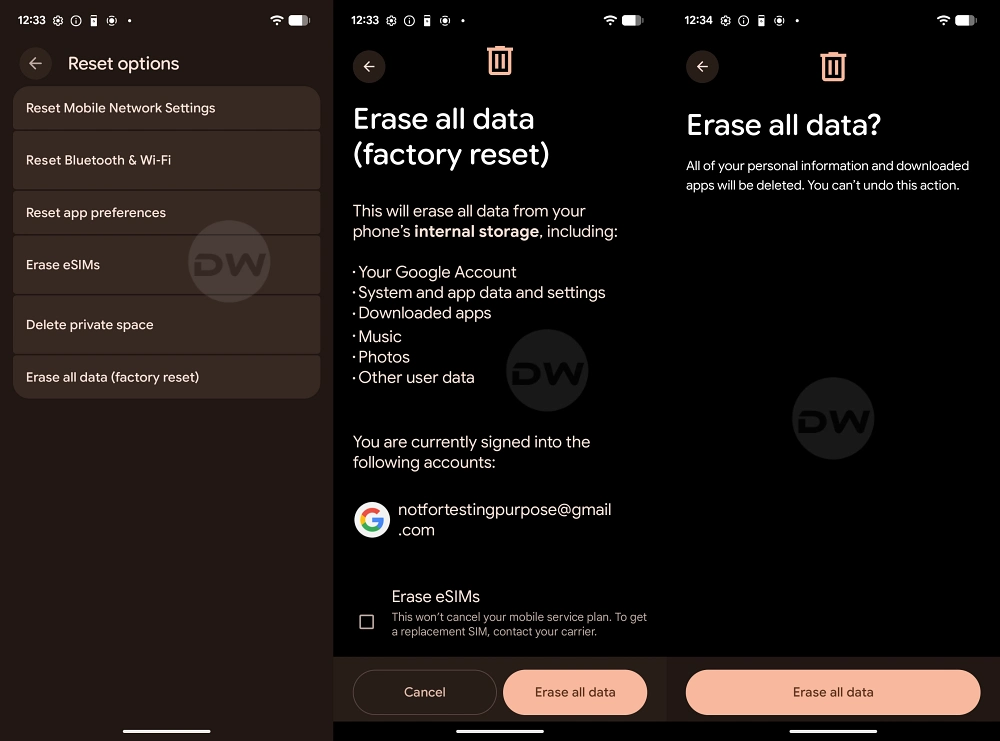
Before proceeding with a factory reset, it is imperative to acknowledge the gravity of the procedure. A reset will eradicate all locally stored information, including encrypted messages, call logs, and application-specific data that may not be synced to the cloud. Therefore, a robust backup strategy is the first step in the recovery process. Users should ensure that Google One backups are up to date, and for those with sensitive data, a manual transfer of media files to an external storage device or a desktop computer is highly recommended. Once the integrity of the backup is verified, the user can navigate to the system settings to initiate the reset.
The technical logic behind the effectiveness of a reset in a beta environment lies in the way Android handles "Project Mainline" modules and the ART (Android Runtime) optimization. During a major version jump, the way the system compiles and caches application code changes. If the system attempts to run an app using a cache generated under Android 16 while the OS is operating on Android 17 logic, a crash is the most likely outcome. A factory reset forces the system to recompile these elements from scratch, ensuring total compatibility with the new environment.
Furthermore, the role of the beta tester extends beyond merely fixing their own device. Once a stable environment is established through a clean install, the user is in a much better position to identify "true" bugs—those that exist within the Android 17 code itself rather than those caused by update conflicts. Google relies on these specific, clean-environment reports to iron out the kinks before the stable rollout. Reporting a crash that occurs on a freshly reset device provides developers with actionable data, whereas reporting a crash on a "dirty" update often provides "noisy" data that is difficult to diagnose.
The current discourse surrounding Android 17 serves as a poignant reminder of the "Beta Paradox." Users desire the latest features immediately but are often unwilling to endure the technical friction required to refine those features. The complaints seen on Reddit and X regarding the "worst OS to date" are often symptomatic of a broader trend where the line between "early access" and "final product" has become blurred in the consumer’s mind. For those who find the current state of Android 17 intolerable even after a factory reset, the most prudent course of action is to opt out of the beta program and revert to the stable Android 16 branch, though this too requires a data wipe.
For the dedicated enthusiast who wishes to remain on the cutting edge, the path forward is clear. Stop the cycle of social media venting and instead embrace the technical hygiene required for high-level software testing. By performing a factory reset, users are not just "fixing" a phone; they are resetting the foundation of their mobile experience to align with the new architectural demands of Android 17. This ensures a smoother interface, better thermal management, and a significant reduction in application-level failures.
As we look toward the subsequent beta releases and the eventual stable launch of Android 17 later this year, it is expected that Google will address the core stability issues that have made this first build so contentious. However, until those optimizations are baked into the system image, the clean install remains the gold standard for troubleshooting. It is the difference between struggling with a broken tool and participating in the refinement of a next-generation platform. If the seventeenth iteration of Android is to reach its full potential, it requires a community of testers who are willing to look past the initial "nightmare" and apply the logical fixes necessary to see the vision through to completion. In the world of beta software, patience is a virtue, but a factory reset is a necessity.
