

The contemporary smartphone has evolved far beyond its original purpose as a portable communication device, transforming into a central hub for professional productivity, personal management, and digital entertainment. However, as the number of applications and services we rely upon continues to expand, a new form of "digital friction" has emerged. Users often find themselves performing the same repetitive sequences of taps and swipes every day—opening an email client, checking a calendar, toggling system settings, and launching navigation tools. While these actions take only seconds individually, their cumulative effect on cognitive load and time management is significant. To address this, power users are increasingly turning to sophisticated automation frameworks that allow for the simultaneous execution of multiple applications and system shortcuts with a single interaction.
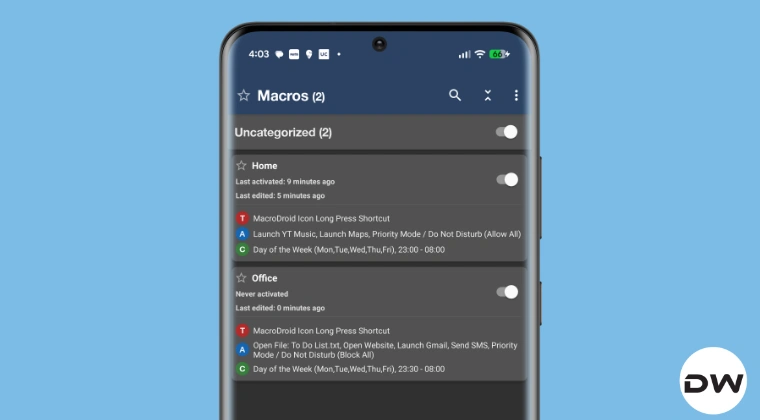
At the forefront of this productivity revolution is MacroDroid, a premier automation utility for the Android platform that balances a user-friendly interface with a robust logic engine. Unlike basic system settings that offer limited "if-this-then-that" functionality, MacroDroid allows for the creation of intricate "macros" that can handle dozens of simultaneous or sequential tasks. By leveraging this technology, users can effectively script their digital lives, ensuring that their devices adapt to their environment rather than requiring constant manual configuration.
The necessity for such automation is most evident in the transition between different daily contexts, such as the shift from home life to the professional environment. Consider the arrival at a workplace. For many, this moment triggers a predictable series of digital chores: notifying family members of a safe arrival, launching a corporate website, checking an inbox for urgent communications, reviewing a daily to-do list, and silencing the device to prevent interruptions during meetings. Executing these five or six distinct actions manually is not merely a waste of time; it is a distraction that prevents immediate focus on high-priority tasks. By consolidating these actions into a single automated trigger, the device becomes a proactive assistant.

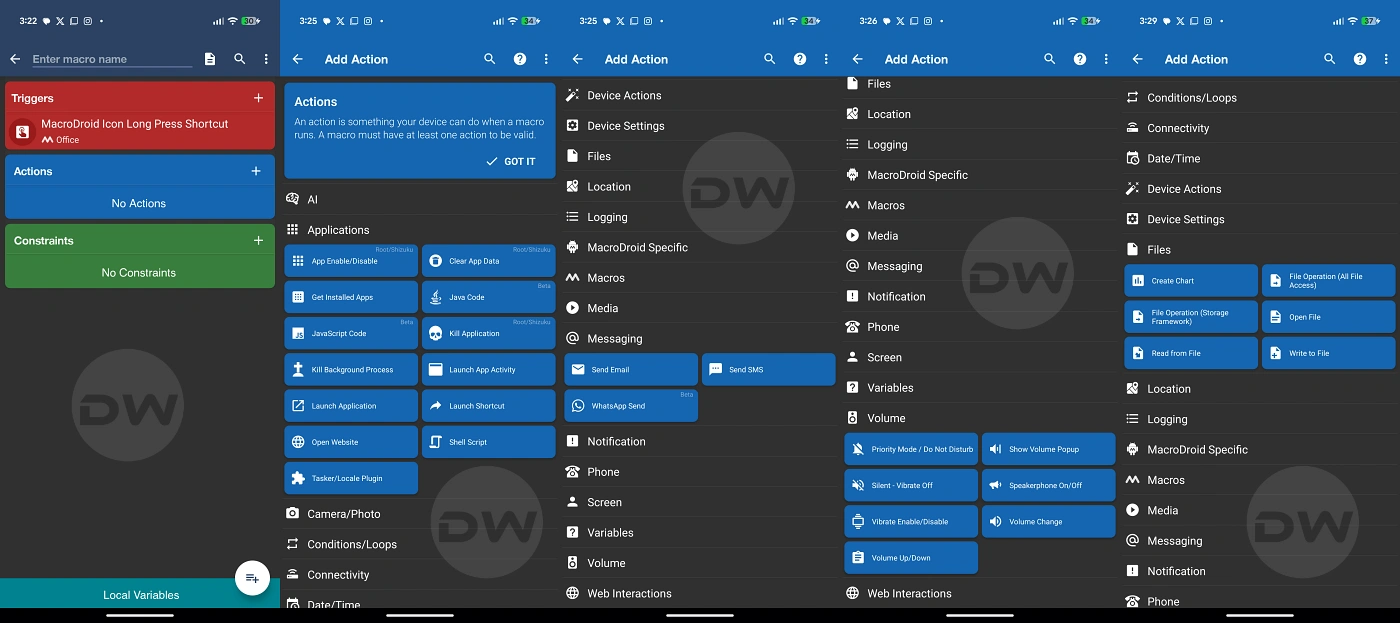
The technical architecture of an automated workflow in MacroDroid relies on three core components: Triggers, Actions, and Constraints. A Trigger is the "when"—the event that sets the macro in motion. While this can be automated via GPS location (arriving at the office) or Wi-Fi connection, many users prefer the "Widget Button" trigger, which places a single icon on the home screen for manual activation. This provides a sense of control, ensuring the sequence only begins when the user is ready.
Once triggered, the "Actions" phase begins. This is where the true power of multi-app execution is realized. For the office-arrival scenario, the macro can be programmed to send a pre-written SMS or WhatsApp message to a specific contact automatically. Simultaneously, the "Launch Application" action can be utilized multiple times in a sequence. While Android typically displays one app at a time, MacroDroid can cycle through the launch commands, placing the most critical app—perhaps the to-do list or the primary email client—at the top of the stack while the others remain open in the background, ready for instant switching via the "Recent Apps" menu.

Furthermore, automation extends beyond just opening software; it encompasses the modification of the device’s hardware state. Integrating a "Do Not Disturb" (DND) command into the morning macro ensures that the transition to a professional mindset is supported by the hardware. This holistic approach to automation means that with one tap, the phone is not just opening apps, but is fundamentally reconfiguring itself to suit a specific environment.
The utility of this system is equally profound during the evening transition. As the workday concludes and the commute home begins, the user’s needs shift toward navigation, safety, and relaxation. A secondary "Going Home" macro can be configured to reverse the morning’s settings. With a single tap, the device can disable DND mode, set the media volume to a preferred level, launch a music or podcast player, and immediately open Google Maps with a pre-set destination for home. This reduces the time spent idling in a parking lot or, more importantly, prevents the dangerous habit of fiddling with a smartphone while beginning a drive.

Enriching these workflows requires an understanding of the more advanced features within the automation space. For instance, the use of "Constraints" allows these macros to behave intelligently. A user might program the "Going Home" macro to only launch the music player if a Bluetooth connection to the car’s audio system is detected. This ensures that the automation is context-aware, preventing the phone from blasting music in a quiet office if the shortcut is accidentally pressed before leaving the desk.
The broader implications of adopting such a system touch upon the concept of "digital minimalism" and "flow state." By reducing the number of manual interactions required to set up a workspace, users can maintain their focus and reduce the "switching costs" associated with moving between different tasks. There is a psychological benefit to knowing that one’s digital environment is prepared and optimized with a single gesture. It transforms the smartphone from a tool that requires constant management into a sophisticated engine of efficiency.
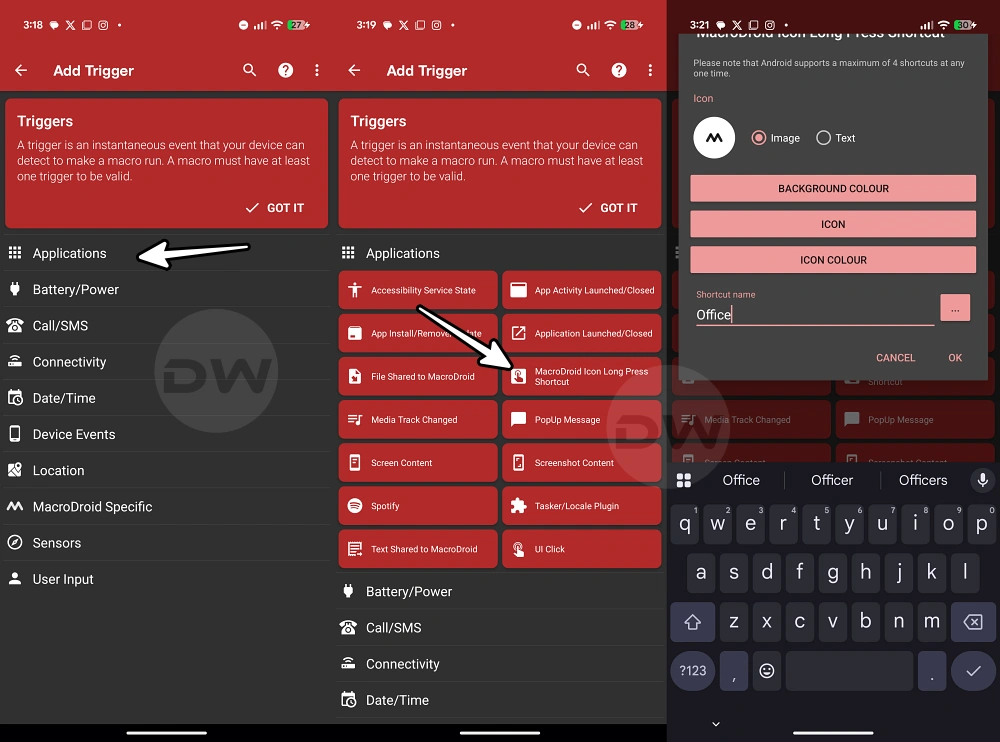
For those looking to implement these strategies, the process is remarkably straightforward, yet it offers deep customization for those who wish to explore it. The initial setup involves selecting the "Add Macro" function within the application, defining a clear trigger—such as a home screen shortcut—and then stacking the desired actions in a logical order. Users can even introduce "Wait" commands between app launches to ensure that the device’s processor has enough time to load one service before the next is initiated, ensuring a smooth and crash-free experience even on mid-range hardware.
Moreover, the versatility of Android’s "Shortcuts" system means that MacroDroid isn’t limited to just launching full applications. It can trigger specific "activities" within an app. For example, instead of just opening a browser, a macro can be set to open a specific URL directly. Instead of just opening a messaging app, it can open the specific chat thread of a supervisor or a spouse. This granular level of control is what separates basic usage from true digital mastery.

As we look toward the future of mobile computing, the trend is clearly moving toward proactive AI and predictive behavior. However, until these systems become perfectly attuned to the nuances of individual daily routines, manual automation via tools like MacroDroid remains the most reliable and powerful method for tailoring a device to specific needs. It empowers the user to define their own rules and sequences, rather than relying on the generalized algorithms provided by manufacturers.
In conclusion, the ability to run multiple apps and shortcuts simultaneously is more than just a technical "trick"; it is a fundamental shift in how we interact with our most used devices. By automating the mundane, repetitive tasks of digital life—whether it is informing a loved one of your location, preparing your professional tools for the day, or setting the stage for a safe commute—you reclaim time and mental energy. The "single tap" solution offered by MacroDroid stands as a testament to the flexibility of the Android operating system and serves as a vital strategy for anyone seeking to optimize their daily workflow in an increasingly complex digital landscape. If the goal of technology is to simplify our lives, then mastering the art of the macro is a significant step toward achieving that ideal. For those who have yet to explore the potential of automated sequences, the transition from manual multi-tasking to automated execution represents a genuine paradigm shift in mobile productivity.
