

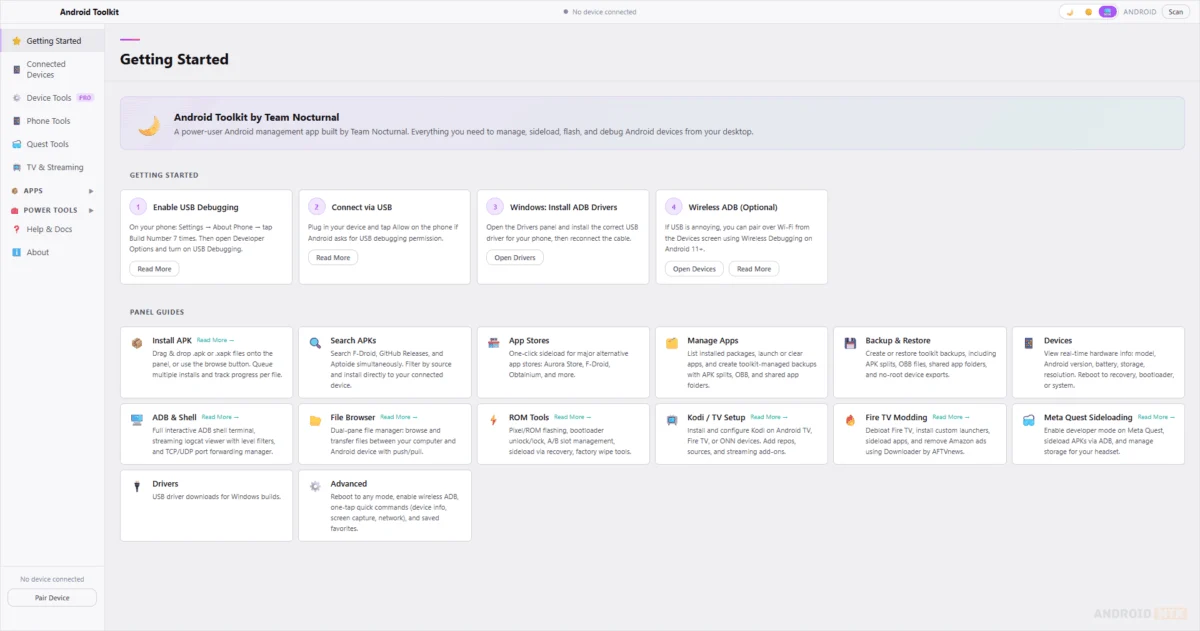
The landscape of Android modification and system administration has long been dominated by fragmented command-line tools that demand a steep learning curve and significant technical intuition. However, Team Nocturnal has fundamentally transformed this paradigm with the release of the Android Toolkit, a comprehensive, cross-platform graphical user interface (GUI) application engineered to consolidate the disparate worlds of ADB (Android Debug Bridge) and Fastboot operations into a singular, cohesive workspace. Designed as a Swiss Army knife for developers, enthusiasts, and device tinkerers, this software eliminates the need for manual terminal inputs, offering a streamlined environment that supports Windows, Linux, and macOS. By bridging the gap between raw hardware control and user-friendly design, the Android Toolkit empowers users to manage their devices with unprecedented precision and ease.
At its core, the Android Toolkit is defined by a commitment to productivity. The application’s interface is built to minimize the friction often associated with technical Android management. Whether a user is attempting to sideload an application, debug a custom ROM, or optimize a Meta Quest headset, the toolkit provides a unified dashboard that tracks operations in real-time. This modernization of legacy protocols ensures that even complex tasks—such as bulk APK installation or partition management—are presented with intuitive visual feedback, logs, and progress indicators that demystify the underlying system processes.
One of the most significant hurdles for Android users is the management of application packages, particularly when dealing with split APKs or large collections of sideloaded software. The Android Toolkit addresses this through a robust APK Installer that features advanced queue management. Unlike standard installers that handle files in isolation, this tool allows users to drag and drop multiple packages simultaneously, automatically detecting split-package configurations and ensuring that dependencies are addressed before installation. By providing detailed installation logs, the toolkit offers a layer of transparency that allows users to identify why an installation might have failed, thereby reducing the time spent troubleshooting via standard shell commands.
Complementing this is the App Manager, a central hub for device hygiene. This module provides a granular look at the software landscape of a connected device. Users are no longer confined to the basic management menus provided by the Android OS; instead, they gain the ability to conduct bulk uninstalls, clear cached data across multiple apps, disable bloatware, and perform comprehensive backups. This is particularly vital for power users who frequently transition between devices and require a reliable method for migrating app data and system settings without relying on cloud-based solutions that may compromise privacy or lack granular control.
The toolkit’s connectivity features further distinguish it from traditional ad-hoc scripts. By supporting both wired USB connections and wireless ADB pairing—including seamless QR code integration—the software caters to the modern trend of cable-free debugging. The ability to save device profiles means that power users with multiple test units, streaming sticks, and VR headsets can switch between configurations instantly. This is bolstered by a dual-pane File Browser that brings desktop-grade file management to the Android environment. By allowing users to view local and remote files side-by-side, the toolkit simplifies the push-and-pull operations that are essential for transferring media, log files, or configuration scripts.
Beyond standard smartphone management, the Android Toolkit has been intentionally optimized for a broader ecosystem of devices. The rise of streaming hardware, such as Amazon Fire TV, Google TV, and NVIDIA Shield, has created a niche for specialized management tools. The toolkit includes a dedicated workflow for these platforms, allowing users to adjust system resolutions, modify developer settings, and sideload apps without navigating cumbersome TV interfaces. Similarly, the inclusion of dedicated Quest Tools acknowledges the growing popularity of VR development. Users can now perform performance tweaks, manage massive game files, and conduct system-level maintenance on Meta Quest headsets through an interface designed specifically for the requirements of VR hardware.
For those deep within the modification community, the ROM Tools and maintenance utilities offer a powerful suite of options. This section of the application provides the necessary hooks for flashing custom recoveries, managing system partitions, and preparing a device for a clean ROM installation. While these operations carry inherent risks, the toolkit’s structured approach ensures that users have a clear view of their partition state and can execute scripts for cleaning bloatware or optimizing performance parameters with significantly lower risk of user error compared to manual terminal execution.
Even for the most advanced users who prefer the speed of the command line, the Android Toolkit provides a sophisticated integrated terminal. This environment is not a mere afterthought; it includes features such as command history, intelligent autocomplete, and real-time output searching. This allows users to blend the convenience of the GUI with the raw power of the ADB shell, ensuring that the toolkit remains useful as one’s technical proficiency grows. Furthermore, the diagnostic panel provides a deep dive into the hardware state, offering insights into battery health, root status, and real-time hardware specifications, which is an invaluable resource for device repair and performance benchmarking.
The commitment of Team Nocturnal to cross-platform accessibility is evidenced by the consistent release cycles and the expansion of support across operating systems. With the latest iterations, the toolkit has reached a state of stability that makes it a viable tool for professional development environments as well as home use. By providing installers for Windows, Linux, and macOS, the developers have ensured that the toolkit is not locked into a single ecosystem, recognizing that the modern developer is just as likely to be using a Linux workstation as a MacBook or a Windows PC.
As the Android ecosystem continues to diversify—encompassing everything from mobile phones to smart home displays and immersive VR headsets—the need for a centralized, reliable management tool has never been greater. The Android Toolkit succeeds by balancing complexity with accessibility. It does not hide the underlying power of Android’s open architecture; rather, it makes that power more reachable, manageable, and efficient. By replacing fragmented, error-prone manual processes with a polished, logical, and highly functional application, Team Nocturnal has established a new standard for Android device management. Whether the goal is to debloat a brand-new handset, troubleshoot a stubborn app, or push the boundaries of custom firmware, the Android Toolkit stands as an essential utility for anyone serious about mastering their Android hardware. The current version, 2.0.3, marks a significant milestone in this trajectory, offering expanded support and refined stability across all supported desktop platforms, solidifying its place as a cornerstone of the modern modding community.
