

Updated on April 15, 2026
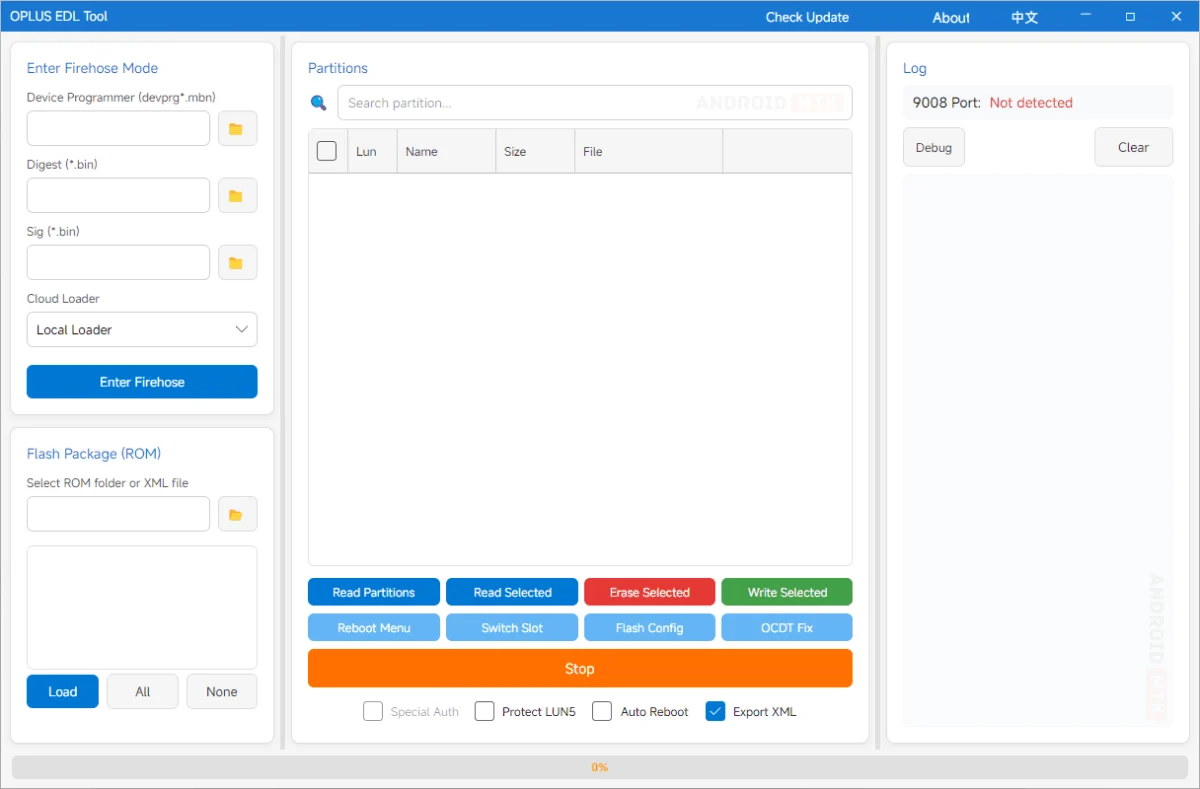
The landscape of mobile device maintenance has shifted significantly with the release of the OPlus EDL Tool, a specialized software suite engineered to streamline the complex process of low-level flashing for devices within the OPLUS ecosystem, which encompasses Oppo, OnePlus, and Realme. Designed specifically for Windows, this cross-platform graphical user interface (GUI) serves as a bridge between the sophisticated Qualcomm Emergency Download (EDL) mode—commonly known as the 9008 mode—and the end-user, effectively democratizing access to technical recovery procedures that were once reserved for service centers.
At its core, the OPlus EDL Tool is designed to mitigate the risks associated with manual command-line operations when dealing with the Firehose protocol. In the past, flashing firmware or repairing a soft-bricked device required an intimate knowledge of hexadecimal addresses, specific partition offsets, and the volatile nature of rawprogrammer XML files. The OPlus EDL Tool abstracts these complexities, offering a robust environment where users can manage partitions, flash full firmware packages, and perform emergency restorations with a high degree of precision and minimal manual input. By automating the communication handshake between the PC and the device’s Qualcomm chipset, the tool significantly reduces the probability of human error, which is the primary cause of permanent device failure during firmware modification.
The technical prowess of this utility is most evident in its handling of the Firehose protocol. When a device enters EDL mode—a state where the internal storage is inaccessible via standard Android ADB or Fastboot interfaces—it relies on a "programmer" file (typically with an .mbn or .elf extension) to establish a bridge to the storage controller. The OPlus EDL Tool automates the injection of these programmer files, alongside the necessary digest and signature files, to gain write access to the device’s partitions. This capability is foundational for unbricking devices that suffer from bootloader corruption, partition table damage, or deep-system software failures.
A standout feature that distinguishes this tool from generic flashing software is its native support for the complex architecture of modern OPLUS devices. This includes the seamless handling of encrypted OFP and OPS packages. These proprietary formats are the standard distribution method for manufacturer firmware, yet they are notoriously difficult to work with due to their inherent encryption. The tool includes an integrated decryption engine that extracts these archives internally, preparing the individual partition images for flashing without requiring the user to navigate separate, often unreliable, third-party decryption scripts.
Partition management is another area where the tool excels. By providing a clear, list-based view of the device’s storage layout, it allows advanced users to interact with specific sectors of the flash memory. Whether the objective is to back up sensitive data partitions like persist, modem, EFS, or the OCDT (One-Click Device Tool) to ensure connectivity and sensor functionality, or to selectively flash a specific partition to address a localized bug, the interface remains intuitive. This granular control is vital for device repair, especially when a full factory reset is either undesirable or insufficient to resolve a persistent system error.

Modern mobile hardware has introduced the concept of "Super Partitions," a dynamic storage architecture where multiple logical partitions share a single physical volume. Managing these via traditional flashing methods is a frequent source of "partition overflow" errors or system instability. The OPlus EDL Tool addresses this through intelligent automation; it recognizes the structure defined in super_def.json and automatically merges segmented super images—such as super.0, super.1, and so on—into a single, coherent image before deployment. This ensures that the system, vendor, and product partitions are mapped correctly, preventing the dreaded boot-loops that often plague manual flashing attempts.
User accessibility has been prioritized through a dual-language interface, offering support for both English and Chinese. This reflects the global distribution of OPLUS hardware and ensures that technical documentation and error logs are readable by the widest possible audience. Furthermore, the inclusion of an automated port detection system simplifies the initial connection phase. Upon plugging a device into the computer, the tool actively monitors for the Qualcomm HS-USB QDLoader 9008 port. This eliminates the often-frustrating requirement for users to manually verify their COM port settings in the Windows Device Manager, thereby accelerating the time-to-recovery for emergency situations.
For power users, the "Cloud Loader" integration represents the next generation of firmware deployment. Instead of manually sourcing matching programmer files for specific Qualcomm chipsets—a process that often involves scouring forums for files that may be outdated or incompatible—the tool can fetch validated, chipset-specific ELF files directly from a cloud repository. This feature ensures that the tool remains compatible with the latest iterations of Qualcomm Snapdragon hardware, such as the SM8750, SM8650, and SM8550 platforms, as they are released to the market. By ensuring the programmer file perfectly matches the device’s silicon, the tool maintains a higher success rate for flashing operations.
The utility is currently distributed in multiple versions, with the v3.2026.025 release serving as the current standard for users requiring support for the latest OPLUS flagship and mid-range devices. While the v2.0.0 release remains available for legacy support, the newer iteration is recommended for those working with recent Android OS versions and modern security patches.
To effectively utilize the OPlus EDL Tool, users must ensure that they have the latest Qualcomm USB drivers installed on their Windows environment. Without these drivers, the device will not be recognized in EDL mode, regardless of the tool’s capabilities. Furthermore, while the tool is powerful, it is intended for use by individuals who understand the inherent risks of firmware modification. Backing up the EFS and modem partitions is strongly advised before attempting any write operations, as these partitions contain unique hardware identifiers, such as IMEI and calibration data, which are non-recoverable if corrupted.
In summary, the OPlus EDL Tool stands as a critical asset for the Oppo, OnePlus, and Realme developer and repair community. By consolidating advanced Firehose operations, proprietary package decryption, and dynamic partition merging into a single, cohesive GUI, it removes the technical barriers that have historically defined the "unbricking" process. Whether used for the professional restoration of devices or for the deep-level customization of firmware, it provides a safe, efficient, and highly capable platform for interacting with the OPLUS ecosystem’s underlying storage architecture. As mobile hardware continues to grow in complexity, such specialized tools remain essential for extending the functional life of devices and providing a safety net against the risks of software-level failures.
