

Updated on September 26, 2025
The landscape of firmware management and hardware recovery for devices powered by Amlogic chipsets has been significantly streamlined with the advent of the Amlogic BootCard Maker, a specialized utility engineered exclusively for the Windows operating system. This compact, indispensable software tool is specifically designed to facilitate the creation of fully bootable Secure Digital (SD) cards. Its principal utility lies in providing a robust, manual pathway for flashing system firmware directly onto Amlogic-based hardware, a crucial capability often required when conventional Over-The-Air (OTA) update mechanisms falter, or, in more severe scenarios, when the device has become entirely unresponsive, commonly termed ‘bricked.’
The necessity for such a dedicated tool arises from the complexity inherent in low-level hardware interaction. While modern Android TV boxes, single-board computers, and various embedded systems rely heavily on seamless OTA updates, these processes are vulnerable to network interruptions, corrupted download caches, or critical errors during the installation phase, rendering the device temporarily or permanently unusable. The Amlogic BootCard Maker circumvents these software-level failures by initiating the recovery process directly from external, prepared media—the bootable SD card.
Deep Dive into Core Functionality and Features
The Amlogic BootCard Maker is not merely a simple disk writing utility; it embodies a focused feature set tailored to the precise requirements of Amlogic hardware initialization sequences. Understanding each component illuminates why this application is considered essential for advanced users, technicians, and repair professionals dealing with this ubiquitous chipset family.
Precision in Firmware Image Preparation and Deployment
At its heart, the application excels at transforming standard Amlogic firmware packages into a boot-ready state on an SD card. Amlogic devices, particularly those designed for media playback or single-purpose computing, utilize specific boot structures stored on removable media to initialize the primary system software. The BootCard Maker ensures that the resultant SD card contains the necessary bootloaders, partition tables, and system images arranged precisely as required by the target Amlogic System-on-Chip (SoC). This capability is the bedrock of hardware restoration, allowing users to bypass damaged internal storage or flawed boot partitions and force the system to load an operational kernel from the external card. This act of forcing a boot sequence is often the final resort for recovering devices that are otherwise inaccessible via standard interfaces.
Emphasizing Accessibility Through a Graphical User Interface (GUI)
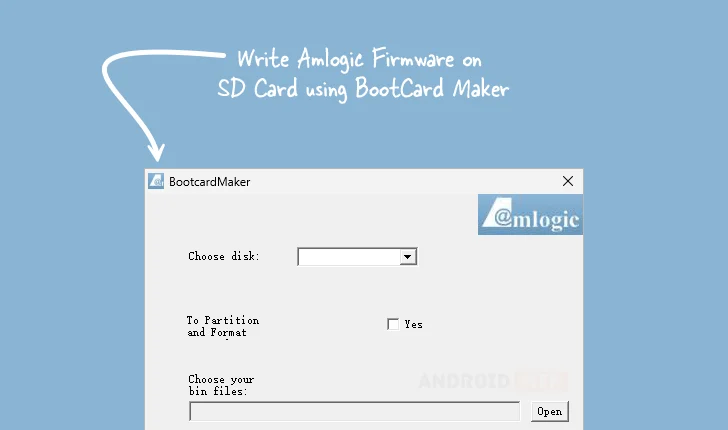
While low-level flashing procedures historically required command-line proficiency and an intricate understanding of disk management utilities, the Amlogic BootCard Maker distinguishes itself through its commitment to usability. It features a clean, intuitive Graphical User Interface (GUI). This design choice democratizes the recovery process. Users are guided through logical steps: selecting the target SD card from a list of available drives, specifying the desired partitioning scheme (if customization is needed), executing a clean format operation, and finally, pointing the utility to the source firmware file. This abstraction of complex technical parameters significantly lowers the barrier to entry for individuals who may lack deep expertise in embedded system recovery but possess the necessary hardware knowledge to perform the physical replacement or diagnostic steps.
Automated Partitioning and Formatting Protocols
A critical, often overlooked, aspect of successful media-based flashing is the preparation of the storage medium itself. Simply copying files to an SD card will not result in a bootable device. The Amlogic BootCard Maker incorporates intelligent routines to automatically manage the SD card’s structure. It handles the requisite partitioning—often creating separate partitions for the bootloader, system image, and possibly user data areas—and applies the precise file system formatting (e.g., FAT32 or EXT4, depending on the firmware requirement) that the Amlogic boot ROM expects. By automating this meticulous preparation, the utility minimizes the risk of encountering boot sequence failures stemming from incorrectly formatted or improperly structured media, thereby increasing the reliability of the entire recovery operation.
Seamless Compatibility with Essential .bin Firmware Files
The utility demonstrates robust support for the most common format used in Amlogic flashing ecosystems: the raw binary image file, typically denoted with the .bin extension. These files often encapsulate the core bootloader code (e.g., U-Boot), which is the very first piece of software executed by the SoC upon power-on. Flexibility in handling various .bin formats—which can range from minimal bootloader images to full factory restoration images—provides technicians with the versatility needed to address a wide spectrum of device models and firmware versions across the Amlogic platform, whether they are updating, downgrading, or performing a complete system overhaul.

The Advantage of Portability: No Installation Overhead
A significant practical benefit for professionals is the application’s inherently portable nature. The Amlogic BootCard Maker is designed to operate without requiring a formal installation process on the host Windows machine. This means the executable file can be carried and run directly from a USB drive or cloud storage. For technicians managing multiple workstations or needing to perform rapid diagnostics in varied environments, this portability translates to efficiency: zero time wasted on administrative installation procedures and no lingering registry entries or system conflicts left behind on the host PC. This "run-and-done" capability is paramount in high-throughput repair settings.
A Viable, Alternative Recovery Pathway Beyond USB Burning
Historically, the primary method for forcing firmware onto Amlogic hardware utilized the Amlogic USB Burning Tool, which necessitates putting the device into a specific low-level USB download mode. While effective, this method relies on the device’s USB data transfer capabilities being functional and recognized by the host PC, and sometimes requires specific driver installations. The BootCard Maker offers a crucial divergence from this reliance. By utilizing the SD card slot—a component often initialized earlier in the boot sequence than the USB controller—it provides a viable recovery avenue when USB communication is compromised, drivers are problematic, or the device firmware itself has damaged the USB stack to the point of non-recognition. This SD card method broadens the scope of potentially salvageable hardware.
Contextualizing the Need: Amlogic’s Market Presence
Amlogic chipsets are pervasive, forming the backbone of countless consumer electronics. They power a vast array of Android TV boxes (both official and generic), digital signage players, specialized IoT gateways, and various embedded Linux systems. This widespread adoption means that when a firmware failure occurs, the user base seeking a solution is extensive. Standardized, reliable recovery methods are therefore not a luxury but a necessity for maintaining product longevity and supporting the ecosystem. The BootCard Maker fills a critical gap by offering a method that works at the lowest possible level of system initialization, often succeeding where software updates fail.
The robustness of the tool is frequently tested in scenarios involving custom ROM development or beta testing, where developers frequently push the boundaries of device capabilities, leading to experimental firmware that may not always boot correctly. For these power users, the ability to instantly revert to a known-good state via a prepared SD card is an invaluable safety net.
Deployment and Acquisition Details
The availability of the Amlogic BootCard Maker is structured to ensure broad accessibility for the target audience of system builders and repair specialists. The utility is provided for the dominant desktop operating system, Windows, supporting both 32-bit and 64-bit architectures to maximize compatibility across different host computers.
The current stable release version detailed for deployment is 1.01. Users seeking to utilize this essential recovery utility can obtain the necessary files through the following established distribution channel:
| Version | Download |
|---|---|
| 1.01 | Link (External Secure Host) |
This provision ensures that users are retrieving a vetted, functional version of the software necessary for critical hardware intervention. The focus on direct, non-repository download links reflects the specialized, often immediate, nature of hardware recovery tasks where reliance on standard application stores is impractical.
In conclusion, the Amlogic BootCard Maker stands as a testament to focused utility software development. By combining portability, an accessible interface, and the precise technical functionality required to prepare bootable recovery media for Amlogic SoCs, it offers a potent, reliable solution to one of the most frustrating challenges in embedded device maintenance: the recovery of seemingly dead hardware. Its role as a complementary, and sometimes superior, alternative to USB flashing methodologies solidifies its position as a cornerstone tool in the Amlogic technician’s software arsenal.
