

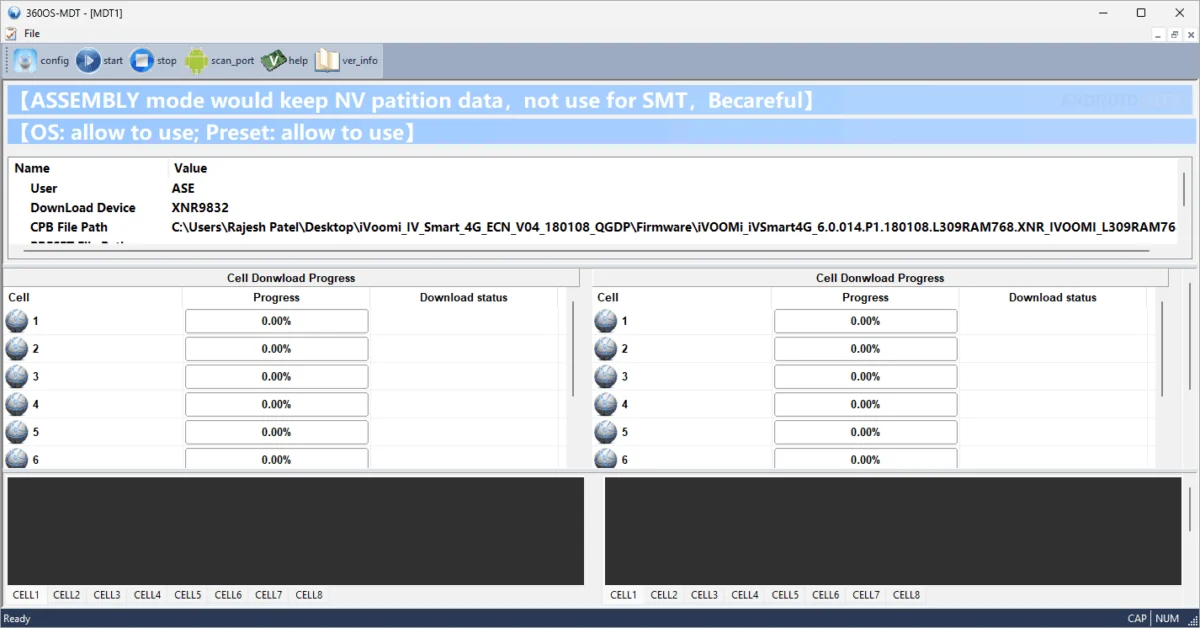
In the rapidly evolving landscape of mobile device manufacturing and repair, the ability to deploy firmware efficiently and reliably is a cornerstone of operational success. The 360OS MDT ASE (MDT Tool) has emerged as a specialized, high-performance solution tailored specifically for the 360OS ecosystem. Designed as a robust Windows-based utility, this software serves as a bridge between complex hardware architectures and the streamlined requirements of modern production environments. By providing a unified interface for the Spreadtrum (Unisoc), MediaTek (MTK), and Qualcomm chipsets, the MDT Tool significantly reduces the technical overhead previously associated with maintaining disparate flashing environments for different hardware platforms.
As of the latest update on April 14, 2026, the 360OS MDT ASE stands as a critical asset for both SMT (Surface Mount Technology) assembly lines and post-manufacturing quality assurance stations. The utility’s primary function centers on the seamless handling of .cpb firmware packages, a proprietary format essential for the integrity of 360OS devices. By centralizing the flashing process, the tool eliminates the need for technicians to switch between multiple manufacturer-specific flashing utilities, thereby minimizing human error and accelerating production throughput.
The architecture of the 360OS MDT Tool is built upon a philosophy of multi-platform versatility. In the current mobile market, manufacturers frequently utilize a heterogeneous mix of processors to balance performance and cost. The MDT Tool addresses this by offering a unified workflow. Whether a device is powered by a Spreadtrum chipset, a MediaTek processor, or a Qualcomm Snapdragon SoC, the utility provides a consistent user interface and control logic. This hardware-agnostic approach is particularly beneficial for high-volume production facilities where downtime is costly. By streamlining the interaction with these varied chipsets, the tool ensures that firmware deployment remains a standardized procedure regardless of the underlying silicon.
One of the most sophisticated aspects of the MDT Tool is its dual-mode operation, which distinguishes between the specific needs of an initial board assembly and a retail-ready firmware update. The SMT mode is engineered for the initial stages of device manufacturing. When a blank circuit board is introduced to the production line, it requires a complete firmware installation that typically involves wiping all existing, potentially volatile data to ensure a clean slate. Conversely, the Assembly mode is calibrated for the later stages of production or field service. This mode is designed to perform firmware upgrades while intelligently preserving essential calibration data and NV (Non-Volatile) memory items. Preserving these items is vital, as they contain unique device information such as IMEI numbers, Wi-Fi MAC addresses, and radio frequency tuning parameters that, if lost, would render the device non-functional or non-compliant with telecommunications standards.
In modern manufacturing, speed is a decisive competitive advantage. The MDT Tool leverages advanced multi-threaded processing, enabling the concurrent flashing of up to 16 devices. This capability transforms a standard workstation into a high-density production hub. Each thread operates independently, providing real-time feedback via a comprehensive message area. This granular level of monitoring allows supervisors to identify problematic hardware or connection issues instantly without disrupting the flow of other ongoing flashing processes. By isolating each connection, the tool ensures that a failure in one device does not cascade into the others, thereby maintaining a stable and predictable output.

The handling of .cpb files—the core of the 360OS firmware architecture—is managed through an automated and transparent process. Upon user authentication, the MDT Tool automatically initializes the unpacking sequence. This automated handling includes the validation of the firmware package, which serves as a crucial security and stability check. By verifying the integrity of the .cpb file, the tool prevents the accidental flashing of corrupted or incompatible firmware, which could lead to "bricking" or permanent hardware damage. Furthermore, the tool intelligently manages preset files and configuration scripts, ensuring that all necessary hardware-specific parameters are correctly staged before the flashing process begins.
Transparency and traceability are inherent in the utility’s design, facilitated by an extensive logging system. In industrial environments, the ability to audit the production process is essential for quality control and technical troubleshooting. The MDT Tool generates a series of detailed logs, categorized by their specific function: unpack logs, sharing status, download progress, platform-specific communications, and full dump logs. These logs serve as a digital paper trail for every device that passes through the station. Operators have the flexibility to configure the logging granularity, choosing to enable or disable specific types of data collection, and designating custom storage paths. This level of customization allows facility managers to balance the need for detailed record-keeping with the storage limitations of the local workstation.
Connectivity management is another area where the MDT Tool excels. The utility includes a highly responsive port-scanning function that automatically detects the device’s state upon connection. Whether a device enters a specific download mode through a hardware key combination or a software trigger, the MDT Tool is designed to immediately identify the active COM port and establish a handshake. The utility also offers advanced configuration settings for users who require deeper control over the communication protocols. While the default settings are optimized for stable, high-speed flashing, the inclusion of tunable parameters ensures that the tool remains adaptable to evolving hardware revisions and non-standard device states.
As technology progresses, the 360OS MDT ASE remains committed to accessibility and cross-platform compatibility. The tool is fully optimized for Windows environments, supporting both 32-bit and 64-bit architectures, which ensures broad compatibility with existing industrial workstation hardware. By providing a stable, version-controlled download path, the development team ensures that production lines can standardize their software environment, reducing the variables that contribute to production inconsistencies.
For organizations integrating 360OS devices into their supply chain or maintenance operations, the 360OS MDT Tool represents a mature, enterprise-grade solution. It effectively bridges the gap between raw hardware manufacturing and refined software deployment. By focusing on multi-threaded efficiency, platform-agnostic flexibility, and rigorous data management, the tool empowers technicians and engineers to maintain high standards of quality while meeting the aggressive timelines demanded by today’s mobile hardware market. As firmware packages become more complex and security requirements more stringent, tools like the 360OS MDT ASE provide the necessary control and oversight to ensure that every device leaving the line performs exactly as intended. The tool’s continued development and support for diverse chipsets underscore its role as a foundational utility for anyone working with the 360OS ecosystem, whether in a high-volume factory setting or a specialized technical repair center.
