

Updated on March 26, 2026
The Rockchip Create Upgrade Disk Tool represents a pivotal utility for technicians, developers, and advanced users working with hardware powered by Rockchip System-on-Chips (SoCs). This specialized Windows application serves as the definitive interface for provisioning boot firmware onto removable media, most commonly SD cards, thereby enabling system recovery, initial device setup, or complex testing procedures. Its core functionality revolves around the precise manipulation of storage structures, allowing for the meticulous writing of bootloaders and operating system images directly onto the target hardware medium. This capability is crucial in environments where direct internal flashing is either inaccessible or undesirable, offering a reliable, external method for firmware deployment.
At its foundation, the tool facilitates the transformation of a standard SD card into a bootable medium capable of initializing Rockchip-based devices, ranging from single-board computers (SBCs) and development kits to various consumer electronics utilizing this popular chipset architecture. The utility’s architecture is designed to interact deeply with the storage hardware, bypassing standard operating system file management protocols when necessary to ensure that low-level boot sectors and partition tables are correctly configured for the target Rockchip processor. This low-level access is what distinguishes it from general-purpose disk imaging software, lending it a specialized authority in the Rockchip ecosystem.
In-Depth Examination of Key Features and Capabilities
The robust feature set integrated within the Rockchip Create Upgrade Disk Tool is meticulously engineered to cover the spectrum of firmware management tasks required for Rockchip hardware. Each component of the software package is designed not merely for execution but for ensuring reliability and precision during critical system provisioning operations.
1. Precision Firmware Writing Module:
The cornerstone of the utility is its dedicated firmware writing capability. This function enables users to inject the necessary Rockchip boot firmware—often referred to as the Bootloader or Loader—directly onto the SD card. This process is far more nuanced than a simple file copy; it involves writing data blocks in a sequence dictated by the Rockchip flashing protocol. The tool ensures compatibility across a variety of firmware formats commonly employed by Rockchip development pipelines, ensuring that the resulting SD card can successfully initiate the boot sequence on the intended device. For developers, this means rapid iteration on custom kernels or initial Android/Linux distributions without the risk associated with potentially corrupting permanent internal storage during early testing phases. The integrity of the bootloader installation is paramount, as any corruption at this level renders the target device unbootable until recovery is performed.
2. Advanced Partition Management System:
A significant differentiator for this tool is its sophisticated control over storage geometry. Users are empowered to define and manipulate both physical and logical partitions on the target SD card. Physical partitioning involves setting the fundamental boundaries of storage volumes recognizable by the host system and the Rockchip device’s boot ROM. Logical partitioning, conversely, allows for the subdivision of these physical spaces into distinct, addressable segments. This granular control is essential for complex deployments where different partitions might be reserved for recovery images, system files, user data, or specialized testing environments. By managing these partitions proactively, users can enforce organizational discipline on the storage medium, preventing cross-contamination between different firmware versions or data sets. Efficient storage allocation, dictated by precise partition mapping, directly contributes to the stability and performance of the booted system.
3. Versatile Multi-Mode Operation Framework:
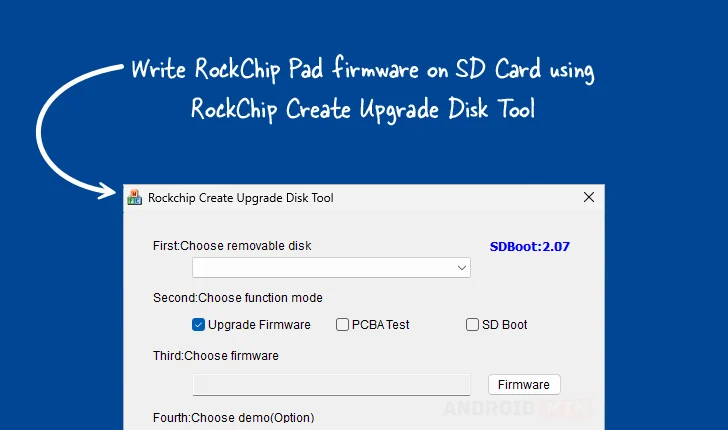
The utility transcends simple flashing by offering operational modes tailored to different stages of the hardware lifecycle. Beyond the standard "Firmware Upgrade" mode, which is geared toward deploying finalized or test OS images, the tool supports specialized configurations. The inclusion of a "PCBA Testing" mode suggests integration points for factory-level quality assurance procedures, likely allowing for the execution of diagnostic routines directly from the SD card to verify the functionality of the Printed Circuit Board Assembly (PCBA) components before final software loading. Furthermore, the "SD Boot Options" provide configuration settings that govern how the Rockchip SoC interprets the card during its initial power-on sequence, which is critical for debugging bootloader behavior or enabling alternative recovery pathways. This flexibility caters equally well to mass production environments and specialized R&D labs.
4. Targeted and Selective Data Deployment:
The capacity for selective data writing elevates the tool from a simple imager to a precise deployment mechanism. Rather than overwriting the entire storage medium with a monolithic image, users can target specific sectors or pre-defined partitions to receive particular files or image segments. This capability is invaluable when only minor updates—such as modifying a configuration file stored in a dedicated partition or updating a specific kernel module partition—are required, minimizing the time and wear associated with re-flashing the entire storage volume. It ensures that only necessary components are updated, preserving existing user data or complex partition layouts where possible. This precision minimizes operational risk and accelerates iterative development cycles.

5. Transparent Progress Monitoring Interface:
Understanding the status of long-running write operations is vital for maintaining workflow efficiency and diagnosing potential failures. The Rockchip Create Upgrade Disk Tool incorporates a visual progress bar and status indicators that provide real-time feedback on the ongoing process—whether it involves writing megabytes of firmware or restructuring partition tables. This transparency assures the user that the application is actively engaged and allows for immediate identification of any stalling or error states, providing a critical layer of user assurance during operations that can sometimes take several minutes to complete.
6. Integrated Demonstration and Verification Support:
Recognizing the need for pre-deployment validation, the tool often includes optional "Demo Support." While the exact implementation details vary by version, this functionality typically allows the user to simulate or conduct a preliminary check of the resulting SD card’s bootability or configuration without committing to a full, potentially disruptive, device flash. For manufacturers or large-scale deployers, this serves as an essential quality gate, ensuring that the provisioned media adheres strictly to required specifications before being introduced into a production line or deployed to end-users.
7. Robust Recovery and Rollback Capability:
A fail-safe mechanism is crucial when dealing with low-level system software. The integrated "Restore Capability" provides a pathway to revert the SD card to a known good state or to recover from an interrupted or failed flashing operation. This function acts as a safety net, allowing operators to quickly reformat or re-provision the card using a verified baseline image, thereby mitigating data loss risk associated with write errors or power interruptions during the critical firmware writing phase. This feature underscores the tool’s design philosophy: prioritizing operational integrity above all else.
Accessibility and Version Management for Windows Environments
The Rockchip Create Upgrade Disk Tool is exclusively developed for the Windows operating system, leveraging the native driver stack and hardware access methodologies of that platform. The utility is typically provided in versions compatible with both 32-bit and 64-bit architectures, ensuring broad compatibility across the diverse range of Windows PCs used in development and repair settings.
The availability of multiple, sequential versions (e.g., 1.4, 1.53, and 1.7) indicates ongoing development and refinement, suggesting that newer versions likely incorporate enhanced hardware support, improved stability, or expanded feature sets based on evolving Rockchip SoC generations and user feedback. Users are generally encouraged to utilize the latest stable release to benefit from the most robust feature set and the most current bug fixes.
The provided download matrix clearly outlines access points for these versions, directing users to dedicated hosting locations for the software binaries.
| Version | Download Link |
|---|---|
| 1.4 | Link to RockChip Create Upgrade Disk v1.4 |
| 1.53 | Link to RockChip Create Upgrade Disk v1.53 |
| 1.7 | Link to RockChip Create Upgrade Disk v1.7 |
The existence of distinct version links allows power users to selectively utilize older builds if specific legacy Rockchip hardware or proprietary testing routines require the exact parameters established in those earlier releases. This archival availability is a subtle but important acknowledgment of the long lifecycle of embedded hardware projects.
In summary, the Rockchip Create Upgrade Disk Tool is more than a simple flashing utility; it is a sophisticated, multi-functional platform for the comprehensive management of bootable storage media for Rockchip-powered devices. Its combination of precise firmware injection, advanced partition control, and operational flexibility makes it an indispensable component in the workflow for hardware manufacturers, embedded system engineers, and advanced hobbyists alike, ensuring reliable provisioning and recovery across the vast ecosystem of Rockchip silicon.
