

Updated on March 26, 2026
The landscape of embedded system maintenance and device repair has seen the introduction of specialized, lightweight utilities designed to tackle critical firmware issues, and among these, the Amlogic BootCard Maker for Windows stands out as a crucial tool. This compact software application is engineered specifically for the creation of bootable Secure Digital (SD) memory cards, a vital process for manually injecting operating system images or recovery firmware onto hardware powered by Amlogic chipsets. Its primary utility lies in emergency scenarios—situations where standard Over-The-Air (OTA) update mechanisms have failed, resulting in a non-responsive or "bricked" device, or when standard USB-based flashing methods are inaccessible or unsuccessful.
Amlogic chipsets are ubiquitous in various consumer electronics, most notably in Android TV boxes, media players, and single-board computers. When the bootloader or core operating system partition becomes corrupted, the device loses its ability to initialize, effectively rendering it inert. Traditional repair often relies on manufacturer-specific flashing tools, frequently requiring a USB connection to a host PC. The BootCard Maker offers a compelling, often necessary, alternative by leveraging the device’s ability to boot from an external SD card, a capability usually preserved even when the internal storage system is compromised.
Comprehensive Feature Set for Robust Firmware Deployment
The Amlogic BootCard Maker is not merely a simple file copier; it encapsulates a suite of functionalities aimed at ensuring the prepared SD card is perfectly formatted and loaded to facilitate a successful low-level system restoration. Each integrated feature addresses a specific bottleneck in the recovery process, contributing to a higher success rate for reviving damaged hardware.
Precision in Firmware Image Creation
At its core, the utility excels at transforming raw Amlogic firmware files into a fully executable, bootable image on an SD card. This process is more involved than standard data transfer; it requires the utility to correctly structure the partition table and place the necessary bootloader components—often involving initial boot sectors—in precise locations on the card. By preparing these bootable SD cards, technicians gain the ability to force a device to load an entirely new or repaired operating system environment directly from removable media, bypassing any corrupted internal boot mechanisms. This makes the tool indispensable for mass flashing operations or for servicing devices where internal memory access is impossible without a working operating system foundation.
Accessibility Through an Intuitive Graphical Environment
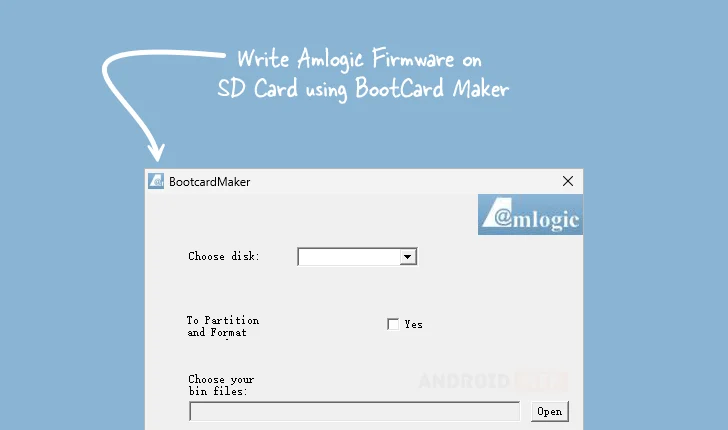
Recognizing that firmware flashing can intimidate less experienced users or those unfamiliar with command-line operations, the developers have implemented a highly user-friendly graphical interface (GUI). This design choice democratizes the recovery process. Users are guided through logical steps: selecting the target SD card from a list of connected drives, specifying the exact firmware file to be utilized, and initiating the preparation sequence. The visual layout abstracts away complex low-level commands related to disk manipulation and file system creation, allowing technicians or end-users to focus solely on selecting the correct inputs, significantly reducing the potential for human error during critical recovery operations.

Automated Partitioning and Formatting Protocols
A critical step often overlooked in manual recovery attempts is the precise preparation of the storage medium. Amlogic devices often demand a specific partitioning scheme—sometimes involving multiple small partitions dedicated to bootloaders, kernel images, and system files—formatted with specific file systems (like FAT32 or EXT4) that the device’s boot ROM can recognize. The BootCard Maker automates this crucial, technical prerequisite. Before writing the firmware data, the utility systematically partitions and formats the selected SD card according to the recognized standards for Amlogic hardware. This automated compliance with required structural standards drastically minimizes the risk of the device failing to recognize the recovery medium during the initial boot sequence, a common failure point in manual flashing attempts.
Broad Compatibility with Standard Binary Firmware Files
Flexibility in firmware sourcing is a significant advantage. The utility maintains compatibility with the standard binary (.bin) format commonly used for Amlogic bootloaders and core recovery images. This support extends the utility’s usefulness across a broad spectrum of Amlogic-based products, as manufacturers and independent developers frequently distribute recovery packages in this universal format. Whether the requirement is to re-flash the primary bootloader, install a custom recovery environment, or deploy a full factory image, the tool reliably handles the requisite .bin files, offering users significant latitude in selecting the precise software needed for their specific hardware revision.
Operational Portability: No Installation Overhead
The Amlogic BootCard Maker is designed as a portable application. This means it executes directly from its downloaded file location without necessitating a formal installation procedure within the Windows operating system registry or file structure. This characteristic offers substantial operational benefits, particularly for professional technicians or repair shops managing multiple workstations or performing on-site servicing. Portability ensures minimal system footprint, rapid deployment across different PCs, and avoids potential conflicts with existing system software. It is ready to operate virtually instantly, conserving valuable time when a quick device rescue is paramount.
Strategic Divergence from USB Burning Protocols
In the Amlogic ecosystem, the USB Burning Tool is the established standard for low-level flashing when a device is connected directly via USB cable. However, this method relies on the device’s USB interface and the functionality of its primary bootloader to enter "maskrom" or "loader" mode recognizable by the PC software. When these USB recovery pathways are damaged, or if the user lacks the appropriate USB cable or driver stability, the device becomes inaccessible via that route. The BootCard Maker provides a crucial fallback mechanism. By utilizing the device’s native SD card boot sequence—which often utilizes a more rudimentary, resilient boot ROM—the utility enables recovery even when the USB stack is completely non-functional. This dual-pathway approach significantly enhances the overall chances of a successful hardware resurrection.
Availability and Deployment
The provision of this essential recovery utility is made accessible to the community to support device maintenance and longevity. Users seeking to leverage the Amlogic BootCard Maker for Windows, compatible with both 32-bit and 64-bit operating systems, can access the latest available version through designated download repositories.
| Version | Download |
|---|---|
| 1.01 | [Link] (Access via androiddatahost.com) |
The availability of version 1.01, as detailed in the table, confirms the current distribution point for this specialized software, ensuring that technicians have access to the established release capable of executing the core functions described—firmware preparation, automated formatting, and portable execution—to manage Amlogic-based device failures effectively. The tool represents a critical piece of infrastructure for anyone tasked with maintaining the operational integrity of hardware powered by the widely deployed Amlogic chipset family.
