


The release of Android 15 by Google marks a significant milestone in the evolution of mobile operating systems, introducing a suite of features focused on privacy, performance, and user-centric customization. While flagship devices often occupy the spotlight during these rollout phases, the developer community has been working tirelessly to bring this modern experience to more accessible hardware. For owners of the Oppo A57, a device typically positioned in the budget-to-mid-range segment, the arrival of an unofficial Android Open Source Project (AOSP) build based on Android 15 offers a unique opportunity to bypass manufacturer software limitations and embrace the cutting edge of mobile technology.
The Oppo A57 (2022 edition) was engineered as a reliable daily driver, balancing cost-efficiency with functional longevity. Equipped with a 6.56-inch IPS LCD panel and a 90Hz refresh rate, it provides a surprisingly fluid visual experience for its price bracket. Under the hood, the MediaTek Dimensity 810 chipset provides the necessary computational power to handle standard multitasking, while the 5000 mAh battery ensures the device remains powered throughout rigorous use. However, like many devices in this category, the official software lifecycle often concludes before the latest Android iterations are released. This is where the custom ROM community provides a vital service, extending the relevance of the hardware through community-driven software updates.

The Android 15 Paradigm Shift
Android 15, internally referred to by developers as "Vanilla Ice Cream," is not merely a cosmetic update; it is a fundamental refinement of the Android ecosystem. Following Google’s official source code release to the Android Open Source Project on September 3, developers have been able to compile builds that run on a variety of hardware configurations.
One of the most anticipated features in Android 15 is "Private Space." This utility allows users to create a sandboxed environment for sensitive applications, isolating them from the rest of the system with an additional layer of authentication. For Oppo A57 users, this means a level of data security previously reserved for high-end enterprise devices. Furthermore, Android 15 introduces "Partial Screen Sharing," enabling users to record or cast a specific application window rather than the entire screen, thereby protecting privacy during presentations or social sharing.
Performance optimizations are equally noteworthy. The updated OS includes "App Archiving" integrated directly into the system settings, allowing users to remove the binaries of rarely used apps while keeping user data intact, effectively reclaiming storage space on the Oppo A57’s 128GB or 256GB internal memory. Additionally, the new "Low Light Boost" feature for the camera API and improved battery management protocols aim to extract more value from the A57’s existing hardware components.

Technical Viability and Current State
The current AOSP build for the Oppo A57 is categorized as an unofficial release. Initial reports from the developer community suggest a high degree of stability, with core functions such as cellular connectivity, Wi-Fi, Bluetooth, and biometric sensors operating as intended. However, as with all early-stage custom firmware, users should remain vigilant. The "Known Issues" section is currently sparse, but this often implies that bugs may emerge as more users adopt the ROM across different regional variants of the A57. Users are encouraged to maintain detailed logs to assist developers in refining the build.
Mandatory Prerequisites for Installation
Transitioning a device from a manufacturer’s stock skin—in this case, ColorOS—to a custom Android 15 ROM is a sophisticated procedure that requires precision. Before initiating the process, several foundational requirements must be satisfied to mitigate the risk of software corruption or "bricking" the device.
- Data Integrity and Backups: The installation of a custom ROM necessitates a complete wipe of the device’s internal storage. Users must secure all personal data, including contacts, media, and application-specific files, to an external drive or cloud service.
- Power Management: A sudden loss of power during the flashing process can be catastrophic. It is imperative that the Oppo A57 is charged to at least 50%, though 80% is recommended for a safety margin.
- Bootloader Status: The bootloader acts as a security gatekeeper. To install unauthorized firmware, the bootloader must be unlocked. This process is specific to Oppo’s protocols and will void the manufacturer’s warranty.
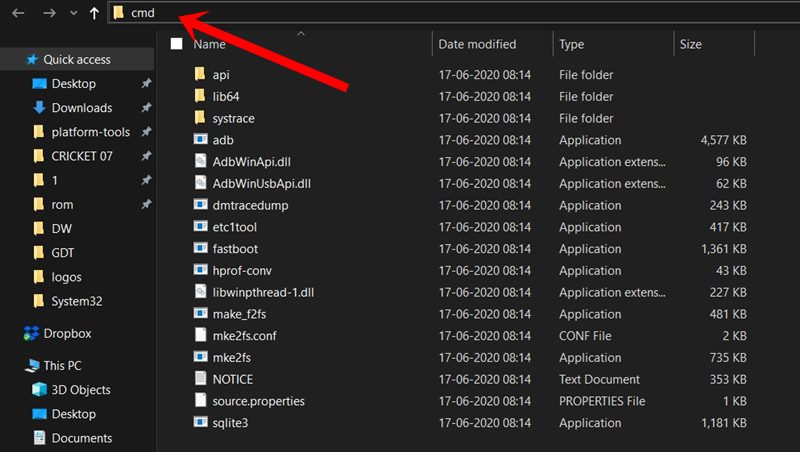
- Environment Setup: A computer equipped with ADB (Android Debug Bridge) and Fastboot binaries is required. These tools facilitate the communication between the PC and the smartphone’s low-level boot system. Furthermore, the correct Oppo USB drivers must be installed on the host computer to ensure a stable data link.
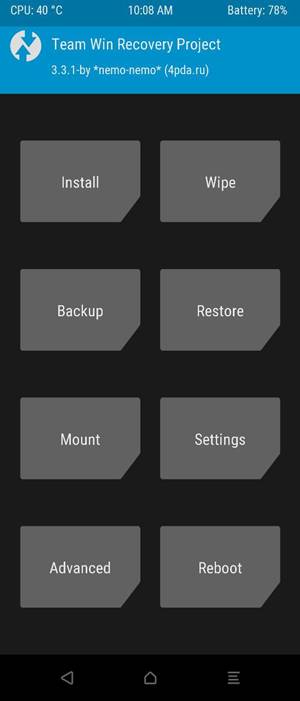
- Recovery Environment: A custom recovery, specifically Team Win Recovery Project (TWRP), must be flashed to the device. TWRP serves as the interface through which the new Android 15 ROM will be installed.
Navigating the GApps Dilemma
AOSP builds are "clean" versions of Android, meaning they do not ship with Google Mobile Services (GMS). Applications like the Google Play Store, YouTube, and Gmail are absent by default. To restore these services, users must flash a "GApps" package.
As Android 15 is in its early stages, dedicated GApps packages for this version are still in development. However, the community has found success using NikGApps designed for Android 14. The "Core" variant of NikGApps is recommended for the Oppo A57, as it provides the essential framework for the Play Store without overloading the system with unnecessary "bloatware." This hybrid approach allows users to enjoy the benefits of Android 15 while maintaining access to the vast library of Android applications.
Step-by-Step Installation Protocol
Once the prerequisites are met, the installation follows a logical progression:
- Transfer the ROM and GApps: Connect the Oppo A57 to the PC and move the downloaded Android 15 ZIP file and the NikGApps ZIP file to the internal storage or an SD card.
- Boot into Recovery: Use the ADB command
adb reboot recoveryor the hardware button combination to enter the TWRP interface. - Systematic Wipe: Navigate to the "Wipe" section in TWRP. Perform a "Factory Reset" and then enter "Advanced Wipe" to clear the System, Data, and Cache partitions. This ensures no residual data from ColorOS interferes with the new installation.
- Flashing the Firmware: Select "Install" and navigate to the Android 15 ROM ZIP file. Swipe to confirm the flash. Once complete, do not reboot the device yet.
- Installing Google Services: Return to the "Install" menu and select the GApps ZIP file. Flashing this immediately after the ROM ensures that the Google framework is integrated correctly into the system partition.
- Finalize and Boot: After both files are successfully flashed, perform a final "Wipe Cache/Dalvik" and select "Reboot System."
The initial boot sequence for a new ROM is significantly longer than a standard restart. The system must build new cache files and initialize the Android 15 environment. Users should allow the device up to 10–15 minutes to reach the "Welcome" setup screen.
Conclusion: The Future of the Oppo A57
By installing Android 15 on the Oppo A57, users are essentially giving their hardware a second lease on life. This transition offers more than just aesthetic changes; it provides access to the latest security patches and system optimizations that would otherwise be unavailable. While the process carries inherent risks, the reward is a cleaner, faster, and more private user experience.
As the Android 15 source code matures and developers release subsequent updates for this AOSP build, the Oppo A57 will likely see improvements in stability and feature parity. For those willing to navigate the technical complexities of custom ROMs, the Oppo A57 remains a testament to the fact that budget hardware, when paired with community-driven software, can still provide a premium mobile experience in 2024 and beyond. Owners are encouraged to participate in community forums to share their experiences and contribute to the ongoing refinement of this ambitious software project.
