

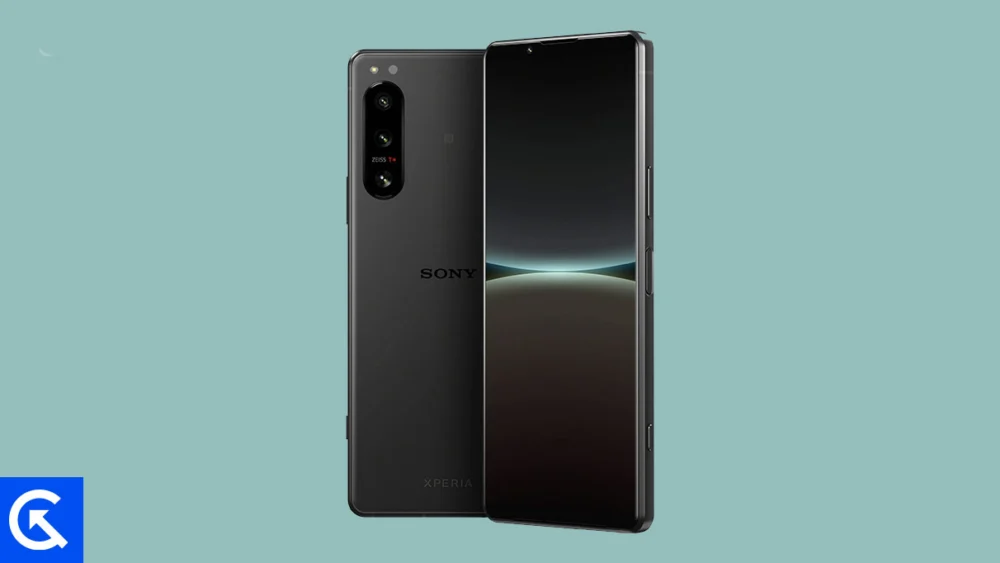
The dedicated Android developer community has once again stepped in to extend the life of premium hardware, successfully porting an unofficial Android 16 custom ROM to the Sony Xperia 5 IV. This release offers owners of the popular compact flagship a critical upgrade path, bypassing manufacturer-imposed software lifecycle limitations and delivering the highly anticipated Material 3 Expressive design language and system enhancements of the latest Android iteration.
Google recently initiated the official rollout of Android 16 for its flagship Pixel devices, marking the beginning of the annual software migration cycle. While major manufacturers like Samsung and Xiaomi prepare their proprietary distributions, enthusiasts utilizing devices that have reached their official end-of-life support windows often turn to the Android Open Source Project (AOSP) community for modern features. The Sony Xperia 5 IV, despite its robust hardware profile, falls into this category, making the availability of this custom build a significant development for its user base.
The Evolution of Experience: Android 16 and Material 3 Expressive
The core appeal of the Android 16 update lies not merely in incremental improvements but in a refined and more fluid user interface experience anchored by Material 3 Expressive. This design overhaul represents a sophisticated evolution of Google’s design philosophy, building upon the foundational elements established in previous Material Design iterations. While not a radical aesthetic shift, Material 3 Expressive focuses on kinetic interaction and visual depth, translating into one of the most palpable user-facing changes since the introduction of the modern design framework.
The enhancements are centered around dynamic scaling, smoother transitions, and an emphasis on larger, more deliberate touch targets, improving accessibility and overall navigation flow, particularly on high-refresh-rate displays like that of the Xperia 5 IV. Where earlier versions of Material Design sometimes felt rigid, Material 3 Expressive introduces a sense of ‘bounce’ and responsiveness that revitalizes the user interaction.
![How to Install Android 16 on Sony Xperia 5 IV [Download Link]](https://www.getdroidtips.com/wp-content/uploads/2026/01/Sony-Xperia-5-IV.jpg)
Beyond the visual refinements, Android 16 incorporates crucial under-the-hood optimizations. These typically include improved resource allocation, enhanced memory management for better multitasking efficiency, and strengthened privacy controls. While the AOSP port may initially lack some proprietary features tied to Sony’s specific kernel implementations, the foundation of modern Android security and performance standards is immediately established, breathing new computational vigor into the hardware.
The Enduring Appeal of the Sony Xperia 5 IV
The fact that the Xperia 5 IV remains a prime target for high-level custom ROM development underscores its enduring appeal and specialized market position. Launched as a compact flagship, the device was engineered for users prioritizing professional creative tools and ergonomic comfort.
Measuring just 6.1 inches and weighing a modest 172 grams, the Xperia 5 IV distinguished itself in a market increasingly dominated by large form factors. Its design integrity is bolstered by Gorilla Glass Victus protection, an aluminum chassis, and industry-leading IP65/IP68 dust and water resistance ratings.
Performance remains formidable, powered by the high-efficiency Snapdragon 8 Gen 1 processor. This chipset ensures fast, smooth operation across demanding applications, multitasking, and high-fidelity mobile gaming. Crucially, Sony retained key features that appeal to power users and multimedia enthusiasts: a MicroSD expansion slot—a rarity in modern flagships—and a 3.5 mm headphone jack supporting Hi-Res audio, complemented by stereo speakers and Snapdragon Sound technology.
The device’s camera system is particularly noteworthy, reflecting Sony’s deep heritage in professional imaging. It features a triple 12 MP sensor array, all equipped with Zeiss optics and real-time autofocus across every lens. Advanced video capabilities, including 4K HDR recording up to 120 frames per second, alongside Alpha-inspired controls and sophisticated eye-tracking technology, cement its status as a niche but premium tool for content creators.
![How to Install Android 16 on Sony Xperia 5 IV [Download Link]](https://www.getdroidtips.com/wp-content/uploads/2026/01/Sony-Xperia-5-IV-300x169.jpg)
For owners committed to this hardware, extending its operational life through modern software is an imperative, especially given the generous 5000 mAh battery capacity—substantial for a phone of this size—which supports both wired and wireless charging standards.
The Technical Gateway: Navigating the Custom ROM Installation
Adopting an unofficial Android 16 build requires users to navigate a complex technical path, transforming the phone from a standard consumer product into a platform for community development. The process necessitates several critical, irreversible, and potentially data-destructive steps.
Critical Prerequisites and Preparations
Data Integrity and Safety: Before commencing any flashing procedure, a full, comprehensive backup of all user data is mandatory. Unlocking the bootloader and subsequent flashing operations inherently risk data loss and typically involve factory resets.
The Bootloader Barrier: The most fundamental step involves unlocking the device’s bootloader. This procedure bypasses the security checks implemented by Sony, which typically prevent the loading of unsigned, non-official operating system components. It is crucial to adhere strictly to Sony’s specific instructions for this process. It must be noted that unlocking the bootloader invariably voids the device’s official warranty.
The Developer Toolkit: Successful flashing relies on establishing a secure communication channel between the computer and the device. This requires the installation of ADB (Android Debug Bridge) and Fastboot binaries (Platform-Tools). ADB is utilized for general debugging and interaction, while Fastboot provides the advanced command-line utility necessary for flashing low-level components like custom recovery images. Corresponding Sony USB drivers must also be correctly installed on the host machine to ensure stable connectivity.
![How to Install Android 16 on Sony Xperia 5 IV [Download Link]](https://www.getdroidtips.com/wp-content/uploads/2020/06/cmd-platform-tools.jpg)
Custom Recovery Environment: Installing a custom recovery solution, most commonly TWRP (Team Win Recovery Project), is essential. TWRP acts as the dedicated environment for installing non-official ZIP files, including the Android 16 custom ROM and the necessary Google applications package (GApps).
Flashing Procedure and Software Dependencies
The AOSP builds of Android 16, by definition, do not include proprietary Google Mobile Services (GMS). Consequently, the user must download and flash the appropriate Android 16 GApps package separately.
The installation sequence is rigidly defined: the custom recovery environment must be used to perform a factory reset and wipe system partitions, followed immediately by the flashing of the Android 16 ROM file. Crucially, the GApps package must be flashed immediately after the ROM, without an intervening reboot, to ensure seamless integration of the Google framework (Play Store, sync services, etc.) into the new operating system.
Stability and Future Development
Early assessments of this unofficial AOSP port indicate a surprisingly high degree of stability, with initial reports suggesting that core functionalities—including cellular connectivity, Wi-Fi, camera function, and audio—are operational. The developers have indicated that "Everything seems to be working fine," a positive sign for an early build.
However, users must proceed with the understanding that custom ROMs are dynamic, community-driven projects. While the current build shows promise, minor bugs or compatibility issues may emerge, particularly concerning specialized hardware features or specific third-party applications. The community relies heavily on user feedback, requiring detailed log reports for any anomalies detected, thereby contributing directly to the maturation and stability of the future releases.
![How to Install Android 16 on Sony Xperia 5 IV [Download Link]](https://www.getdroidtips.com/wp-content/uploads/2020/08/twrp-custom-rom.jpg)
By embracing this Android 16 port, Xperia 5 IV owners are making a calculated trade-off: they sacrifice official manufacturer support and warranty coverage in exchange for cutting-edge software features and system optimizations that dramatically extend the practical usability and relevance of their high-quality hardware for years to come. The initial setup time may be lengthy, and the first system boot after installation often takes longer than usual, but the resulting access to modern Android functionality provides a significant return on the investment of effort.
