

The landscape of mobile operating systems is currently witnessing a significant shift as Google accelerates its development cycle, bringing the much-anticipated Android 16 to the forefront of the technological conversation. While flagship devices typically wait months for official manufacturer rollouts, the vibrant community of independent developers has once again bridged the gap. For owners of the Xiaomi 13T Pro, a device renowned for its high-performance hardware and sophisticated imaging capabilities, the opportunity to bypass the traditional waiting period has arrived. Through the utilization of unofficial Android Open Source Project (AOSP) builds, users can now experience the "Material 3 Expressive" design language and the under-the-hood optimizations of Android 16 well ahead of the official HyperOS schedule.
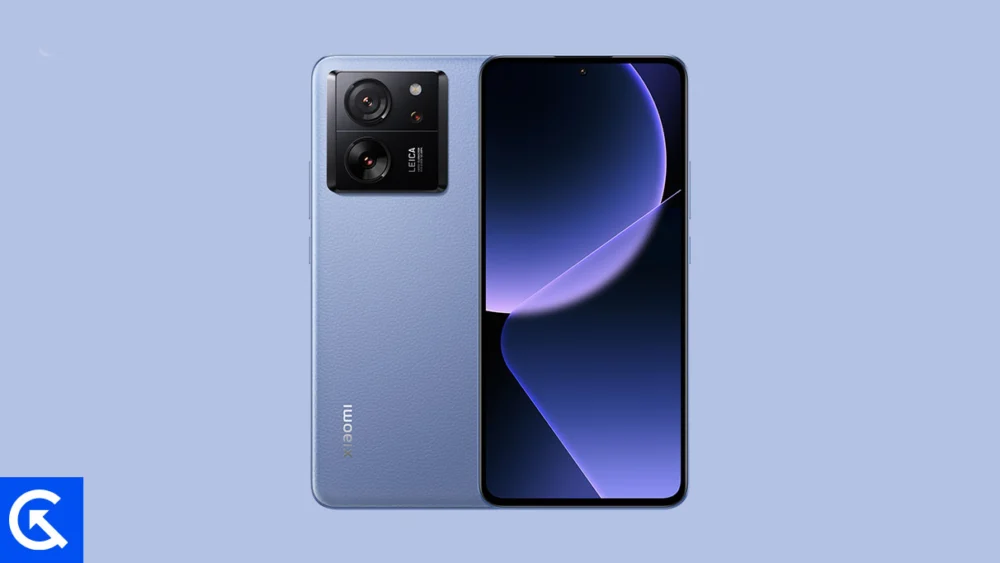
The Xiaomi 13T Pro, internally referred to by its codename "corot," stands as a testament to the power of modern mobile engineering. Launched as a performance-centric flagship, it bridges the gap between premium aesthetics and raw processing power. At the heart of its appeal is a stunning 6.67-inch AMOLED display, capable of a 144Hz refresh rate. This panel is not merely about speed; with support for Dolby Vision and HDR10+, it provides a cinematic canvas that is particularly well-suited for the refined animations introduced in Android 16. The device’s structural integrity, featuring IP68 water resistance and a choice between a sleek glass finish or a durable eco-leather back, ensures that it remains a relevant piece of hardware even as software generations evolve.
![How to Install Android 16 on Xiaomi 13T Pro [Download Link]](https://www.getdroidtips.com/wp-content/uploads/2026/02/Xiaomi-13T-Pro.jpg)
Under the hood, the Xiaomi 13T Pro is powered by the MediaTek Dimensity 9200+ chipset. Built on a cutting-edge 4nm process, this silicon is designed to handle the most demanding computational tasks with remarkable thermal efficiency. Paired with up to 16GB of LPDDR5X RAM and ultra-fast UFS 4.0 storage, the 13T Pro possesses the overhead necessary to run experimental software builds without compromising on fluidity. Furthermore, the Leica-tuned triple camera system—anchored by a 50 MP primary sensor with Optical Image Stabilization (OIS)—remains a formidable tool for mobile photography, even when transitioning away from the stock Xiaomi software environment to a more "vanilla" Android experience.
The arrival of Android 16 introduces a philosophy that Google describes as "Material 3 Expressive." This is not a radical departure from the previous design language but rather a sophisticated evolution. It focuses on the "polish" of the user interface, introducing smoother, physics-based animations that make the OS feel more responsive to touch. Typography has been emboldened, and touch targets have been enlarged to improve accessibility and ease of use. For the Xiaomi 13T Pro, which already boasts a high-refresh-rate screen, these software refinements translate into a user experience that feels significantly more modern than the current iterations of Android 15. Beyond the visuals, Android 16 brings optimized system resource management, designed to squeeze more battery life out of the 13T Pro’s 5000 mAh cell and further reduce the latency of the already impressive 120W HyperCharge technology.
However, the path to installing a custom ROM based on Android 16 requires a methodological approach and an understanding of the risks involved. Unlike official OTA (Over-The-Air) updates, flashing a custom ROM involves modifying the device’s fundamental software partitions. The first and most critical step in this journey is the comprehensive backup of all personal data. The process of unlocking the bootloader—a prerequisite for any custom installation—triggers a security protocol that wipes the internal storage of the device. Users are encouraged to utilize cloud services or external hardware to secure their photos, documents, and application data before proceeding.
![How to Install Android 16 on Xiaomi 13T Pro [Download Link]](https://www.getdroidtips.com/wp-content/uploads/2026/02/Xiaomi-13T-Pro-300x169.jpg)
Technical readiness is equally important. A Xiaomi 13T Pro must have at least 50% battery capacity to ensure it does not power down during the delicate flashing process, which could lead to a software "brick" or a corrupted state. Furthermore, the computer used for the installation must be equipped with the latest ADB (Android Debug Bridge) and Fastboot binaries. These command-line tools serve as the primary communication link between the PC and the smartphone when the latter is in its bootloader mode. Accompanied by the correct Xiaomi USB drivers, these tools allow for the seamless transfer of system images and recovery environments.
The "gatekeeper" of this entire process is the bootloader. Xiaomi devices require a specific unlocking procedure through the company’s official tools, often involving a waiting period and the creation of a Mi Account. Once the bootloader is unlocked, the installation of a custom recovery, such as TWRP (Team Win Recovery Project), becomes possible. TWRP acts as a secondary mini-operating system that allows users to wipe partitions and "flash" the new Android 16 ROM files. Without a custom recovery, the device’s stock security measures would prevent the installation of any non-official software.
The software package itself consists of two primary components: the Android 16 AOSP ROM and the GApps (Google Apps) package. Because AOSP is a "de-googled" version of Android, users who rely on the Play Store, Gmail, and Google Maps must flash a separate GApps bundle immediately after the ROM. It is a critical technical nuance that these two must be flashed in succession without a system reboot in between to ensure that the Google Play Services framework integrates correctly with the new system architecture.
![How to Install Android 16 on Xiaomi 13T Pro [Download Link]](https://www.getdroidtips.com/wp-content/uploads/2020/06/cmd-platform-tools.jpg)
The actual installation follows a strict sequence. After booting into TWRP, the user must perform a "Factory Reset" and wipe the Data, Cache, and Dalvik partitions. This ensures a "clean flash," preventing conflicts between the old HyperOS files and the new Android 16 code. Once the partitions are prepared, the user navigates to the "Install" menu, selects the Android 16 ROM zip file, and initiates the process. Following the ROM, the GApps package is added to the queue. Upon completion, a final "Format Data" command (typing ‘yes’ to confirm) is often required to bypass encryption hurdles that might otherwise prevent the OS from booting.
The initial boot after such a significant upgrade is notoriously slow. The system must rebuild its cache and initialize new background services. For the Xiaomi 13T Pro, this first boot into Android 16 marks the beginning of a new chapter. Users are greeted by the clean, minimalist aesthetic of stock Android, free from the pre-installed "bloatware" that often accompanies manufacturer-specific skins. The result is a device that feels lighter, faster, and more aligned with Google’s original vision for the Android ecosystem.
While the current builds of Android 16 for the 13T Pro are reported to be remarkably stable, the nature of unofficial ports means that some bugs may persist. Developers rely on user feedback and system logs to identify and patch issues related to specific hardware sensors, Bluetooth connectivity, or network stability. For the enthusiast, this is part of the appeal—participating in the refinement of a cutting-edge operating system.
![How to Install Android 16 on Xiaomi 13T Pro [Download Link]](https://www.getdroidtips.com/wp-content/uploads/2020/08/twrp-custom-rom.jpg)
In conclusion, the Xiaomi 13T Pro remains a powerhouse of mobile technology, and the ability to run Android 16 today is a testament to its enduring hardware relevance. By following a disciplined installation path—encompassing bootloader unlocking, recovery installation, and a clean system flash—users can enjoy the very latest in mobile software innovation. This process does more than just update a version number; it breathes new life into the hardware, providing a glimpse into the future of the Android platform while maximizing the utility of one of Xiaomi’s most capable smartphones. As Android 16 continues to mature, the 13T Pro stands ready to deliver a flagship experience that rivals, and in some cases exceeds, the latest devices on the market.
