

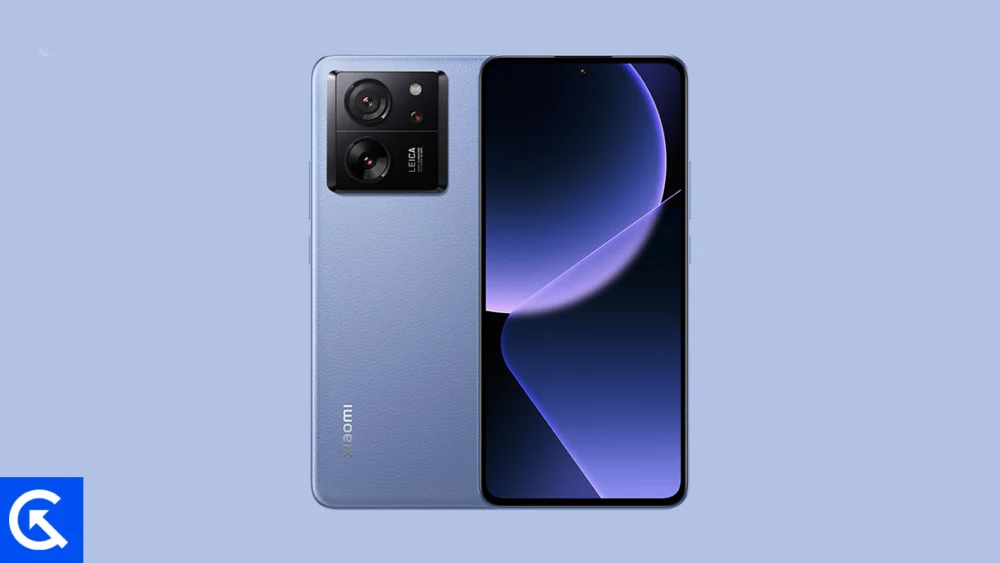
The landscape of mobile operating systems is currently witnessing a significant shift as Google initiates the rollout of Android 16. While the initial release is traditionally reserved for the Pixel lineup, the open-source nature of the Android ecosystem has allowed independent developers to port early builds to a variety of high-performance third-party hardware. Among the most prominent devices receiving this treatment is the Xiaomi 13T Pro, a flagship-tier smartphone that remains a powerhouse in the enthusiast community. By leveraging an unofficial Android Open Source Project (AOSP) build, users can now bypass the standard manufacturer waiting periods and experience the latest advancements in Google’s software design. This transition not only refreshes the user interface but also provides a glimpse into the future of mobile computing, characterized by the new Material 3 Expressive design language and deep-seated system optimizations.
![How to Install Android 16 on Xiaomi 13T Pro [Download Link]](https://www.getdroidtips.com/wp-content/uploads/2026/02/Xiaomi-13T-Pro.jpg)
To understand the appeal of installing a custom Android 16 ROM, one must first appreciate the hardware capabilities of the Xiaomi 13T Pro. Released as a performance-centric flagship, the device bridges the gap between premium luxury and raw utility. It is anchored by a 6.67-inch AMOLED display that boasts a 144Hz refresh rate, ensuring that the fluid animations of Android 16 are rendered with clinical precision. With support for Dolby Vision and HDR10+, the display is designed for high-dynamic-range content, making it an ideal canvas for the vibrant color palettes introduced in the new OS. Internally, the device is powered by the MediaTek Dimensity 9200+ chipset. This 4nm silicon, paired with up to 16GB of RAM and ultra-fast UFS 4.0 storage, provides the necessary computational overhead to handle the experimental nature of early AOSP builds without compromising on speed or efficiency. Furthermore, the Leica-tuned triple camera system and the staggering 120W HyperCharge technology—capable of a full charge in under 20 minutes—ensure that the hardware remains relevant even as the software evolves.
The centerpiece of the Android 16 update is the "Material 3 Expressive" design philosophy. Since the introduction of Material You in Android 12, Google’s aesthetic has focused on personalization and color harmony. Android 16 takes this a step further by refining the foundation laid by Material Design 3. This is not merely a cosmetic skin; it is a fundamental recalibration of how users interact with their screens. Material 3 Expressive introduces more dynamic, physics-based animations that respond to touch with greater nuance. Touch targets have been enlarged for better ergonomics, and typography has become bolder and more legible, reducing cognitive load during navigation. For the Xiaomi 13T Pro user, this represents a departure from the feature-heavy HyperOS interface toward a leaner, more focused "Stock Android" experience. This transition often results in improved system latency and a more predictable user journey, as the OS sheds the proprietary overlays that can sometimes obscure the core Android features.
![How to Install Android 16 on Xiaomi 13T Pro [Download Link]](https://www.getdroidtips.com/wp-content/uploads/2026/02/Xiaomi-13T-Pro-300x169.jpg)
Beyond the visual overhaul, Android 16 introduces several structural improvements. The update is engineered to enhance the user experience across diverse form factors, including foldables and tablets, but these optimizations translate well to large-format smartphones like the 13T Pro. Enhanced multitasking capabilities, more granular privacy controls, and improved notification management are hallmarks of this release. By installing an AOSP-based ROM, users gain access to a "clean" version of the software, free from pre-installed bloatware. This often leads to better battery longevity and more consistent performance, as background processes are minimized. While Xiaomi’s official HyperOS is slated for several years of updates, the community-driven AOSP builds offer a way for power users to experiment with cutting-edge features months before they reach the general public through official channels.
However, the path to installing a custom ROM requires a disciplined approach and a clear understanding of the technical prerequisites. This is an unofficial procedure that carries inherent risks, including the potential for "bricking" the device or voiding the manufacturer’s warranty. The most critical first step is a comprehensive data backup. Flashing a new operating system requires a complete wipe of the internal storage; therefore, all photos, documents, and application data must be secured externally. Furthermore, the device must maintain at least a 50% battery charge throughout the process to prevent an unexpected shutdown, which could lead to permanent software corruption.
![How to Install Android 16 on Xiaomi 13T Pro [Download Link]](https://www.getdroidtips.com/wp-content/uploads/2020/06/cmd-platform-tools.jpg)
The technical foundation for this installation rests on three pillars: the Bootloader, the Recovery, and the ADB/Fastboot interface. Unlocking the bootloader is the prerequisite for any system-level modification on Xiaomi devices. This process typically involves using Xiaomi’s official unlock tool and may require a waiting period as per company policy. Once the bootloader is unlocked, the user must install a custom recovery environment, such as TWRP (Team Win Recovery Project). TWRP acts as a secondary operating system that allows for the flashing of ROM files, the creation of system images, and the management of partitions. To facilitate communication between the smartphone and a computer, the installation of ADB (Android Debug Bridge) and Fastboot drivers is essential. these command-line utilities allow the user to send instructions to the phone while it is in its low-level bootloader state.
Once the environment is prepared, the installation process follows a specific sequence. After downloading the Android 16 ROM file and the corresponding Google Apps (GApps) package—since AOSP builds often exclude proprietary Google services for licensing reasons—the user must boot the Xiaomi 13T Pro into TWRP recovery. The procedure begins with a "Clean Wipe," which involves clearing the Data, Cache, and Dalvik partitions to ensure no remnants of the previous OS interfere with the new installation. Following the wipe, the ROM zip file is "flashed" or installed via the TWRP interface. Crucially, the GApps package should be flashed immediately after the ROM, without a reboot in between, to ensure that Google Play Services are correctly integrated into the system architecture.
![How to Install Android 16 on Xiaomi 13T Pro [Download Link]](https://www.getdroidtips.com/wp-content/uploads/2020/08/twrp-custom-rom.jpg)
Upon the final reboot, the first boot cycle may take significantly longer than usual as the system initializes the new file structures and compiles application caches. Once the device reaches the setup screen, the user is greeted by the pristine Android 16 environment. Early reports from the developer community suggest that these initial AOSP ports for the Xiaomi 13T Pro are remarkably stable, with core functions such as Wi-Fi, Bluetooth, and cellular connectivity working as intended. However, as with any unofficial software, minor bugs or "edge-case" issues may persist. Users are encouraged to document these anomalies and provide logs to the developers on platforms like XDA Developers to assist in the iterative refinement of the ROM.
In conclusion, the arrival of Android 16 on the Xiaomi 13T Pro through unofficial channels is a testament to the vibrancy of the Android modification community. It allows users to reclaim control over their hardware, opting for a streamlined, high-performance software experience that highlights the best of Google’s design language. While the process demands technical diligence and a tolerance for risk, the reward is a device that feels brand new, equipped with the latest features and a fluid interface that rivals any contemporary flagship. For the Xiaomi 13T Pro owner, Android 16 is not just an update; it is an evolution of the smartphone experience, pushing the boundaries of what a mobile device can achieve when hardware excellence meets software innovation. As the development cycle continues, these builds will only become more stable, further extending the lifecycle of this impressive piece of hardware and ensuring it remains at the forefront of the mobile industry.
