

Updated on September 26, 2025
The landscape of hardware maintenance and firmware recovery for devices powered by Amlogic chipsets has been significantly streamlined with the introduction of the Amlogic BootCard Maker for Windows environments. This specialized, compact utility is engineered specifically to facilitate the creation of bootable Secure Digital (SD) cards, serving as a critical lifeline when standard Over-The-Air (OTA) updates falter or, in more severe cases, when an Amlogic-based device becomes completely unresponsive, commonly referred to as being "bricked." By circumventing complex command-line interfaces and offering a visual pathway to prepare recovery media, the BootCard Maker democratizes the firmware flashing process, bringing sophisticated recovery techniques within reach of a broader user base, from advanced technicians to end-users facing unexpected software failure.
The architecture of Amlogic chipsets, prevalent in media players, single-board computers (SBCs), and various Android TV boxes, often necessitates direct, low-level access to the bootloader for maintenance. While tools relying on USB connections are common, they are not universally effective, particularly if the device’s USB recovery mode is compromised or inaccessible. The BootCard Maker addresses this vulnerability by leveraging the ubiquitous SD card slot as the primary conduit for system restoration, providing an essential fallback mechanism that ensures a higher probability of hardware salvage.
Deep Dive into Core Functionality and Feature Set
The utility’s robust design centers on preparing the external media with the necessary boot sector information and firmware payloads to initiate a system recovery sequence upon hardware boot-up. The feature set is meticulously curated to handle the often-intricate steps of preparing flashing media efficiently.
Pioneering Bootable Firmware Image Creation
At its core, the Amlogic BootCard Maker excels at transforming standard firmware archives into fully bootable SD card images. This process is far more nuanced than a simple file copy. It involves correctly structuring the data—placing the bootloader binaries, kernel images, and root filesystem partitions in the precise locations and formats that the Amlogic System-on-a-Chip (SoC) expects during its initial power-on sequence. By successfully embedding this operational structure onto the SD card, the tool ensures that when the target device is powered on while the card is inserted, the SoC bypasses its internal storage and executes the recovery routine directly from the external media. This capability is paramount for restoring devices suffering from corrupted boot partitions or unrecoverable internal memory states.
Intuitive Graphical User Interface (GUI) Design
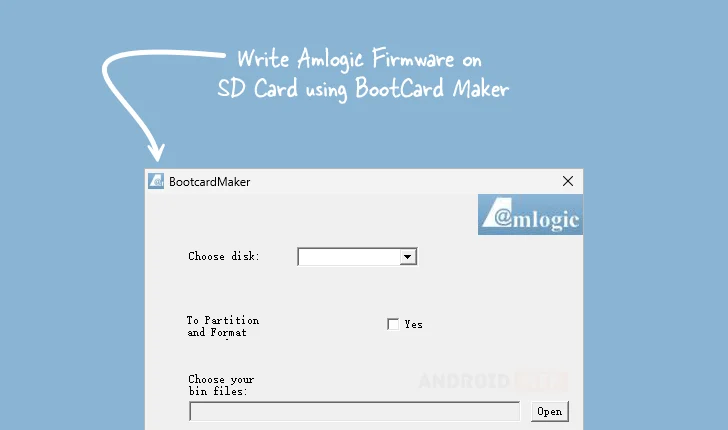
Recognizing that firmware recovery is inherently technical, the developers prioritized an accessible, user-friendly graphical interface. This design philosophy contrasts sharply with many legacy flashing tools that rely solely on command-line instructions, which can be daunting and error-prone for non-specialists. The BootCard Maker abstracts the complexity, presenting users with clear prompts for disk selection, firmware file input, and partition configuration. This visual approach minimizes the cognitive load associated with low-level system flashing, enabling users to select the correct physical drive, specify the firmware file (typically an Amlogic-specific .img or .bin package), and initiate the entire process with minimal technical overhead. This accessibility broadens the tool’s utility beyond professional repair shops and into the hands of informed enthusiasts.

Automated Partitioning and Precision Formatting
A critical aspect of successful firmware flashing is the preparation of the target medium. The BootCard Maker incorporates sophisticated logic to automatically manage the SD card’s structure. Before the firmware writing commences, the utility systematically partitions and formats the SD card according to the requirements of the specific Amlogic boot process. Amlogic systems often require a specific Master Boot Record (MBR) layout or specific partition schemes (like FAT32 or ext4 for different stages). By automating the creation of these precise partitions and ensuring the card is formatted correctly, the tool proactively eliminates common sources of failure related to incorrect media preparation, thereby significantly enhancing the reliability of the subsequent flashing operation.
Broad Compatibility with .bin Firmware Files
Flexibility in firmware handling is a hallmark of effective recovery utilities. The BootCard Maker demonstrates this by offering native support for standard .bin firmware files. These binaries often encapsulate critical low-level components, such as the primary bootloader code that dictates how the device initializes hardware. Support for this common format ensures that users can readily utilize official, vendor-supplied, or community-developed recovery packages without needing third-party conversion utilities. This versatility makes the tool adaptable across a wide array of Amlogic platforms that may utilize slightly different firmware packaging standards.
The Advantage of Portability: Zero Installation Requirement
The Amlogic BootCard Maker operates as a fully portable application. This characteristic means the executable file can be run directly from any location—a USB drive, a network share, or a temporary folder—without needing to write registry entries or place files in system directories. For IT professionals, field technicians, or consultants who frequently move between diagnostic workstations, portability is invaluable. It ensures a clean operational environment, eliminates potential conflicts with other installed software, and allows for rapid deployment of the recovery solution on any compatible Windows machine without administrative overhead or leaving residual traces on the host system.
A Vital Alternative to USB Burning Protocols
The utility’s existence is partly justified by the limitations inherent in USB-based recovery methods, such as those managed by the Amlogic USB Burning Tool. In scenarios where the device’s internal bootloader has been so severely corrupted that it fails to initialize the USB peripheral correctly, USB flashing becomes impossible. The BootCard Maker offers a crucial architectural alternative. By utilizing the SD card interface—which is often initialized at a much earlier stage in the boot sequence than the USB host controller—the tool provides a recovery path when the USB protocol is effectively dead. This redundancy in recovery methods dramatically increases the chances of reviving otherwise defunct hardware.
Deployment and Accessibility
The focus on broad compatibility extends to the operating system requirements. Recognizing the long lifecycle of many Amlogic-powered devices, the tool is engineered to function reliably across various iterations of the Windows operating system, supporting both 32-bit and 64-bit architectures. This broad compatibility ensures that users on older diagnostic hardware can still leverage the utility.
The availability of the software is facilitated through direct download links, streamlining the process for end-users and technicians alike. Currently, version 1.01 is highlighted as the stable release available for immediate deployment.
| Version | Download |
|---|---|
| 1.01 | [Link to Download] |
The commitment to providing this specialized tool underscores a broader trend in the embedded systems community: the necessity of readily available, robust offline recovery mechanisms. As Amlogic chipsets continue to dominate sectors ranging from smart home appliances to digital signage, the importance of utilities like the BootCard Maker in preserving hardware investment cannot be overstated. It transforms a potentially costly hardware failure into a manageable software repair exercise, secured by the simple, reliable medium of a bootable SD card. The tool represents an essential component in the modern hardware technician’s toolkit, ensuring that even deeply corrupted firmware installations are not an absolute end-point for Amlogic-based hardware.
