

Updated on September 8, 2025
The Rockchip Create Upgrade Disk Tool, a specialized Windows-based application, has emerged as an indispensable utility for developers, technicians, and enthusiasts working with Rockchip-powered hardware. Its primary function centers on the precise inscription of Rockchip boot firmware onto external storage media, predominantly SD cards. This capability transcends simple file copying; it facilitates the creation and meticulous management of both physical and logical partitions, thereby granting users granular control over how data, including critical image files and operating system components, is written to designated sectors of the storage device. This level of control is crucial for establishing reliable boot environments, executing rigorous hardware diagnostics, and deploying customized software builds across a wide array of Rockchip System-on-Chips (SoCs) utilized in single-board computers, Android TV boxes, and embedded systems.
The utility’s architecture is specifically tailored to interact with the low-level boot mechanisms inherent to Rockchip processors. When a device fails to boot or requires a complete system overhaul, the traditional method often involves complex flashing procedures through proprietary loaders. The Create Upgrade Disk Tool simplifies this by packaging the entire boot sequence onto a readily accessible medium like an SD card, transforming it into a portable recovery or installation drive. This abstraction layer significantly lowers the barrier to entry for complex firmware operations, making sophisticated system restoration accessible to a broader audience.
In-Depth Examination of Core Functionalities
The robust feature set embedded within the Rockchip Create Upgrade Disk Tool is designed to address the multifaceted requirements of firmware deployment and storage configuration. Each feature serves a critical role in ensuring device integrity and operational readiness.
Advanced Firmware Inscription Capabilities: At the heart of the tool lies its capacity for direct firmware writing. This is not merely about flashing a monolithic image; it involves correctly sequencing the necessary bootloaders, boot partitions, and potentially recovery environments required by the target Rockchip device. The tool inherently understands the structure expected by Rockchip’s boot ROM, ensuring that the inscribed data results in a valid, bootable state upon initial power-up. Support for various firmware file formats—often including .img or proprietary Rockchip packaging—ensures wide compatibility with evolving hardware standards and software releases. This feature is foundational for initial device provisioning or recovering "bricked" hardware where the internal eMMC or NAND memory is inaccessible via standard software interfaces.
Sophisticated Partition Management: A key differentiator of this utility is its advanced partition handling. Users are empowered to define the storage topology of the target SD card by creating and modifying both physical and logical partitions. Physical partitions divide the raw storage space into distinct, addressable blocks recognized by the operating system kernel. Logical partitions, often layered on top of extended physical partitions, allow for more flexible subdivision of space. This capability is vital for scenarios requiring dual-boot configurations, separating user data from system files, or dedicating specific partitions for logging or diagnostic capture. By enabling precise allocation, the tool ensures optimal utilization of the SD card’s capacity, preventing fragmentation and improving read/write performance for specific operational tasks.
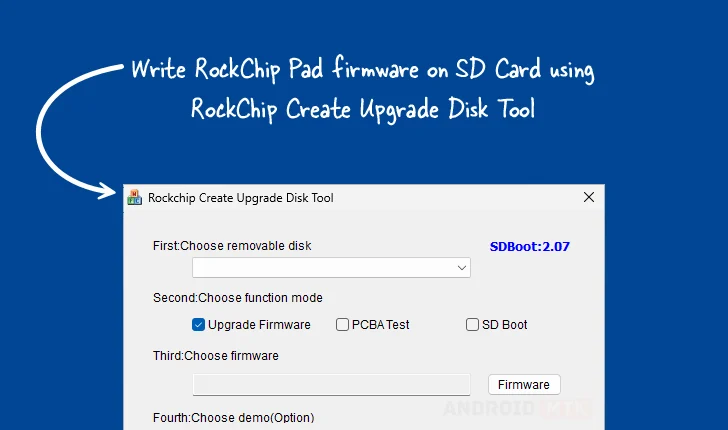
Versatile Multi-Mode Operation: The software is engineered for adaptability, supporting several operational modalities beyond standard firmware installation. The Firmware Upgrade Mode is the standard pathway for system restoration. However, the inclusion of PCBA Testing Mode suggests integration into the manufacturing or large-scale repair pipeline. In this context, the tool can load specific diagnostic routines onto the SD card, allowing technicians to rapidly verify the functionality of core components (Peripheral Chip Board Assembly) without needing a fully functional operating system installed internally. Furthermore, the SD Boot Option caters directly to development needs, allowing engineers to rapidly iterate on kernel and root filesystem changes by booting directly from the external media, bypassing the slower process of re-flashing internal memory for every minor modification.
Precision in Data Placement via Selective Writing: The ability to write specific data blocks or entire image files to precisely defined locations on the storage medium offers unparalleled control. This is crucial when dealing with specialized firmware components, such as vendor-specific blobs, custom boot splash screens, or encrypted data regions that must reside at exact sector offsets. Unlike generic disk imaging tools that overwrite entire volumes, the Create Upgrade Disk Tool allows for surgical precision, preserving existing partitions while updating only the necessary elements. This targeted approach significantly reduces the risk of accidental data loss during maintenance operations.
Transparent Operational Feedback: Recognizing that firmware operations are inherently sensitive, the tool incorporates robust Progress Monitoring. A highly visible, real-time progress indicator ensures that the user maintains situational awareness throughout the often time-consuming inscription process. This visual feedback is critical for diagnosing stalled operations or anticipating completion times, enhancing the overall user experience by eliminating ambiguity regarding the tool’s current status.

Integrated Demonstration and Validation Support: The optional Demo Support feature is a valuable addition for quality assurance and training environments. This functionality likely allows for the pre-loading of demonstration payloads or pre-configured system states. Developers can use this to quickly showcase device capabilities or validate that a specific hardware/software combination meets predefined acceptance criteria before the device is shipped or integrated into a larger network.
Essential Recovery and Reversion Mechanisms: In the dynamic world of embedded development, failures are inevitable. The Restore Capability built into the tool acts as a safety net. This feature is designed not only to revert the SD card to a previous, known-good state but also to potentially facilitate recovery from operations that terminated prematurely or resulted in an unbootable configuration on the target hardware. This emphasis on reversibility minimizes downtime associated with troubleshooting complex flashing errors.
Accessibility and Version Management
To support the diverse hardware ecosystem reliant on Rockchip technology, the developers provide access to several historical and contemporary versions of the utility. Maintaining compatibility across different firmware standards and Windows operating system architectures (32-bit and 64-bit) necessitates version control, which is clearly provided through the readily available download matrix.
The availability of versions 1.4, 1.53, and 1.7 indicates an active development cycle addressing bugs, improving performance, and adapting to newer Rockchip SoC families. For instance, Version 1.7 might incorporate specific optimizations or support for newer USB protocol standards or memory types introduced in recent hardware generations, whereas Version 1.4 might remain the most stable choice for legacy systems relying on older firmware structures. Users are strongly advised to select the version recommended by their specific hardware vendor or the firmware package they intend to deploy, ensuring protocol alignment between the tool and the target device’s expected boot sequence.
The provided download links direct users to centralized repositories, streamlining the process of acquiring the necessary software package. This standardized distribution method ensures that users obtain authentic, untampered versions of the essential flashing utility, a critical consideration given the sensitive nature of firmware manipulation.
Contextual Importance in the Embedded Landscape
The Rockchip Create Upgrade Disk Tool addresses a significant bottleneck in the Rockchip development and maintenance lifecycle. Rockchip processors are prevalent in markets demanding high performance at low cost, including budget laptops, educational tablets, smart home hubs, and industrial controllers. In these sectors, the ability to reliably provision storage externally is paramount. When internal eMMC storage fails or when a developer needs to test a kernel module against a clean slate without erasing the internal memory, an SD card flashing utility becomes the primary lifeline.
The tool’s emphasis on partition management also speaks to evolving security requirements. Modern operating systems often utilize distinct partitions for verified boot chains (like Verified Boot or dm-verity), where specific sectors must contain cryptographic signatures. By allowing users to write images selectively, the tool supports the correct placement of these security-critical elements, ensuring that the deployed firmware adheres to necessary integrity checks upon initialization.
In summary, the Rockchip Create Upgrade Disk Tool is far more than a simple writer; it functions as a comprehensive staging and diagnostic environment delivered via a familiar Windows interface. Its specialized features—spanning firmware inscription, partition control, multi-mode deployment, and progress tracking—cement its status as a cornerstone utility for anyone tasked with managing the boot integrity and storage configuration of Rockchip-based embedded systems as of late 2025.
