

The landscape of mobile operating systems is shifting once again as OnePlus announces the official arrival of the OxygenOS 17 Developer Preview, built upon the foundation of Android 17. This early-access release, affectionately referred to by the internal Google codename "Cinnamon Bun," marks a significant milestone for the OnePlus 15 flagship. While the rollout signals the beginning of a new chapter in performance and user interface design, it arrives with the heavy caveat that this software is in its infancy. For the community of enthusiasts and developers, this represents an opportunity to glimpse the future of the OnePlus ecosystem, albeit one that requires a high tolerance for technical instability.
The transition to Android 17 is not merely a numerical increment; it represents a fundamental refinement of how hardware and software interact. OnePlus has traditionally been at the forefront of the Android adoption curve, often being among the first manufacturers to integrate Google’s latest core features into its proprietary skin. With OxygenOS 17, the company aims to blend the "Fast and Smooth" philosophy that has defined its brand with the underlying architectural improvements introduced in the latest Android version. These improvements typically focus on enhanced privacy controls, more granular permission management, and significant optimizations for high-refresh-rate displays and multi-tasking capabilities.
However, the current release is strictly a Developer Preview. In the lifecycle of software development, this is the most volatile stage. It is designed primarily for app developers to test their software against new APIs and for hardcore enthusiasts to provide telemetry data back to OnePlus. Consequently, the build is riddled with the kinds of bugs that would make it unsuitable for a primary device. Users can expect intermittent connectivity issues, rapid battery depletion, and potential crashes in third-party applications that have not yet been optimized for the Android 17 framework. The "Beta 2" designation suggests that while some initial catastrophic hurdles have been cleared, the system remains a work in progress where core functions—such as mobile payments, biometric authentication, or high-end camera processing—might behave unpredictably.
Before any user attempts to bridge the gap between OxygenOS 16 and this new frontier, several critical preparations are mandatory. The most paramount of these is the execution of a comprehensive data backup. The transition to a Developer Preview is a destructive process for local storage. To install the new firmware, the system must undergo a factory reset, wiping all photos, messages, documents, and application data. Furthermore, users must ensure their OnePlus 15 maintains at least a 30% battery charge and has several gigabytes of free storage space to accommodate the substantial firmware package. There is also the inherent risk of "bricking" the device—a state where the hardware becomes unresponsive due to a software failure—though this is rare if instructions are followed precisely.
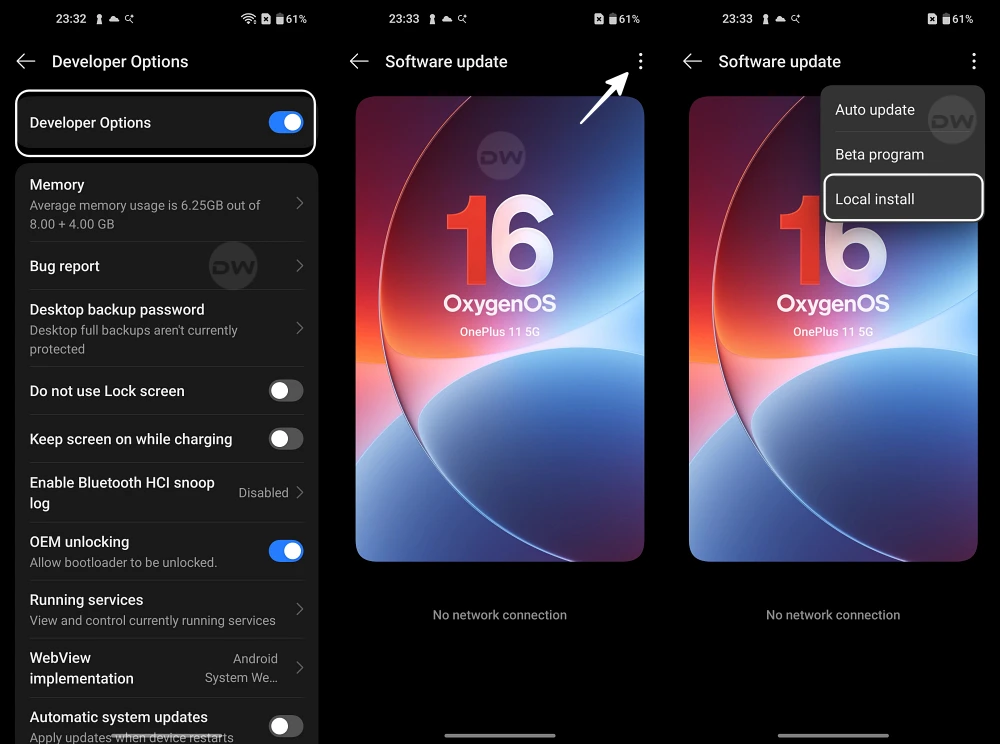
For users situated in the European (EU) and Indian (IN) regions, the installation process utilizes the integrated "Local Install" method. This pathway is preferred for its relative simplicity, though it requires the user to manually handle the firmware file. First, the specific Android 17 ROM package must be downloaded directly to the phone’s internal storage. It is vital that the file remains in the root directory and is not tucked away inside a subfolder. Once the download is verified, the user navigates through the system settings to the "About Device" section. By tapping on the version card and accessing the overflow menu (often represented by three dots in the top right corner), the "Local Install" option should appear. Selecting the downloaded package initiates the transformation. If the "Local Install" option is missing or greyed out—a common occurrence in newer iterations of OxygenOS—users may need to enable Developer Options or utilize a specific "Local Install" utility APK provided by the community to bypass the restriction.

The North American (NA) region follows a slightly different protocol, typically requiring a specialized APK tool to facilitate the update. Because carrier-unlocked and carrier-branded models in North America often have different partition structures, OnePlus provides a dedicated installation application. Users in this region must download the firmware and the accompanying installer APK. Once the APK is installed and granted the necessary system permissions, it acts as the bridge, allowing the user to select the local firmware file and trigger the update. This method ensures that the regional specificities of the NA hardware are respected during the flash process, minimizing the risk of losing cellular band compatibility.
Once the installation is complete, the device will reboot into OxygenOS 17. Initial impressions will likely reveal a UI that feels familiar yet distinct. OnePlus has been leaning into a design language that emphasizes fluid animations and "aquamorphic" aesthetics. With Android 17, this is expected to evolve with deeper integration of Material You color polling and perhaps new widgets that leverage the latest Google APIs. However, users should be prepared for the "Cinnamon Bun" experience to be unpolished. Known issues in these early builds often include the inability to use 5G in certain areas, broken Face Unlock functionality, and graphical glitches in the notification shade. These are not failures of the device itself but rather the growing pains of a new operating system.
The question then arises: what if the experience is too unstable for daily use? OnePlus has accounted for this by providing a clear, albeit equally destructive, downgrade path. Moving back to OxygenOS 16 (Android 16) is a necessity for many who realize that the cutting edge is a bit too sharp. The downgrade process mirrors the installation process but requires a specific "Rollback" firmware package. It is crucial to note that moving backward in versions also triggers a complete data wipe. Users cannot "downgrade" and keep their settings; the system must be reset to ensure compatibility with the older architecture. This highlight reinforces why the initial backup is the most important step in the entire journey.
As the development cycle progresses, OnePlus will move from this Developer Preview into an Open Beta phase, and finally to a stable OTA (Over-The-Air) rollout. Each phase will see the "Bugs" list shrink and the "Features" list grow. For now, OxygenOS 17 is a playground for the brave. It represents the collaborative spirit of the Android community, where users help shape the final product through feedback and bug reporting. By participating in this early rollout, OnePlus 15 owners are not just users; they are part of the development pipeline that will eventually deliver a polished "Cinnamon Bun" experience to millions of devices worldwide.
In the broader context of the smartphone industry, this rapid deployment of Android 17 demonstrates OnePlus’s commitment to longevity and software support. In an era where hardware gains are becoming incremental, the software experience is the primary differentiator. By giving developers early access, OnePlus ensures that when the stable version finally hits the mainstream, the app ecosystem will be ready to take full advantage of the new hardware-software synergy. For those who choose to wait, the stable release of OxygenOS 17 promises to be a refined, AI-enhanced, and highly efficient version of the OnePlus experience. For those who choose to install it today, the journey into the future of Android begins now, one bug report at a time. Stay tuned as more devices are added to the compatibility list and the firmware evolves toward its final, polished form.
