

For over a decade, the landscape of Samsung mobile device customization and maintenance has been dominated by a single, monolithic utility: Odin. Originally an internal tool leaked from Samsung’s own service centers, Odin became the de facto standard for enthusiasts, developers, and repair technicians looking to flash stock firmware, recover "bricked" handsets, or downgrade operating system versions. Despite its ubiquity, Odin has long remained a closed-source, proprietary relic of a bygone era of software design, often criticized for its aging user interface and occasionally sluggish performance. However, the tides of the Android modding community are shifting. The emergence of Brokkr, a sophisticated open-source alternative, promises to modernize the firmware flashing experience while providing the transparency that the developer community has long craved.
Developed by the prominent XDA Senior Member Royna, Brokkr arrives at a time when the "Right to Repair" and open-source movements are gaining unprecedented momentum. Unlike its predecessor, Brokkr is built from the ground up with modern coding standards and an emphasis on user efficiency. Named after the legendary Norse blacksmith who helped forge Mjölnir, the tool aims to be the definitive instrument for shaping the software environment of Samsung’s vast Galaxy lineup. While Odin has served the community well, the introduction of an open-source competitor is more than just a matter of preference; it is a necessary evolution for a community that prides itself on software freedom and security.
The primary draw of Brokkr lies in its fundamental architecture. In the world of firmware flashing, data integrity is paramount. A single corrupted byte during the transfer of a system image can result in a "hard brick," rendering an expensive smartphone little more than a glass-and-metal paperweight. To prevent this, firmware files are packaged with MD5 checksums—cryptographic hashes that verify the file has not been altered or corrupted. Traditional tools like Odin perform this verification the moment a file is loaded into the interface. For the "AP" (System) file, which can often exceed five or six gigabytes in modern Android builds, this verification process can cause the software to hang or freeze for fifteen to thirty seconds while the CPU calculates the hash.

Brokkr optimizes this workflow significantly. By deferring the MD5 verification until the moment immediately preceding the flash—or handling it in a more resource-efficient background thread—Brokkr allows for near-instantaneous file loading. Users have reported that AP files which take half a minute to load in Odin are recognized by Brokkr in a single second. This efficiency is not merely a convenience; for professional technicians handling dozens of devices a day, these saved seconds accumulate into significant productivity gains.
Furthermore, the open-source nature of Brokkr addresses a long-standing security concern within the modding community. Because Odin is proprietary and its source code is not public, users must essentially trust that the binaries they download from third-party hosting sites are untainted. Brokkr, by contrast, allows anyone to inspect its codebase on platforms like GitHub. This transparency ensures that there are no hidden telemetry features, malicious hooks, or backdoors. In an era where mobile devices contain our most sensitive personal and financial data, the ability to audit the tools used to modify their core operating systems is an invaluable asset.

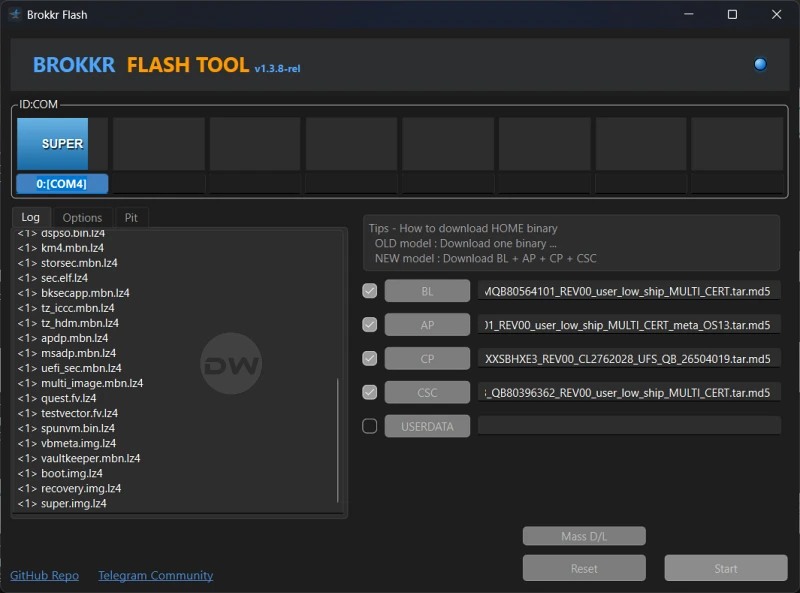
The user interface of Brokkr also marks a significant departure from the Windows XP-era aesthetic of Odin. While Odin’s interface is cluttered with cryptic checkboxes and legacy options that many modern users find intimidating, Brokkr adopts a cleaner, more intuitive layout. It prioritizes the essential partitions that Samsung users need to interact with: the Bootloader (BL), the System/Kernel (AP), the Modem/Radio (CP), and the Consumer Software Customization (CSC). By streamlining the visual experience, Brokkr lowers the barrier to entry for novice users who may be attempting to unbrick their devices for the first time.
To understand the practical application of Brokkr, one must look at the standard procedure for Samsung firmware restoration. The process begins with the acquisition of the correct firmware package, typically sourced through tools like Frija or SamFirm, which pull binaries directly from Samsung’s servers. Once the multi-gigabyte zip file is extracted, the user is presented with several files prefixed with BL, AP, CP, and CSC.

Before engaging with Brokkr, the prerequisite of data preservation cannot be overstated. Flashing firmware is a high-level administrative action that interacts with the device’s storage at a block level. While some flashing methods—specifically those using the "HOME_CSC" file—aim to preserve user data, the risk of data loss is ever-present. Therefore, a comprehensive backup of photos, contacts, and application data is the first mandatory step in any flashing workflow.
The transition to "Download Mode" is the next critical phase. Samsung devices utilize a proprietary pre-boot environment, often referred to as "Odin Mode," which allows the device to communicate with a PC via the Samsung USB drivers. Typically achieved by holding a specific combination of volume and power buttons while connecting the device to a computer, this mode places the hardware in a receptive state, waiting for commands from the flashing utility.

Once the device is connected and recognized by the PC, the user populates the corresponding slots in Brokkr. The BL file goes into the Bootloader slot, the CP file into the Modem slot, and the AP file into the System slot. The CSC slot offers a choice that defines the outcome of the flash: using the standard "CSC" file will trigger a factory reset, wiping the device clean for a fresh start (ideal for fixing persistent software bugs), while the "HOME_CSC" file attempts to flash the system update without erasing the user’s personal partitions.
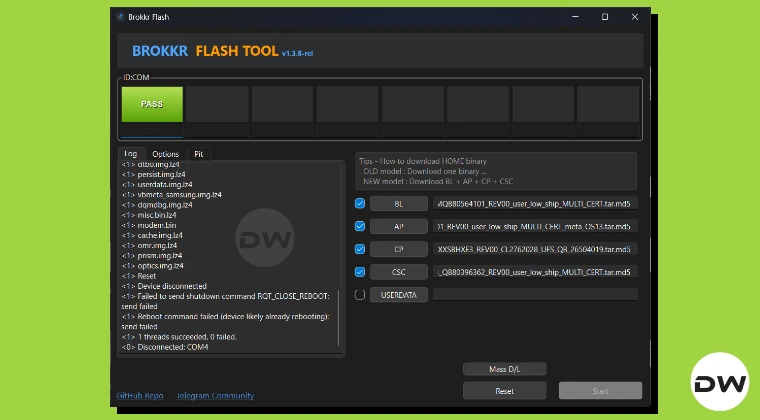
The final execution phase in Brokkr is where the tool’s performance shines. Upon hitting the "Start" button, the utility performs its rapid MD5 checks and begins the sequential transfer of data. A progress bar tracks the movement of the system images, and upon completion, the device automatically reboots. This "reboot-on-success" logic is a hallmark of a well-designed flashing tool, ensuring that the device transitions immediately from its vulnerable state back into its functional operating system.

However, the power of Brokkr extends beyond simple updates. It is a vital tool for the "unbricking" process. When a device fails to boot—perhaps due to a failed over-the-air update or an experimental modification—Brokkr can be used to re-partition the storage and reinstall the factory software from scratch. This capability provides a safety net for the entire Samsung ecosystem, giving users the confidence to explore their devices’ capabilities knowing they have a reliable recovery path.
Despite its advantages, the emergence of Brokkr does not necessarily mean the immediate death of Odin. Odin remains a battle-tested veteran with years of edge-case compatibility under its belt. However, Brokkr represents the future. As Samsung continues to update its security protocols, such as Knox and the locked bootloaders found on North American Snapdragon variants, the community needs a tool that can adapt as quickly as the hardware does. An open-source project like Brokkr can be updated by any developer in the community, ensuring that it remains compatible with the latest Galaxy S and Z series devices long after a proprietary tool might have been abandoned.

In conclusion, Brokkr is more than just a software utility; it is a statement of intent from the Android development community. It proves that the tools we use to maintain our technology can be fast, beautiful, and—most importantly—transparent. By offering a high-performance alternative to the aging Odin, Royna has provided Samsung users with a powerful new instrument for device sovereignty. Whether you are a seasoned developer looking for a more efficient workflow or a casual user trying to breathe life back into a boot-looping phone, Brokkr stands as a testament to the enduring power of community-driven innovation. As the project matures and more users migrate from the old guard to this modern blacksmith’s forge, the era of closed-source flashing may finally be coming to a close.
