

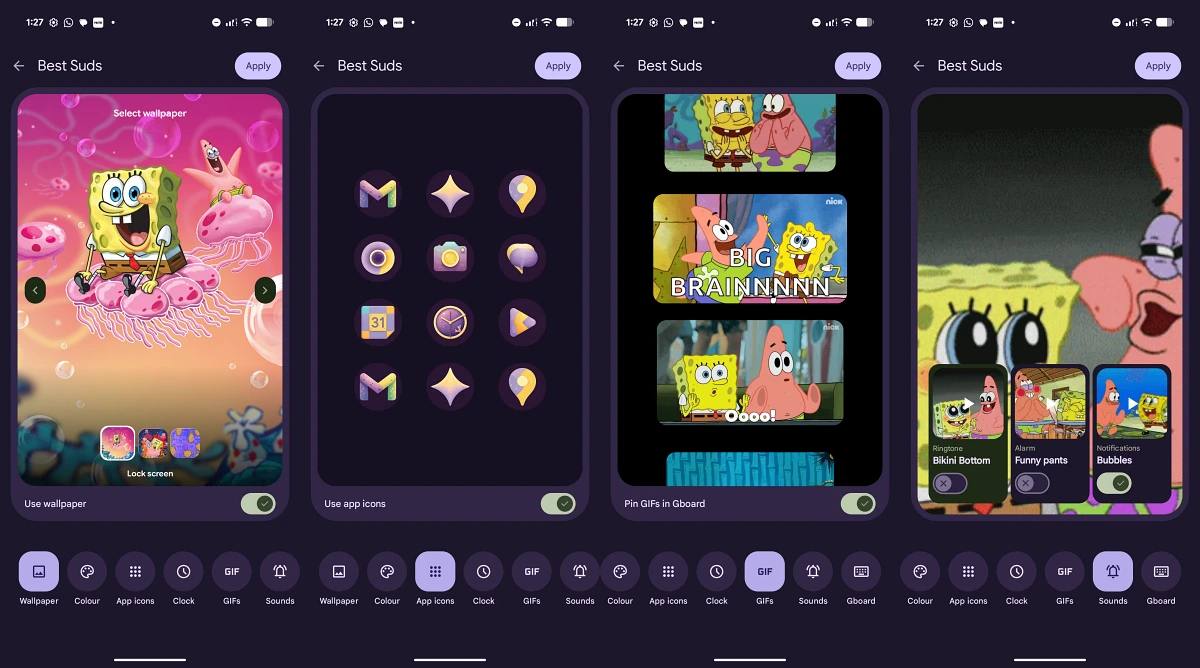
The landscape of the Android operating system has long been defined by a tug-of-war between the minimalist, functional aesthetic of Google’s "stock" experience and the feature-rich, highly customizable skins offered by third-party manufacturers. For years, users of Google’s Pixel hardware have enjoyed the smoothest performance and the fastest updates, yet they often looked with envy at the deep personalization options available on Samsung’s One UI or Xiaomi’s HyperOS. That dynamic is shifting significantly with the release of the March Feature Drop for Android 17. This latest update represents a pivotal moment for the Pixel ecosystem, introducing a suite of features that leverage artificial intelligence to bridge the gap between utility and personal expression. At the heart of this transformation are the newly introduced custom AI icon packs and themes, features that promise to redefine the visual identity of the Pixel lineup.
Google’s Feature Drops have evolved from simple bug-fix bundles into major software events that breathe new life into existing hardware. The March update is particularly ambitious, targeting several key areas of the user interface (UI) and user experience (UX). While the headlines are dominated by visual changes, the update also brings functional improvements to staple features like Circle to Search, a new dedicated Now Playing application, and a sophisticated "Magic Cue" recommendation engine. However, for the enthusiast community, the most significant additions are the tools that allow for a more granular control over the device’s appearance—specifically the custom AI-generated icon packs and an expanded theme engine that goes far beyond the initial promise of Material You.

The journey toward this level of customization began with the introduction of Material You in Android 12, which used color extraction from wallpapers to create a cohesive system theme. While revolutionary at the time, many users found the implementation of "themed icons" to be restrictive, as it relied on developers to provide compatible assets. The new AI-driven approach in Android 17 removes these hurdles. By utilizing on-device generative models, the system can now analyze the user’s preferred aesthetic and generate custom icon packs that maintain visual consistency across both first-party and third-party applications. This ensures that the home screen no longer looks like a fragmented collection of mismatched designs, but rather a curated, artistic interface.
For users currently enrolled in the Android 17 Beta program, specifically those on Beta 2 or subsequent builds, accessing these features requires a slightly more technical approach than those on the stable QPR3 (Quarterly Platform Release) branch. Because these UI enhancements are often hidden behind "feature flags" during the testing phase, beta testers must employ specific system tweaks to enable the new customization menus. This process, while straightforward for seasoned Android enthusiasts, highlights the experimental nature of the current build. Testing on flagship devices like the Pixel 9 Pro XL has shown that while the features are technically in beta, the generative AI performance is remarkably fluid, suggesting that Google has optimized its Gemini-powered backend to handle real-time UI rendering without significant battery drain.
Beyond the visual overhaul, the March Feature Drop significantly expands the utility of Circle to Search. Since its debut, Circle to Search has become one of the most praised additions to the Android toolkit, allowing users to identify objects and text without switching apps. The new update introduces "Find the Look" and "Try it on," two features clearly aimed at the intersection of search and e-commerce. "Find the Look" allows users to highlight an item of clothing or furniture and immediately see curated styling suggestions or similar products from across the web. "Try it on" takes this a step further by utilizing augmented reality (AR) and AI to project how specific items might look on the user or in their environment. These additions transform a simple search tool into a comprehensive shopping assistant, demonstrating Google’s intent to monetize and utility-maximize every pixel on the screen.

The update also addresses long-standing requests for better media and environmental awareness. The "Now Playing" feature, a Pixel staple that identifies music playing in the vicinity, has been graduated to a dedicated application. Previously buried deep within the sound settings, the new standalone app provides a more robust history of discovered tracks, deeper integration with streaming services like YouTube Music and Spotify, and a more intuitive interface for managing past discoveries. Similarly, the "At a Glance" widget, which serves as the information hub of the Pixel home screen, has received numerous updates to its backend logic, allowing it to surface more relevant data points such as real-time package delivery tracking, commute disruptions, and even smart home alerts with higher precision.
One of the more exclusive additions in this cycle is "Magic Cue," a restaurant recommendation engine that leverages Google’s vast knowledge graph and the user’s personal preferences to suggest dining options. As of the March update, this feature remains exclusive to the Pixel 10 series. This exclusivity underscores a growing trend in Google’s strategy: using cutting-edge software features to drive sales of its latest silicon, the Tensor G5 and G6 chips. By tying "Magic Cue" to the Pixel 10, Google is signaling that the next generation of AI-driven personal assistance requires the specialized NPU (Neural Processing Unit) capabilities found only in its newest hardware.
Perhaps the most technically impressive part of the Android 17 March update is the continued evolution of the "Desktop Experience." For years, Android has toyed with the idea of a desktop mode similar to Samsung DeX or Motorola’s Ready For. With the latest update, Google has refined the windowing logic and taskbar functionality, making the Pixel a much more viable productivity tool when connected to an external monitor. This move is part of a broader strategy to position the Pixel not just as a mobile device, but as a central hub for both work and play. The improvements in the desktop interface, combined with the new AI themes, allow for a seamless transition between a personalized mobile UI and a professional desktop environment.

For the average Pixel user, the arrival of these features represents the fulfillment of a long-term promise. The "breath of life" mentioned by many in the community refers to the feeling that the Pixel is finally shedding its reputation for being visually "plain." By integrating AI directly into the theme engine, Google is providing a level of customization that feels more modern and intelligent than the manual icon switching found on other platforms. Instead of downloading static packs from the Play Store, users are now participating in a dynamic design process where the phone learns and adapts to their visual taste.
As Android 17 continues to mature through its QPR cycles, the stability and reach of these AI features are expected to expand. What currently requires "tweaks" for beta users will soon become the standard for the entire Android ecosystem. The March Feature Drop serves as a roadmap for the future of the operating system—a future where the interface is not a fixed set of assets, but a fluid, AI-generated experience tailored to the individual. Whether it is through the sophisticated shopping tools of Circle to Search or the artistic expression of AI icon packs, Google is making it clear that the next era of the smartphone will be defined by how well the device understands and reflects its user. For those on the Pixel 9 Pro XL and other compatible devices, that future has arrived, turning the daily interaction with a smartphone into something more personal, more productive, and significantly more beautiful.
