

The digital landscape of the Android ecosystem is governed by a complex and often invisible framework of trust, designed to ensure that the devices interacting with sensitive services are secure, untampered, and authentic. At the heart of this security architecture lies the "keybox," a critical component of the hardware-backed attestation system that serves as the device’s digital birth certificate. In recent years, as the battle between mobile security protocols and community-driven device modification has intensified, the status of these keyboxes—specifically whether they have been revoked by Google—has become a central concern for developers, security researchers, and advanced enthusiasts alike. While most users rely on automated tools to verify their device’s standing, understanding the manual, official methodology for identifying a revoked keybox offers a profound look into the mechanics of Android’s Play Integrity API and the broader Public Key Infrastructure (PKI) that protects billions of mobile users.
To comprehend the significance of keybox revocation, one must first understand the role of the Trusted Execution Environment (TEE) and the Keystore system. Every modern Android device is equipped with a secure hardware area, isolated from the primary operating system, which handles sensitive cryptographic operations. Within this environment, the keybox provides the necessary cryptographic material to prove to Google’s servers that the device is running a legitimate, certified version of Android. When a user attempts to use a high-security application, such as a banking interface or a digital wallet like Google Pay, the Play Integrity API (the successor to the legacy SafetyNet) queries the device. The device responds by signing a "challenge" using its hardware-backed keys. If the keys match a known, valid keybox, the device is granted "Integrity" status. However, if those keys are leaked, shared across the internet to bypass security checks, or otherwise compromised, Google adds the unique serial identifiers of that keybox to a global revocation list, effectively "blacklisting" any device attempting to use those specific credentials.

The most common methods for checking this status involve third-party applications, such as the Play Integrity API Checker, or internal settings within the Google Play Store. These tools act as a user-friendly interface for the API, providing a simple "pass" or "fail" result. However, these results can sometimes be ambiguous or obscured by software "spoofing" techniques used by the rooting community to mask a device’s true state. To find the absolute "source of truth," one must look toward the official manual verification process. This method bypasses the convenience of app-based interfaces and goes directly to the cryptographic roots of the device’s identity: the serial number of the keybox file and Google’s official repository of revoked serial IDs.
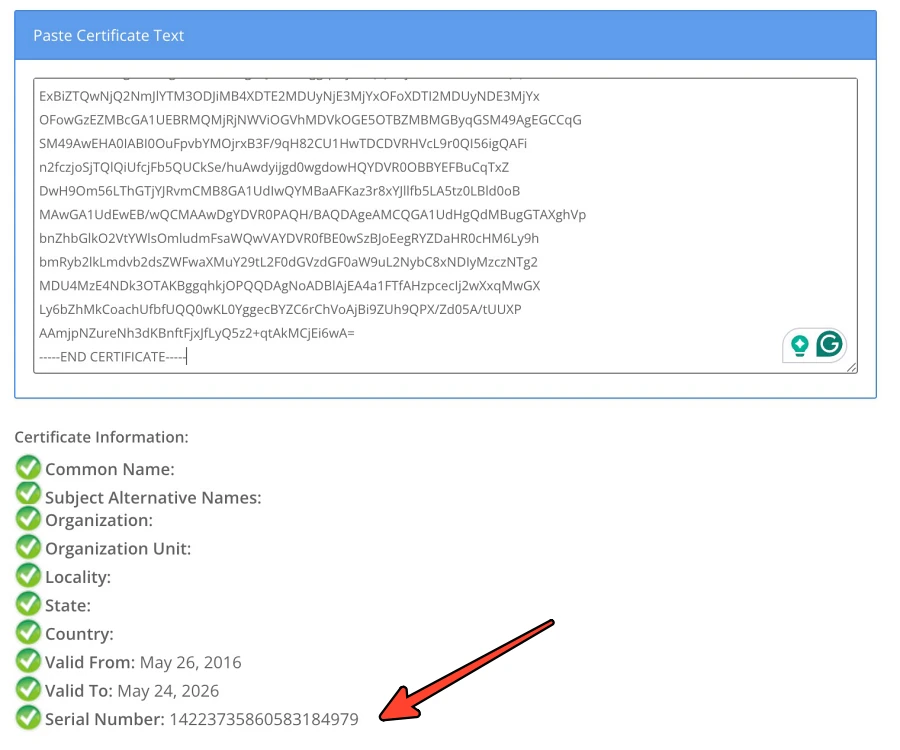
The manual audit begins with the extraction of the device’s keybox serial number. This is not a simple task for the average user, as it typically requires access to the device’s system-level information or the specific certificate chain provided by the hardware during an attestation request. In a technical environment, a developer might use tools to dump the attestation certificate and parse its fields to find the unique identifier. This serial number is a hexadecimal string that uniquely identifies the set of keys issued to a specific batch of devices or a specific hardware model. Once this identifier is obtained, the investigator must cross-reference it with the master list maintained by Google. This list functions similarly to a Certificate Revocation List (CRL) in traditional web security; it is a database of identifiers that were once trusted but are now considered compromised. If a device’s serial number appears on this list, the hardware-backed integrity of that device is permanently voided in the eyes of the Play Integrity system.
Why would Google take the drastic step of revoking a keybox? The answer lies in the ongoing "cat-and-mouse" game between Google’s security teams and the custom ROM community. For users who unlock their bootloaders or root their devices, passing the Play Integrity check becomes a significant challenge because Google’s servers can detect that the software environment has been modified. To circumvent this, some developers discovered they could "borrow" keyboxes from other certified devices—often low-power IoT devices or older smartphones—and inject them into the firmware of a rooted device. This allows the modified device to "spoof" the identity of a secure, certified device. When Google discovers that a specific keybox is being used by thousands of different devices simultaneously across the globe, it is a clear indicator of a leak. In response, Google revokes that serial ID, rendering it useless for everyone. This cycle of discovery and revocation is what necessitates a manual check for those trying to diagnose why their device has suddenly lost its "Strong Integrity" status.

The official manual method, while technically rigorous, is rarely the first choice for the general public. As noted by industry experts, there is a distinct lack of efficiency in performing these steps manually when automated tools can query the API in milliseconds. However, the manual approach serves a vital educational and diagnostic purpose. For a security auditor, relying on an app to tell you if a device is secure is a circular logic; if the device is compromised, the app itself might be compromised or provide a false positive. By manually inspecting the serial ID and checking it against a known-good database, an auditor removes a layer of abstraction and deals directly with the raw data. This level of transparency is essential for maintaining trust in an ecosystem where software can be easily manipulated.
Furthermore, the implications of a revoked keybox extend far beyond the inability to use mobile payments. We are moving toward an era where mobile devices are used as digital keys for vehicles, identity documents for travel, and secure tokens for corporate access. If a device’s hardware-backed trust is revoked, it essentially loses its "digital personhood." It can no longer be trusted to prove that it is what it claims to be. This is why Google’s revocation list is guarded with such importance. It is the final barrier that prevents compromised hardware from undermining the security of the entire Android platform.
For the enthusiast community, the manual check is often a sobering reminder of the limitations of modern device modification. When a keybox is revoked, there is no "un-revoking" it. The hardware remains functional, but its ability to interact with the secure tier of the Android ecosystem is extinguished. This has led to a shift in how custom ROM developers approach integrity checks, moving away from simple spoofing and toward more sophisticated methods of environment isolation. Yet, regardless of the method used to bypass checks, the fundamental truth remains: Google holds the master list, and the serial ID is the key to the kingdom.

The manual verification process also highlights a broader trend in cybersecurity: the move toward "Zero Trust" architectures. In a Zero Trust model, no device is trusted by default, even if it was manufactured by a reputable company. Trust must be continuously earned and verified through cryptographic proofs. The keybox is the cornerstone of this verification. By allowing individuals to manually check the revocation status of their hardware, Google provides a window into the infrastructure that makes this continuous verification possible. It allows the user to see the "why" behind a failed integrity check, transforming a frustrating error message into a clear, data-driven reality.
In conclusion, while the average Android user will likely never need to manually locate their keybox serial number or navigate Google’s revocation databases, the existence of this "official" path is a testament to the transparency and robustness of the Android security model. It serves as a bridge between the high-level user interface and the low-level cryptographic realities of the hardware. Whether used for deep-system troubleshooting, security research, or simple curiosity, understanding how to verify a keybox’s status manually provides a comprehensive view of the safeguards that keep our digital lives secure. As the Play Integrity API continues to evolve and become more deeply integrated into the fabric of mobile computing, the ability to audit and understand these underlying systems will remain an invaluable skill for anyone operating at the intersection of technology and security. The choice to use this method may be yours, but the knowledge of its existence ensures that the power of verification remains in the hands of those who seek the truth behind the "pass" or "fail" screen.
