

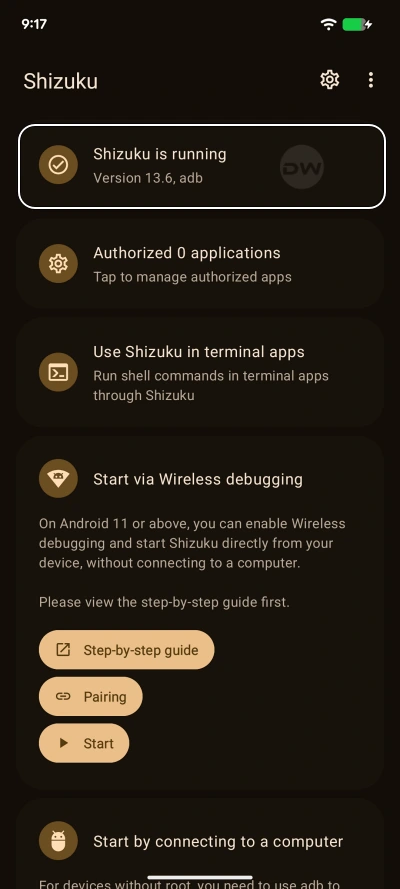
The Android ecosystem has long been divided by a fundamental technical barrier: the choice between the unbridled control of a rooted device and the rigid security of a stock, non-rooted operating system. For years, power users seeking to modify system behaviors without compromising the integrity of their device’s bootloader have turned to Shizuku. This specialized tool acts as a bridge, allowing third-party applications to access high-level System APIs through the Android Debug Bridge (ADB) runtime. However, the primary drawback of Shizuku on non-rooted devices has always been its lack of persistence. Every time a device is restarted, the Shizuku service terminates, requiring the user to manually re-initialize the process via a computer or a cumbersome Wireless Debugging handshake. This limitation has finally been addressed by a new technological breakthrough in the developer community, enabling Shizuku to achieve auto-start capabilities on boot without requiring administrative root access.
To understand the significance of this development, one must first grasp the architectural role Shizuku plays within the Android framework. Unlike traditional applications that operate within a restricted "sandbox," Shizuku leverages the permissions of the shell user. This allows it to perform tasks that are usually reserved for the system itself, such as managing app permissions, modifying UI elements, or accessing hidden system files. While the root method for Shizuku has always offered a seamless "set it and forget it" experience, the non-root methods—specifically those utilizing PC-based ADB or on-device Wireless Debugging—have been hindered by the ephemeral nature of the ADB daemon. Under standard conditions, the Android security model wipes these temporary permissions upon a system reboot to ensure that unauthorized processes do not gain a permanent foothold in the system.
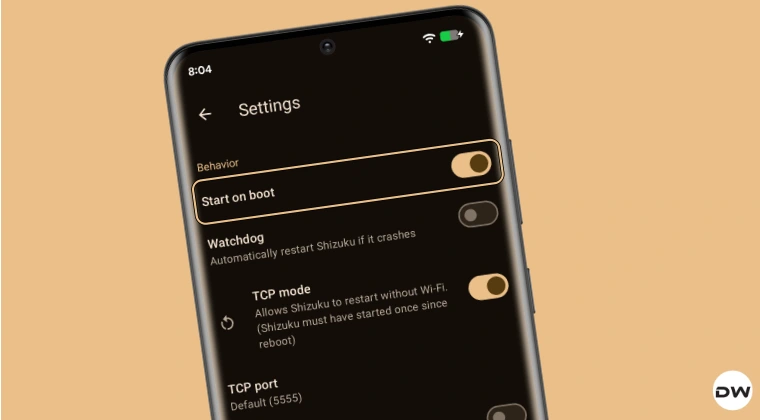
The newly surfaced solution bypasses this hurdle by utilizing modified "forks" of the original Shizuku source code, specifically those maintained by prominent community developers such as thedjchi and pixincreate. These developers have identified a method to maintain service continuity by leveraging a specific, high-level Android permission known as WRITE_SECURE_SETTINGS. By granting this permission to a specialized version of Shizuku, users can effectively authorize the application to manage its own startup sequence. This transition represents a major shift in the utility of non-rooted devices, bringing them one step closer to the convenience previously exclusive to the enthusiast-level rooting community.
The core mechanism of this automated startup relies on a one-time configuration involving the Android Debug Bridge. During the initial setup, the user must grant the application the authority to modify secure system settings. Once this permission is established, the modified Shizuku client can listen for the system’s "boot completed" broadcast. After the device restarts, there is a brief latency period—typically lasting between four and five seconds—during which the system initializes the Wi-Fi stack and establishes a local network environment. As soon as the network is active, the automated Shizuku service triggers itself in the background. This chain reaction ensures that any dependent applications, such as advanced file managers, system debloaters, or UI customizers, can resume their functions immediately without user intervention.
For users interested in implementing this persistent environment, the process begins with the selection of the appropriate software fork. While the standard version of Shizuku available on mainstream repositories focuses on a specific security philosophy that avoids auto-start features, the forks provided by thedjchi and pixincreate are engineered specifically for this purpose. After installing the chosen version, the user must navigate to the developer options of their Android device to enable Wireless Debugging. This serves as the initial "handshake" that allows the app to communicate with the internal system shell.

The pivotal moment in the setup involves the escalation of permissions via a command-line interface. By connecting the device to a workstation or using a local shell terminal, the user must execute a command that grants the android.permission.WRITE_SECURE_SETTINGS to the Shizuku package. This specific permission is a critical component of the Android security architecture; it allows an application to read or write to the secure settings table, which governs everything from input methods to system-level automation toggles. In this context, it provides Shizuku with the "key" to restart its own service after the OS has finished its boot sequence.
Once the permission is granted, the manual labor associated with maintaining Shizuku effectively vanishes. The software is designed to be intelligent enough to detect the state of the device’s connectivity. Because the non-root method relies on the Wireless Debugging protocol, the service requires an active network interface to function. The slight delay observed after a reboot is a deliberate safety and functional buffer, allowing the Android OS to fully load its network drivers and connect to a known Wi-Fi access point. Once that connection is confirmed, the Shizuku service initializes silently in the background, signaling to all dependent apps that the system-level bridge is active.
This advancement has profound implications for the broader Android community. For many, the decision to avoid rooting is driven by the need to maintain access to banking applications, digital wallets, and high-security corporate software, all of which are often disabled when a device’s bootloader is unlocked. By achieving auto-start capabilities for Shizuku without root, users no longer have to choose between system-level customization and the security features provided by the manufacturer. This "middle ground" provides the best of both worlds: the stability and security of an untouched system image combined with the power of automated, persistent system modifications.

Furthermore, the availability of multiple forks, such as the one from pixincreate, ensures a level of redundancy for the user. If a particular device’s firmware or manufacturer skin (such as Samsung’s One UI or Xiaomi’s HyperOS) interferes with the execution of one version, the alternative fork often provides a different approach to the same goal. These developers have essentially democratized a feature that was once the sole domain of the most technically adventurous users, making it accessible to anyone comfortable with basic ADB commands.
The logic behind using WRITE_SECURE_SETTINGS as the catalyst for automation is also a testament to the ingenuity of the Android developer community. Rather than attempting to exploit a vulnerability in the operating system, these forks utilize legitimate, albeit restricted, system permissions to achieve their goals. This makes the method relatively stable across different versions of Android, from the aging Android 11 to the latest iterations of Android 14 and beyond. As long as the underlying Wireless Debugging architecture remains a part of the Android Open Source Project (AOSP), this method of persistence is likely to remain viable.
In conclusion, the ability to automatically start Shizuku on reboot without root access marks a significant milestone in Android customization. It eliminates the single greatest friction point for non-root power users: the need for manual reactivation. By following a one-time setup involving specialized forks and the granting of secure system permissions, users can now enjoy a seamless experience where their favorite system-level tools are always ready for use. This development not only enhances the utility of the Shizuku framework but also reaffirms the flexibility of the Android platform for those willing to explore its deeper configurations. As the community continues to refine these tools, the line between rooted and non-rooted functionality continues to blur, offering users more control over their mobile hardware than ever before.
