

The Poco F7 has rapidly solidified its reputation as a powerhouse within the enthusiast community, continuing the long-standing tradition of Xiaomi-branded devices serving as the primary canvas for custom software development. While the device entered the market with formidable hardware specifications designed to challenge flagship competitors, its true potential is often unlocked through the vibrant third-party developer ecosystem. In a remarkably short timeframe following its release, the Poco F7 has already seen the deployment of over thirty custom ROMs, ranging from minimalist AOSP builds to feature-rich alternatives based on Android 16. This momentum has reached a new peak with the official introduction of OrangeFox Recovery for the Poco F7, a development that provides users with a sophisticated gateway to deep system-level modifications and enhanced device maintenance capabilities.
The release of a custom recovery is frequently regarded as the most critical milestone in a smartphone’s aftermarket lifecycle. While many users are content with the stock recovery environment or the basic AOSP recovery provided alongside custom ROMs, these standard tools are intentionally restrictive. The stock recovery is designed primarily for official over-the-air (OTA) updates and factory resets, offering little in the way of granular control. OrangeFox Recovery, conversely, is a fork of the venerable Team Win Recovery Project (TWRP), refined with a more intuitive Material Design interface and a suite of integrated scripts designed to simplify complex tasks. Its arrival on the Poco F7 signifies that the device has moved beyond experimental modding and into a phase of mature, stable customization.

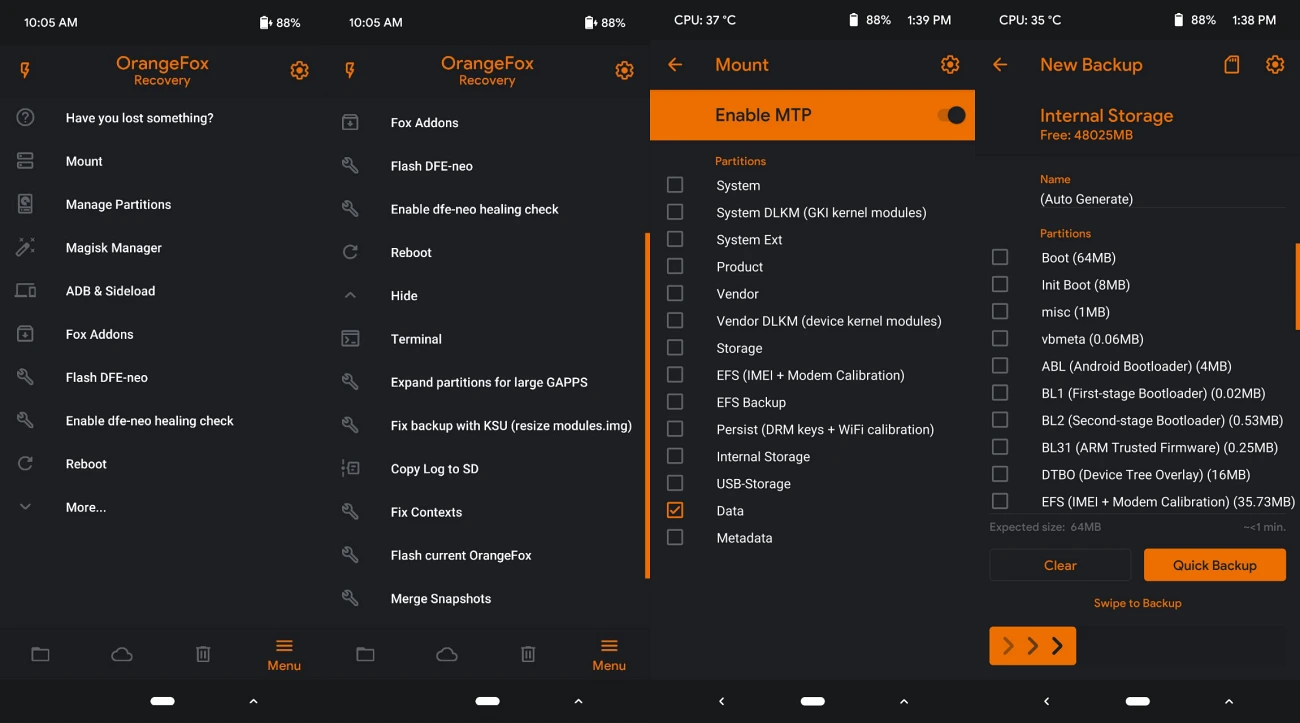
To understand the significance of OrangeFox Recovery, one must examine the limitations of the standard AOSP recovery that typically ships with custom ROMs. While an AOSP recovery is sufficient for basic sideloading of ROM updates, it lacks the infrastructure for comprehensive system management. OrangeFox fills this void by offering a robust environment where users can perform Nandroid backups. A Nandroid backup is essentially a bit-for-bit snapshot of the entire device state, including the operating system, user data, applications, and system settings. For the Poco F7 user who frequently experiments with different kernels or system-level modules, the ability to create a full system restore point is an indispensable safety net. Should a software modification result in a "bootloop" or system instability, the user can simply boot into OrangeFox and revert the device to its exact previous state within minutes, bypassing the need for a tedious manual setup.
Beyond backup and restoration, OrangeFox Recovery provides advanced partition management tools that are vital for the modern Android architecture. The Poco F7 utilizes a sophisticated dynamic partition system, which can be difficult to navigate using rudimentary tools. OrangeFox allows users to mount, unmount, and format specific partitions such as System, Data, Cache, and Vendor with precision. This level of access is particularly useful for troubleshooting "dirty flashes"—instances where a user updates their software without wiping data—as it allows for the manual clearing of specific caches that might cause application crashes. Furthermore, OrangeFox supports the flashing of both ZIP and IMG files, enabling users to update their modem firmware, flash custom kernels to improve battery life or gaming performance, and install Magisk or KernelSU for root access, all from a unified interface.
The transition to OrangeFox Recovery is a strategic move for any Poco F7 owner currently utilizing TWRP or a basic AOSP recovery. While TWRP established the foundation for custom recoveries, OrangeFox has gained a dedicated following due to its "out-of-the-box" inclusion of essential patches. For instance, OrangeFox often includes built-in support for decrypting data partitions, a common hurdle on modern Android devices protected by File-Based Encryption (FBE). It also features a built-in file manager that allows users to move or delete files even when the main operating system fails to boot. This can be a lifesaver if a rogue Magisk module is preventing the device from starting; a user can simply navigate to the module directory within OrangeFox and delete the offending folder to restore functionality.

The process of installing OrangeFox Recovery on the Poco F7 requires a systematic approach, beginning with the prerequisite of an unlocked bootloader. Xiaomi’s bootloader unlocking process has become more stringent with the introduction of HyperOS, requiring users to maintain an active Mi Account and, in some cases, wait for a designated period before the unlock can be finalized. Once the bootloader is unlocked, the device becomes eligible for custom partition writes. Users must also ensure they have a functional ADB (Android Debug Bridge) and Fastboot environment configured on a personal computer. This setup facilitates the communication between the PC and the Poco F7 while the latter is in its bootloader mode, allowing the recovery image to be flashed to the device’s storage.
For those already running a custom recovery like TWRP, the migration to OrangeFox is relatively seamless. The process typically involves downloading the OrangeFox recovery ZIP file directly to the device’s internal storage. Once in the existing recovery environment, the user simply navigates to the file and initiates the flash. OrangeFox is designed to automatically handle the installation of its own recovery ramdisk, ensuring that it persists even after system updates. This "self-healing" capability is one of the hallmarks of the OrangeFox project, reducing the likelihood of the recovery being overwritten by the stock software during a reboot.
If a user is starting from a stock or AOSP recovery, the installation usually involves the Fastboot method. This requires connecting the Poco F7 to a computer via a high-quality USB cable and putting the device into Fastboot mode. Using the command line, the user executes a command to flash the OrangeFox recovery image to the recovery partition. Given that the Poco F7 utilizes a modern A/B partition slot system, the recovery is often integrated into the boot image. Consequently, the process may involve "booting" the recovery image temporarily to verify its functionality before permanently installing it to both slots. This ensures that regardless of which partition slot the device is currently using, the custom recovery remains accessible.

Safety remains a paramount concern during these procedures. The development community emphasizes the importance of a complete data backup before attempting any recovery flash. While the installation of OrangeFox itself does not inherently wipe user data, the prerequisite of unlocking the bootloader does trigger a factory reset. Furthermore, the volatility of system-level modifications means that there is always a non-zero risk of data corruption. By maintaining a redundant backup—ideally both in the cloud and on a physical external drive—users can explore the capabilities of their Poco F7 with the confidence that their personal information, photos, and documents remain secure.
The broader implications of OrangeFox Recovery for the Poco F7 extend to the longevity of the device. As manufacturers eventually sunset official support for older models, the custom development community steps in to provide the latest security patches and Android versions. A robust recovery like OrangeFox is the primary tool that allows a device to stay relevant for years beyond its official end-of-life date. With the Poco F7 already supporting early builds of Android 16, the synergy between high-end hardware and advanced recovery software ensures that users will enjoy a cutting-edge experience for the foreseeable future.
In conclusion, the arrival of OrangeFox Recovery for the Poco F7 is more than just the release of a new tool; it is a validation of the device’s status as a premier choice for the global modding community. By offering a sophisticated suite of features—from Nandroid backups and partition management to automated decryption and a user-friendly interface—OrangeFox empowers Poco F7 owners to take full ownership of their hardware. As the ecosystem of custom ROMs continues to expand, this recovery will serve as the essential foundation for every modification, providing the stability and control necessary to push the boundaries of what the Poco F7 can achieve. Whether for the purpose of performance optimization, aesthetic customization, or extending software support, OrangeFox stands as a definitive upgrade for any serious enthusiast.
