

Updated on September 26, 2025
The landscape of firmware management and device resuscitation for hardware powered by Amlogic chipsets has been significantly enhanced with the release and ongoing support of the Amlogic BootCard Maker, a specialized, lightweight utility designed exclusively for the Windows operating system. This indispensable tool addresses one of the most critical challenges faced by technicians and advanced users alike: the necessity of manually injecting core operating system files onto storage media to resurrect malfunctioning or "bricked" electronic devices. Unlike standard Over-The-Air (OTA) updates, which rely on a functioning system partition, the BootCard Maker operates at a fundamental level, utilizing an SD card as the primary conduit for firmware delivery, making it the ultimate last resort when conventional software update mechanisms fail.
The core mission of the Amlogic BootCard Maker is the precise creation of high-integrity, bootable SD cards pre-loaded with the necessary Amlogic firmware images. This capability is vital for systems ranging from TV boxes and single-board computers (SBCs) to various embedded systems that leverage Amlogic’s versatile System-on-Chips (SoCs). When a device enters an unrecoverable state—perhaps due to a corrupted bootloader, a failed major firmware revision, or improper user modification—the system often lacks the necessary environment to even recognize a standard USB connection for flashing. The SD card boot method circumvents these limitations entirely, leveraging the device’s initial boot sequence, which is often hardwired to check for bootable media like an SD card before attempting to load the main operating system.
The utility’s efficacy stems from a meticulously curated set of features, each designed to streamline the potentially complex process of low-level firmware deployment.
Comprehensive Feature Set for Expedited System Restoration
The Amlogic BootCard Maker transcends the functionality of a simple disk imaging utility by incorporating specific logic tailored for Amlogic architecture.
1. High-Fidelity Firmware Image Deployment:
At its heart, the software specializes in transforming raw Amlogic firmware packages into functional, bootable media. This involves correctly placing critical boot sectors and partitioning the SD card in a sequence that the Amlogic boot ROM recognizes instantly. By ensuring the correct alignment and structure of the firmware image onto the storage medium, the tool drastically reduces the probability of initialization errors during the recovery attempt, which is often the primary failure point when using generic imaging software. This dedicated focus ensures that the resulting SD card carries the necessary instructions to initiate the device’s recovery sequence, allowing it to accept the full operating system image during the subsequent boot process.

2. Intuitive Graphical Interface for Accessibility:
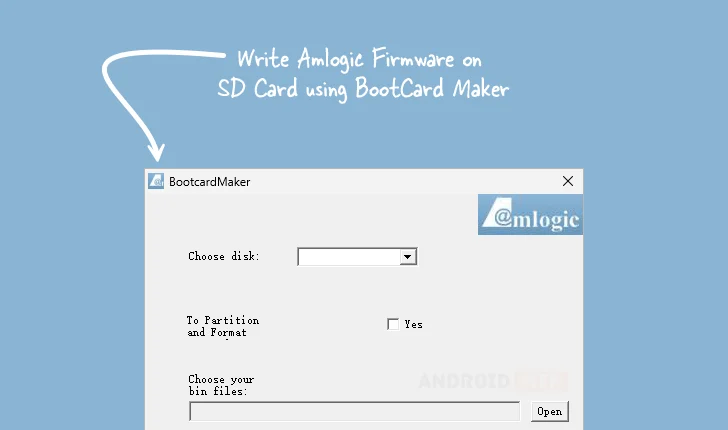
Recognizing that firmware recovery often falls to individuals without deep command-line expertise, the developers prioritized an accessible Graphical User Interface (GUI). This design philosophy democratizes the recovery process. Users are guided through clear, sequential steps: selecting the target SD card from a list of available drives, specifying the desired partition scheme (though often pre-defined by the firmware), formatting the medium to the required filesystem standard, and finally, designating the source firmware file. This layered approach shields the user from intricate sector-level commands, translating complex technical procedures into a simple point-and-click workflow.
3. Automated Partitioning and Formatting Precision:
A key differentiator is the tool’s capacity to manage the physical preparation of the SD card automatically. Amlogic devices frequently require specific partition layouts—sometimes involving distinct FAT32 or ext4 partitions for the bootloader and system data—that generic tools may not replicate accurately. BootCard Maker integrates logic to handle this partitioning and subsequent formatting automatically. This pre-emptive preparation ensures the media’s structure is perfectly aligned with the expectations of the Amlogic boot sequence, minimizing read errors and streamlining the boot procedure when the card is inserted into the target hardware.
4. Native Support for Essential Binary Firmware Files:
The utility demonstrates robust compatibility by natively accepting standard Amlogic firmware formats, prominently featuring support for .bin files. These files often encapsulate crucial low-level components, such as the initial bootloader binaries (like u-boot or proprietary loaders). The flexibility to ingest these fundamental building blocks allows technicians to address issues at the earliest stage of the boot process. Whether flashing a custom recovery environment or injecting a factory-fresh bootloader, the direct handling of .bin files provides the necessary precision for deep-level system modification.
5. True Portability and Zero Installation Footprint:
A significant advantage, particularly in professional or field service environments, is the application’s portable nature. Amlogic BootCard Maker executes directly from its downloaded location without requiring installation into the Windows registry or system directories. This "no-install" architecture allows for immediate deployment across various Windows workstations (32-bit or 64-bit) without administrative hurdles or concerns about leaving residual files. For technicians managing multiple client devices across different PCs, this portability translates directly into reduced setup time and maximized efficiency.
6. A Viable Alternative to USB Burning Protocols:
The utility provides a crucial contingency plan against reliance on USB-based flashing methods. While tools like the Amlogic USB Burning Tool are highly effective, they necessitate that the target device successfully enters the correct USB download mode (often requiring specific button combinations or cable configurations). When a device is so severely damaged that it cannot even initialize the USB controller or respond to host commands, the SD card method becomes the only viable path. BootCard Maker positions itself as the superior alternative in these "deep brick" scenarios, exploiting the inherent boot priority given to removable media slots.
Deployment and Accessibility
Ensuring broad access to this critical recovery resource, the Amlogic BootCard Maker is made available for direct download, supporting both common Windows architectures. The developers have made Version 1.01 readily available through hosted links, ensuring that users can quickly obtain the necessary files to prepare their recovery media.
| Version | Download Link |
|---|---|
| 1.01 | Link to Host (Access via external host) |
The continued availability and utility of tools like the Amlogic BootCard Maker underscore the dynamic relationship between hardware longevity and software support. As Amlogic chipsets continue to dominate various consumer electronics sectors, having reliable, non-system-dependent recovery mechanisms remains paramount for sustaining the lifespan of these devices and providing robust repair options outside of manufacturer service centers. The tool represents a democratization of low-level firmware management, moving complex procedures into the hands of a wider user base through careful design and specialized functionality.
