

The Samsung Galaxy S23 Ultra remains a titan in the mobile industry, boasting hardware that continues to rival contemporary releases. However, as the software landscape shifts toward an AI-driven future, enthusiasts often look beyond official release cycles to experience the cutting edge of mobile operating systems. The emergence of One UI 8, based on the Android 16 architecture, represents a significant milestone in this pursuit. Through the dedicated efforts of the independent development community, specifically prominent figures such as XDA Senior Member Sameer Al Sahab, users can now port these next-generation experiences onto their S23 Ultra hardware via custom ROMs like AstroROM, Evolution X, and Project Infinity X. This transition not only refreshes the user interface but also integrates sophisticated system-level optimizations and features typically reserved for future flagship iterations like the S25 series or Google’s Pixel lineup.
The transition to a custom One UI 8 environment is a high-stakes technical endeavor. It requires a deep understanding of the Android partition system and the replacement of the stock recovery with advanced tools such as TWRP (Team Win Recovery Project) or OrangeFox Recovery. Before embarking on this modification, the necessity of a comprehensive data backup cannot be overstated. Altering the system firmware involves unlocking the bootloader and wiping the device’s internal storage, an action that permanently trips the Knox security fuse and voids standard warranties. While the community-driven development offers unparalleled features, it also shifts the burden of device stability and data integrity entirely onto the user.
AstroROM stands at the forefront of this software revolution, serving as a feature-rich bridge between Samsung’s proprietary ecosystem and the open-source flexibility of Android 16. The primary draw of this ROM is its heavy emphasis on Artificial Intelligence. In the current mobile climate, AI is no longer a gimmick but a core functional pillar. AstroROM integrates an extensive suite of AI tools including Audio Eraser for post-production sound cleaning, Best Face for photography optimization, and Browsing Assist for streamlined web navigation. Communication is further enhanced through Call Assist and Interpreter functions, which provide real-time linguistic translations. For productivity, the inclusion of Note Assist, Writing Assist, and Transcript Assist leverages machine learning to summarize, format, and transcribe content with high precision. Even the creative aspects of the device are bolstered by Drawing Assist and Photo Assist, allowing for generative edits that were previously impossible on older firmware versions.

Beyond the intelligence layer, the ROM significantly upgrades the Galaxy S23 Ultra’s photographic capabilities by backporting features from the upcoming S25 Ultra. This includes high-bandwidth support for 4K video recording at 120 frames per second, a feature that provides cinematic fluidity for slow-motion captures. Professional videographers will find the LOG video support particularly valuable, as it preserves a wider dynamic range for color grading in post-production. The user interface for the camera is also modernized with the S25 Ultra’s zoom slider and advanced Camera Assistant features. These include sophisticated distortion correction and anamorphic lens support, ensuring that the S23 Ultra’s formidable sensor array is utilized to its maximum potential.
The regional and system-level customization, often referred to as CSC (Country Specific Code) features, are also expanded in this One UI 8 port. Users gain access to native call recording, a feature frequently restricted by regional telecommunications laws but highly sought after for professional documentation. Security and utility are enhanced through a built-in AppLock, a network speed meter in the status bar, and a comprehensive firewall. The inclusion of AltZlife provides a sophisticated privacy layer, allowing users to switch between public and private profiles seamlessly. Furthermore, the ROM is heavily debloated, meaning unnecessary "bloatware" applications that typically consume background resources in the stock Samsung firmware have been removed, leading to improved battery longevity and snappier system response times.

One of the more unique aspects of AstroROM is its ability to "spoof" the Galaxy S23 Ultra as a Google Pixel 10 Pro XL. By altering the device’s digital fingerprint, the system tricks Google’s servers into granting the device access to Pixel-exclusive features. This includes the coveted unlimited storage in Google Photos at original quality, as well as exclusive AI features within Google’s first-party apps. This hybrid approach allows users to enjoy the best of both worlds: Samsung’s superior hardware and One UI aesthetics combined with Google’s software-exclusive perks.
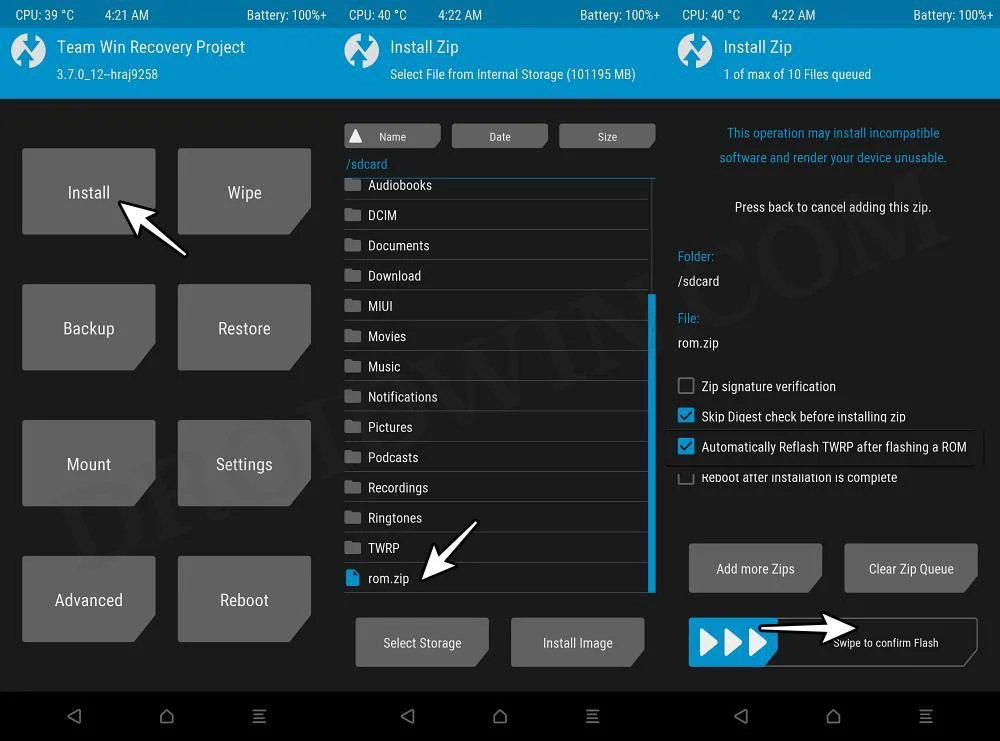
The technical installation of these ROMs can be achieved through several distinct methodologies, depending on the user’s current recovery environment and technical comfort level. The first and most common method involves using TWRP. The process begins by booting the S23 Ultra into recovery mode and performing a factory reset. Once the data partition is cleared, the user navigates to the "Install" menu, selects the AstroROM ZIP file, and initiates the flashing process. A critical final step in this method is the "Format Data" command, which requires the user to type "yes" to remove encryption and ensure the new OS can boot successfully.

For those who prefer a more streamlined approach, the TWRP Sideload method utilizes the Android Debug Bridge (ADB) from a connected workstation. By putting the device into "Sideload" mode within TWRP, the user can push the ROM file directly from their computer using the adb sideload command. This reduces the need for external SD cards or OTG drives, making it a preferred choice for many developers. Similarly, the OrangeFox Recovery offers a parallel set of instructions. OrangeFox is often praised for its superior UI and more robust handling of encrypted partitions. The installation flow remains similar: wiping the cache and data, flashing the ROM, and then performing a final format of the data partition to resolve any lingering encryption conflicts.
A specific technical hurdle often encountered during this process is "Error 1," which typically occurs when the updater script fails to mount the /optics or /prism partitions. These partitions are specific to Samsung’s modern file structure and contain regional and carrier-specific data. To circumvent this, the "TWRP+BL File" method is employed. This involves using the Odin tool on a PC to flash a specific Bootloader (BL) file alongside the recovery image, effectively pre-configuring the partition table to accept the custom ROM. Once the hardware-level handshake is corrected via Odin, the user can proceed with the standard TWRP installation steps without encountering the mounting errors.

While AstroROM is a dominant choice, Evolution X and Project Infinity X provide alternative philosophies for the One UI 8 experience on the S23 Ultra. Evolution X is renowned in the community for its "Pixel-like" purity, often stripping away more of the Samsung aesthetic in favor of a cleaner, more stock-Android appearance while maintaining the core One UI 8 features. Project Infinity X, on the other hand, focuses on "Infinity" customization, offering deep-level system tweaks that allow users to change everything from the animation scales to the underlying kernel behaviors. Both ROMs follow a similar installation logic to AstroROM, requiring an unlocked bootloader and a custom recovery.
The successful installation of these Android 16-based ROMs effectively extends the life of the Galaxy S23 Ultra by several years. By bypassing the official update schedule, users gain immediate access to the latest security protocols, AI innovations, and UI refinements. These modifications fix long-standing issues with Knox-dependent apps—such as Secure Folder and Samsung Health—which traditionally break when a device is rooted. Through sophisticated patching of the Bluetooth library and the removal of Samsung’s forced encryption, these ROMs offer a level of freedom and performance that the stock firmware simply cannot match. As the mobile world moves toward an increasingly software-defined future, the ability to flash One UI 8 onto the S23 Ultra ensures that this legendary device remains at the pinnacle of the Android ecosystem.
