

The landscape of the Android operating system, long celebrated for its "open-source" philosophy and user autonomy, is undergoing a seismic shift that has sent shockwaves through the global developer and enthusiast communities. For over a decade, the ability to sideload applications—installing software via APK files from third-party sources rather than the official Google Play Store—has been a cornerstone of the Android experience. However, a recent policy update from Mountain View has introduced what many are calling the most restrictive hurdle in the platform’s history: a mandatory 24-hour waiting period for external app installations.

This new regulatory framework does not merely suggest a delay; it enforces a strict one-day quarantine on any application package file sourced outside of Google’s proprietary ecosystem. Furthermore, the installation process has been encumbered with a series of additional verification steps, including forced system reboots and multiple confirmation prompts that significantly disrupt the user experience. While Google maintains that these measures are essential to combat the rising tide of sophisticated malware and financial fraud, the implementation has been criticized as an overreach that penalizes power users and developers under the guise of safety.
According to official documentation released via the Android Developer blog, the rationale behind this "cooling-off" period is to provide a window of time for Google Play Protect to analyze the signature and behavior of the unknown file before it gains system-level permissions. Google argues that many victims of social engineering scams are coerced into downloading malicious APKs while on a live phone call with a fraudster. By mandating a 24-hour delay and a system reboot, Google aims to break the "spell" of the scammer, theoretically giving the user time to reconsider their actions and ensuring that any active remote-access sessions are terminated during the restart process.

Despite these security justifications, the tech community’s reaction has been overwhelmingly negative. Critics argue that the 24-hour rule is a "sledgehammer" approach to a problem that requires a "scalpel." The friction introduced by these 3-4 additional steps—which include navigating deep into system settings and acknowledging redundant warnings—is seen as an attempt to discourage sideloading entirely, nudging users back into the controlled environment of the Play Store where Google can maintain its 15-30% revenue cut.
For those who rely on sideloading for legitimate purposes, such as testing proprietary enterprise apps, accessing region-locked content, or using open-source repositories like F-Droid, the new rules are more than an inconvenience; they are a barrier to productivity. Fortunately, a technical loophole remains open for those willing to use a computer. The Android Debug Bridge (ADB), a versatile command-line tool used by developers for app debugging and system manipulation, currently remains exempt from the 24-hour quarantine. Because ADB is designed for development and requires a physical connection (or a secure wireless pairing) to a PC, Google has seemingly left this door open, recognizing that developers cannot afford to wait a full day to test every new build of an application.

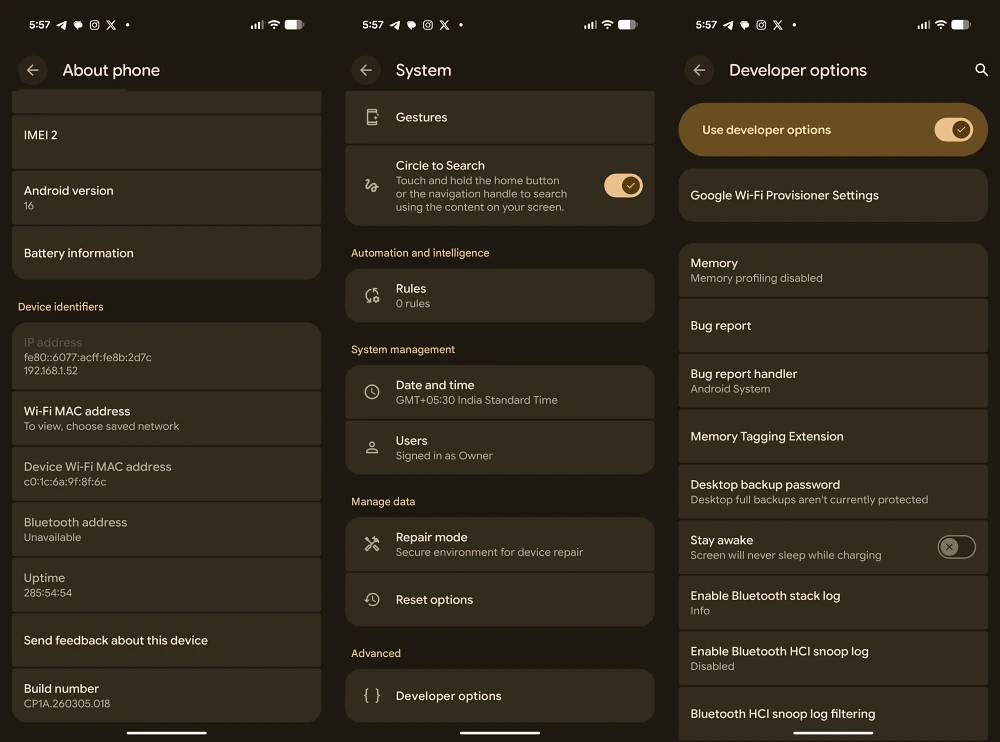
To bypass the 24-hour sideloading rule using the ADB method, users must first prepare their environment. This involves downloading the Android SDK Platform-Tools on a Windows, macOS, or Linux machine. On the mobile device itself, one must enable "Developer Options" by tapping the "Build Number" in the system settings seven times, and then toggling on "USB Debugging." Once the device is connected to the PC via a certified data cable, the user can open a terminal or command prompt and execute the installation command: adb install [filename].apk.
This method bypasses the on-device "Package Installer" UI that triggers the 24-hour timer. By pushing the app directly through the bridge, the installation occurs near-instantaneously, restoring the fluid experience users enjoyed in previous iterations of Android. While using a PC for every app installation is undeniably less convenient than a simple tap on a mobile screen, it remains the only viable path for those who refuse to wait a day for their software to "validate."

The technical nuances of this workaround become slightly more complex when dealing with older applications. Recent versions of Android have begun deprecating support for apps built for ancient API levels. In such cases, standard ADB commands might fail, requiring the use of specific flags like --bypass-low-target-sdk-block. This highlights an escalating trend in Google’s development cycle: the systematic closing of doors that once allowed Android to be a "do-it-yourself" operating system.
When comparing Google’s new policy to other manufacturers, the severity of the 24-hour rule becomes even more apparent. Xiaomi, for instance, has long utilized a "security wait" for certain high-risk settings, but their implementation is limited to a 10-second countdown. This short delay forces the user to actually read the warning text before the "Accept" button becomes active, striking a balance between informed consent and functional efficiency. Google’s decision to scale this wait from 10 seconds to 86,400 seconds (24 hours) is seen by many industry analysts as a disproportionate response.

The requirement for a system reboot is another point of contention. Google’s claim that a reboot clears remote-access tools is technically accurate for many non-persistent exploits. However, in the context of a modern scam, a fraudster who has convinced a victim to wait 24 hours can easily call them back after the reboot. A more effective solution, critics suggest, would be the implementation of "In-Call Overlays" or "Sensitive Action Protection," similar to what many banking apps currently use. These features detect when a user is on a phone call or sharing their screen and automatically mask sensitive information or block the installation of new software until the call is terminated. Such a solution would address the security risk in real-time without the need for an arbitrary day-long delay.
In an interesting twist, Google has included a "Turn On Indefinitely" toggle within the advanced security settings for certain enterprise-managed devices and specific user profiles. This suggests that the infrastructure for bypassing the rule is already baked into the OS, but is hidden behind layers of menus to prevent the average user from finding it. This "opt-out" mechanism is the saving grace for the enthusiast community, as it allows those with the requisite knowledge to permanently disable the quarantine, provided they can navigate the labyrinthine settings menu.

The long-term implications of this policy shift remain to be seen. If Google continues to tighten the noose around sideloading, it may inadvertently drive users toward alternative operating systems or lead to increased interest in "rooting" devices to regain administrative control. Furthermore, this move could attract the attention of regulatory bodies in the European Union and the United States, who are already investigating tech giants for anti-competitive behavior. By making it nearly impossible to install apps from outside the Play Store, Google risks being labeled a "gatekeeper" under the Digital Markets Act (DMA), which could lead to massive fines and forced reversals of these very policies.
For now, the Android community remains in a state of transition. The "Wild West" days of APK installations are seemingly coming to an end, replaced by a "Nanny State" architecture that prioritizes the lowest common denominator of user safety at the expense of professional utility. While the ADB workaround provides a temporary reprieve, the message from Google is clear: the era of frictionless sideloading is over. Users must now decide if the security benefits of a 24-hour waiting period outweigh the loss of the immediate, open-access freedom that once defined the Android brand. As the debate continues to rage in forums and comment sections, one thing is certain—the tension between user agency and corporate security has reached a new, uncomfortable peak.
