

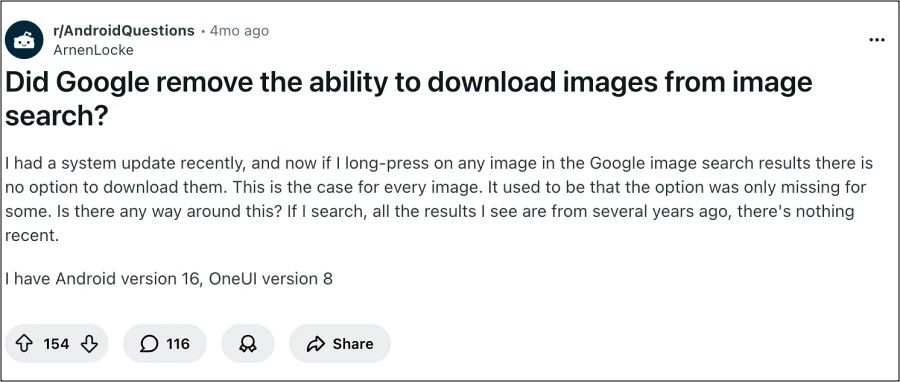
The relationship between modern technology conglomerates and their massive user bases has long been characterized by a certain degree of unpredictability, particularly regarding the longevity of beloved software features. Silicon Valley giants, led by the likes of Google, have established a precedent where the user interface is treated as a fluid, ever-changing landscape. While this iterative approach often leads to innovation, it also results in the sudden, unannounced removal of functionalities that millions of individuals have come to rely upon for their daily digital workflows. The most recent casualty in this ongoing evolution is the "Download Image" functionality within the Google Search app, a tool that has historically allowed users to save visual content directly to their mobile devices with a simple long-press gesture.
For years, the process of acquiring an image from a Google Search result was a matter of muscle memory. A user would perform a search, navigate to the "Images" tab, tap on a relevant result to expand it, and then apply a sustained press to the image to trigger a context menu. Within that menu, the "Download Image" option stood as a reliable gateway to local storage, facilitating everything from student research projects to the simple sharing of memes. However, a growing number of users across various mobile platforms have recently discovered that this familiar option has vanished. In its place, the context menu now presents a more limited array of choices: "Save to Collection," "Share," "Search with Google Lens," and "Report." The absence of a direct download path has left many feeling stranded, particularly when traditional alternatives, such as sharing the image to a file management application, appear to be malfunctioning or intentionally restricted.
This shift has reignited a long-standing debate regarding the motivations of major tech firms. When a feature disappears, it is often difficult for the average consumer to discern whether they are witnessing a permanent strategic removal, a temporary A/B test designed to gauge user behavior, or a genuine software bug. Google has a documented history of altering its image search interface in response to external pressures. One of the most significant shifts occurred in 2018 when the "View Image" button was removed following a settlement with Getty Images. That move was designed to encourage users to visit the source website of an image, thereby providing traffic to creators and respecting copyright boundaries. While the current disappearance of the "Download" option might seem like a continuation of that philosophy, the technical nuances suggest a more complex situation.
The frustration is compounded by the fact that the "Share" option, which many users attempted to use as a surrogate for downloading, has proven ineffective for saving files locally. When attempting to "Share" an image and selecting a local file manager or the device’s internal storage as the destination, the process often fails to generate a saved file, or it merely saves a link rather than the actual JPEG or PNG asset. This breakdown in the "Share-to-Save" pipeline suggests that the current issue may be more than just a menu change; it may represent a deeper shift in how the Google app handles media assets.
Despite the prevailing confusion, industry analysts and tech enthusiasts have begun to dissect the problem, suggesting that the disappearance might be a localized bug within specific versions of the Google Search application rather than a global policy change. This theory is supported by the fact that the "Download Image" functionality remains fully operational when users access Google Search through a standard mobile web browser like Chrome, Firefox, or Safari. Furthermore, some users have reported that the option is available on one Google account but missing on another, even when using the same device and the same version of the app. This inconsistency is a classic hallmark of server-side updates or A/B testing, where Google rolls out experimental UI changes to a subset of its billions of users to monitor how they adapt.

For those whose productivity has been hindered by this change, two primary workarounds have emerged as the most effective methods for reclaiming the ability to save images. The first and most reliable method involves bypassing the dedicated Google Search app entirely. By opening a mobile browser—such as Google Chrome or the native browser on an Android or iOS device—and performing the search there, users can typically find the "Download Image" option still intact within the long-press menu. Browsers operate under different protocols than the unified Google app, and they tend to maintain standard web interaction features that the app might override for the sake of its own internal ecosystem, such as "Collections."
The second workaround involves a more technical approach to the Google app itself. Some users have found success by clearing the application’s cache and data or by switching to a different Google account within the app. Clearing the cache can often resolve glitches where the UI fails to load certain menu items correctly. To do this on an Android device, one must navigate to the system settings, locate the "Apps" or "Applications" section, find the Google app, and select the options to clear storage. If the issue is indeed part of a limited A/B test tied to a specific user profile, switching to a secondary account or browsing in "Incognito" or "Guest" mode may restore the missing download button.
Beyond the immediate technical fix, the disappearance of this feature highlights a broader trend in the tech industry: the push toward "walled gardens" and cloud-based organization. By replacing "Download" with "Save to Collection," Google is nudging users away from local, offline storage and toward its own proprietary cloud ecosystem. "Collections" allows users to categorize and store images within the Google infrastructure, ensuring that the user remains engaged with Google services rather than moving their data to a local drive where it can be manipulated by third-party apps. While this offers convenience in terms of cross-device syncing, it strips the user of the autonomy that comes with possessing a physical file on their own hardware.
The psychological impact of these "silent updates" cannot be understated. When a tool that has worked for a decade suddenly ceases to exist, it creates a sense of digital instability. Users are forced to spend time troubleshooting and searching for workarounds for tasks that should be instantaneous. This "feature fatigue" is a growing concern in a world where software is never "finished" but is instead a "service" that can be altered at any moment by a distant corporation.
As the tech community waits for an official word or a corrective patch from Google, the current consensus remains that this is likely a bug stemming from a recent update to the Google app’s internal webview. History suggests that if the backlash is significant enough, or if the "bug" is identified as a detriment to the user experience, the feature may eventually return in a future version. Until then, the transition from the app to the browser remains the most seamless path for those who require local access to the world’s visual information.
In the grander scheme of digital literacy, this episode serves as a reminder of the importance of understanding the underlying platforms we use. Relying on a single app for all information retrieval can lead to bottlenecks when that app undergoes structural changes. Diversifying one’s toolkit—knowing how to switch between apps and browsers or understanding how to manage application caches—is becoming an essential skill in the modern era. While Google may continue to prioritize its ecosystem and "Collections" over traditional file downloads, the open nature of the web still provides avenues for those willing to look for them. We will continue to monitor the status of the Google app and provide updates as the situation evolves, but for now, the "long-press and download" era has, at least temporarily, entered a state of flux.
